
Circuit Documentation
Summary of the Circuit
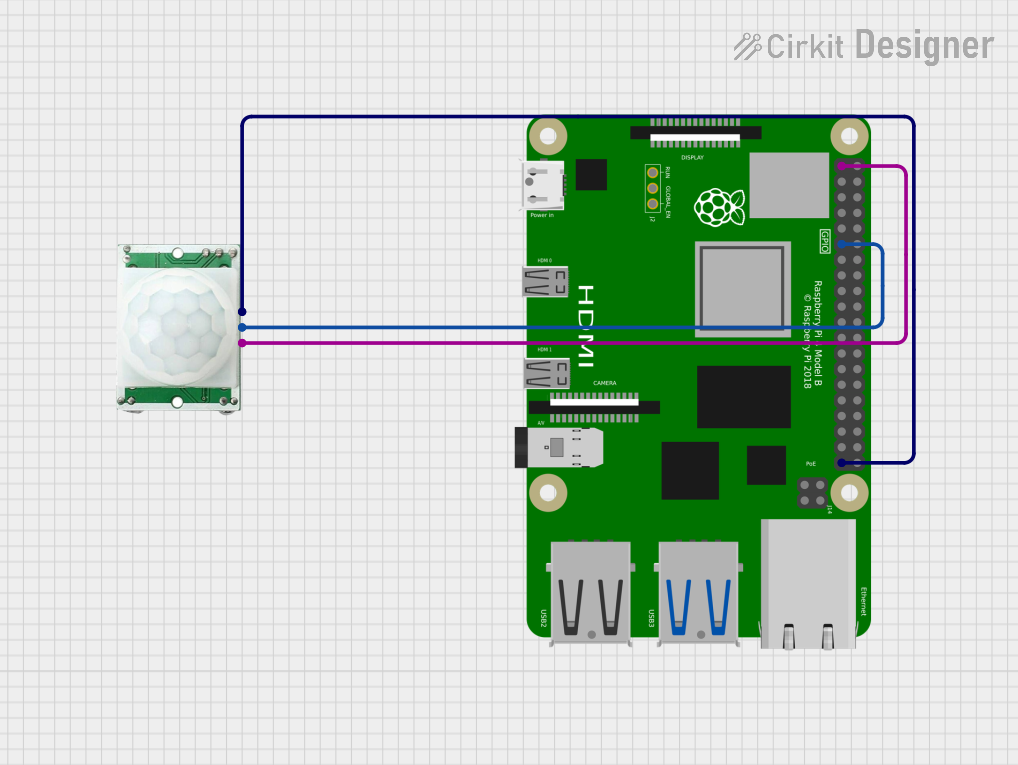
This circuit integrates a Raspberry Pi 4B with a PIR (Passive Infrared) motion sensor. The Raspberry Pi 4B serves as the central processing unit, capable of executing complex tasks and interfacing with various peripherals. The PIR motion sensor is used to detect motion in its vicinity, which can be utilized for security systems, automation, and interactive projects. The sensor's output is connected to one of the GPIO pins of the Raspberry Pi, allowing the Raspberry Pi to detect motion events.
Component List
Raspberry Pi 4B
- Description: A powerful microcomputer with multiple GPIO pins for interfacing with external components.
- Pins: 3V3, 5V, multiple GPIOs, GND, and other specific function pins.
- Purpose in Circuit: Acts as the main controller, processing inputs from the PIR sensor and executing user-defined tasks based on sensor input.
PIR/Motion Sensor
- Description: A sensor that detects motion based on infrared radiation changes in its field of view.
- Pins: GND, OUTPUT, VCC.
- Purpose in Circuit: Provides motion detection capability to trigger events or actions on the Raspberry Pi.
Wiring Details
Raspberry Pi 4B
- 3V3: Provides power to the PIR motion sensor.
- GPIO17: Receives the output signal from the PIR motion sensor.
- GND: Common ground with the PIR motion sensor.
PIR/Motion Sensor
- VCC: Connected to the 3V3 pin of the Raspberry Pi 4B for power.
- OUTPUT: Sends the motion detection signal to GPIO17 of the Raspberry Pi 4B.
- GND: Connected to the GND pin of the Raspberry Pi 4B to complete the circuit.
Documented Code
No code has been provided for the microcontrollers in the circuit. To fully utilize the PIR motion sensor with the Raspberry Pi 4B, embedded code should be written and loaded onto the Raspberry Pi. This code would typically initialize the GPIO pin connected to the sensor's output, monitor the pin for changes indicating motion detection, and then execute a user-defined response, such as logging the event or triggering an alarm.
Since no code is available, it is recommended to develop a Python script or use a suitable programming language that is compatible with the Raspberry Pi's operating system to interact with the GPIO pins and implement the desired functionality.