
Arduino Uno Wi-Fi Controlled Rover with Ultrasonic and PIR Sensors
View and Edit Project In Cirkit Designer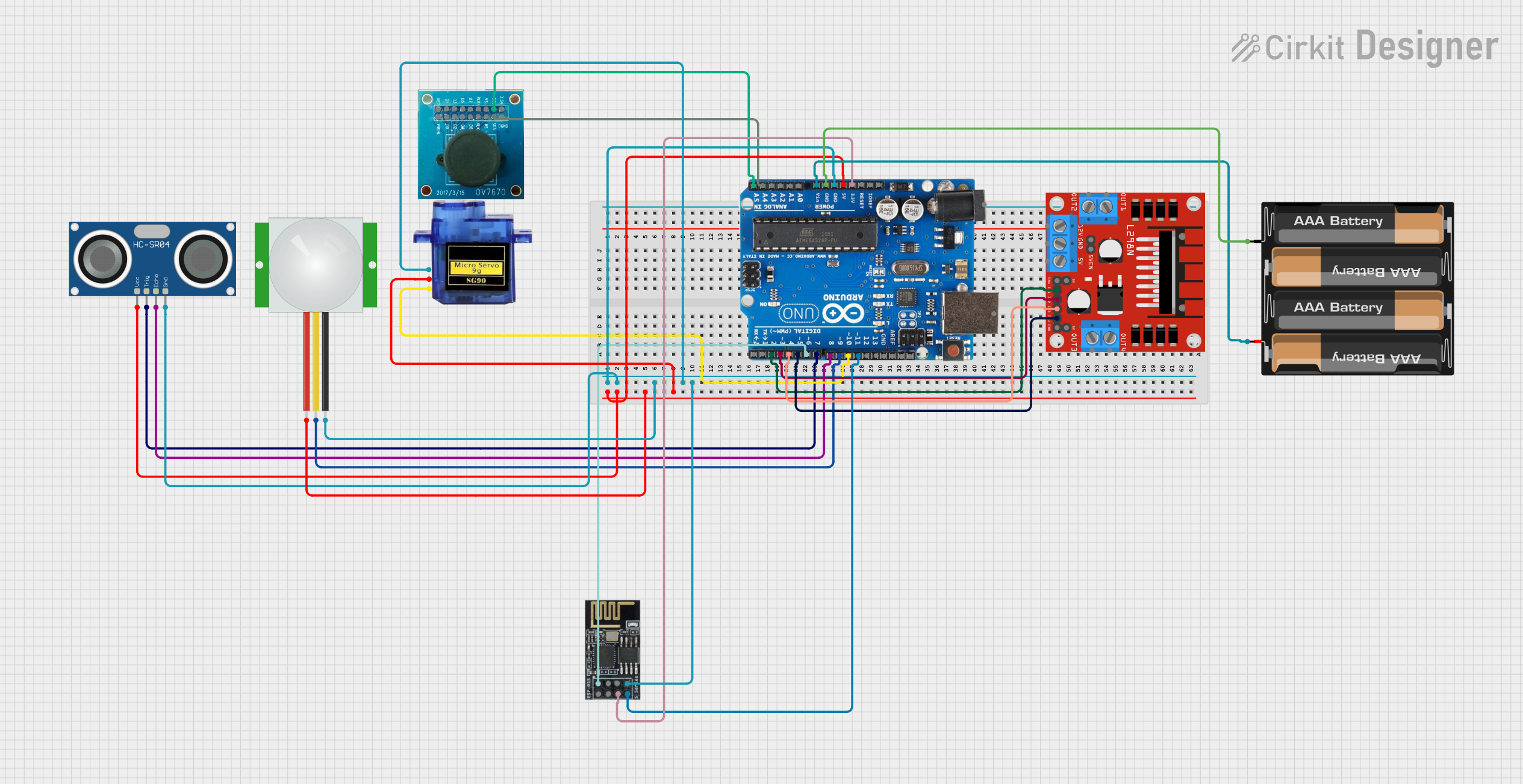
Circuit Documentation
Summary
This document provides a detailed overview of a circuit that integrates various sensors, actuators, and a Wi-Fi module with an Arduino Uno R3 microcontroller. The circuit is designed to control a rover with functionalities such as motion detection, distance measurement, and camera panning. The rover can be controlled via a web interface hosted on the ESP8266 Wi-Fi module.
Component List
Arduino Uno R3
- Description: A microcontroller board based on the ATmega328P.
- Pins: D8, D9, D10, D11, D12, D13, GND, AREF, SDA, SCL, D0/RX, D1/Tx, D2, D3, D4, D5, 6, D7, A5/SCL, A4/SDA, A3, A2, A1, A0, Vin, 5V, 3.3V, RESET, IOREF, NONE, USB Jack, Power Jack
HC-SR04 Ultrasonic Sensor
- Description: A sensor used for distance measurement.
- Pins: VCC, TRIG, ECHO, GND
PIR Sensor
- Description: A sensor used for motion detection.
- Pins: VDD, SIG, GND
Micro Servo 9G
- Description: A small servo motor used for camera panning.
- Pins: GND, +5V, PWM
L298N DC Motor Driver
- Description: A dual H-Bridge motor driver used to control the motors of the rover.
- Pins: OUT1, OUT2, 12V, GND, 5V, OUT3, OUT4, 5V-ENA-JMP-I, 5V-ENA-JMP-O, +5V-J1, +5V-J2, ENA, IN1, IN2, IN3, IN4, ENB
Wi-Fi Module ESP8266-01
- Description: A Wi-Fi module used to connect the rover to a wireless network.
- Pins: RX, GPIO0, GPIO2, GND, +3V3, Reset, CH-PD Chip power down, TX
OV7670 Camera Module
- Description: A camera module used for capturing images.
- Pins: RET, PWDN, D1, D0, D3, D2, D4, D5, D6, PLK, XLK, D7, VS, HS, SCL, SDA, 3.3V, DGND
4 x AAA Battery Mount
- Description: A battery holder for powering the circuit.
- Pins: -, +
Wiring Details
Arduino Uno R3
5V connected to:
- HC-SR04 Ultrasonic Sensor (VCC)
- PIR Sensor (VDD)
- Micro Servo 9G (+5V)
GND connected to:
- HC-SR04 Ultrasonic Sensor (GND)
- PIR Sensor (GND)
- Micro Servo 9G (GND)
- Wi-Fi Module ESP8266-01 (GND)
- 4 x AAA Battery Mount (-)
D8 connected to:
- HC-SR04 Ultrasonic Sensor (ECHO)
D9 connected to:
- PIR Sensor (SIG)
D10 connected to:
- Micro Servo 9G (PWM)
D11 connected to:
- Wi-Fi Module ESP8266-01 (TX)
D2 connected to:
- L298N DC Motor Driver (IN1)
D3 connected to:
- L298N DC Motor Driver (IN2)
D4 connected to:
- L298N DC Motor Driver (IN3)
D5 connected to:
- L298N DC Motor Driver (IN4)
6 connected to:
- Wi-Fi Module ESP8266-01 (RX)
D7 connected to:
- HC-SR04 Ultrasonic Sensor (TRIG)
A5/SCL connected to:
- OV7670 Camera Module (SCL)
A4/SDA connected to:
- OV7670 Camera Module (SDA)
Vin connected to:
- 4 x AAA Battery Mount (+)
3.3V connected to:
- Wi-Fi Module ESP8266-01 (CH-PD Chip power down)
HC-SR04 Ultrasonic Sensor
VCC connected to:
- Arduino Uno R3 (5V)
GND connected to:
- Arduino Uno R3 (GND)
ECHO connected to:
- Arduino Uno R3 (D8)
TRIG connected to:
- Arduino Uno R3 (D7)
PIR Sensor
VDD connected to:
- Arduino Uno R3 (5V)
SIG connected to:
- Arduino Uno R3 (D9)
GND connected to:
- Arduino Uno R3 (GND)
Micro Servo 9G
GND connected to:
- Arduino Uno R3 (GND)
+5V connected to:
- Arduino Uno R3 (5V)
PWM connected to:
- Arduino Uno R3 (D10)
L298N DC Motor Driver
IN1 connected to:
- Arduino Uno R3 (D2)
IN2 connected to:
- Arduino Uno R3 (D3)
IN3 connected to:
- Arduino Uno R3 (D4)
IN4 connected to:
- Arduino Uno R3 (D5)
Wi-Fi Module ESP8266-01
TX connected to:
- Arduino Uno R3 (D11)
RX connected to:
- Arduino Uno R3 (6)
GND connected to:
- Arduino Uno R3 (GND)
CH-PD Chip power down connected to:
- Arduino Uno R3 (3.3V)
OV7670 Camera Module
SCL connected to:
- Arduino Uno R3 (A5/SCL)
SDA connected to:
- Arduino Uno R3 (A4/SDA)
4 x AAA Battery Mount
+ connected to:
- Arduino Uno R3 (Vin)
- connected to:
- Arduino Uno R3 (GND)
Documented Code
#include <ESP8266WiFi.h>
#include <Servo.h>

// Define Wi-Fi credentials
const char* ssid = "YourWiFiSSID";
const char* password = "YourWiFiPassword";

// Define pin connections
const int motorA1 = D2;
const int motorA2 = D3;
const int motorB1 = D4;
const int motorB2 = D5;
const int servoPin = D10;  // Servo motor for camera panning
const int trigPin = D7;    // HC-SR04 Trigger Pin
const int echoPin = D8;    // HC-SR04 Echo Pin
const int pirPin = D9;     // PIR sensor Pin

Servo cameraServo;  // Create Servo object

WiFiServer server(80);  // HTTP server on port 80

void setup() {
  // Start serial communication for debugging
  Serial.begin(115200);

  // Initialize the motor control pins
  pinMode(motorA1, OUTPUT);
  pinMode(motorA2, OUTPUT);
  pinMode(motorB1, OUTPUT);
  pinMode(motorB2, OUTPUT);

  // Initialize the servo motor for camera panning
  cameraServo.attach(servoPin);
  cameraServo.write(90);  // Set initial position to middle (90 degrees)

  // Initialize the HC-SR04 ultrasonic sensor
  pinMode(trigPin, OUTPUT);
  pinMode(echoPin, INPUT);

  // Initialize PIR sensor
  pinMode(pirPin, INPUT);

  // Connect to Wi-Fi
  WiFi.begin(ssid, password);
  while (WiFi.status() != WL_CONNECTED) {
    delay(1000);
    Serial.println("Connecting to WiFi...");
  }
  Serial.println("WiFi connected!");

  // Start the server
  server.begin();
  Serial.println("Server started");
}

void loop() {
  // Check for incoming clients (Web browser connection)
  WiFiClient client = server.available();
  if (client) {
    String request = client.readStringUntil('\r');
    client.flush();

    // Print out the received request (for debugging)
    Serial.println(request);

    // Control the rover based on the HTTP request
    if (request.indexOf("/forward") != -1) {
      moveForward();
    }
    else if (request.indexOf("/backward") != -1) {
      moveBackward();
    }
    else if (request.indexOf("/left") != -1) {
      moveLeft();
    }
    else if (request.indexOf("/