
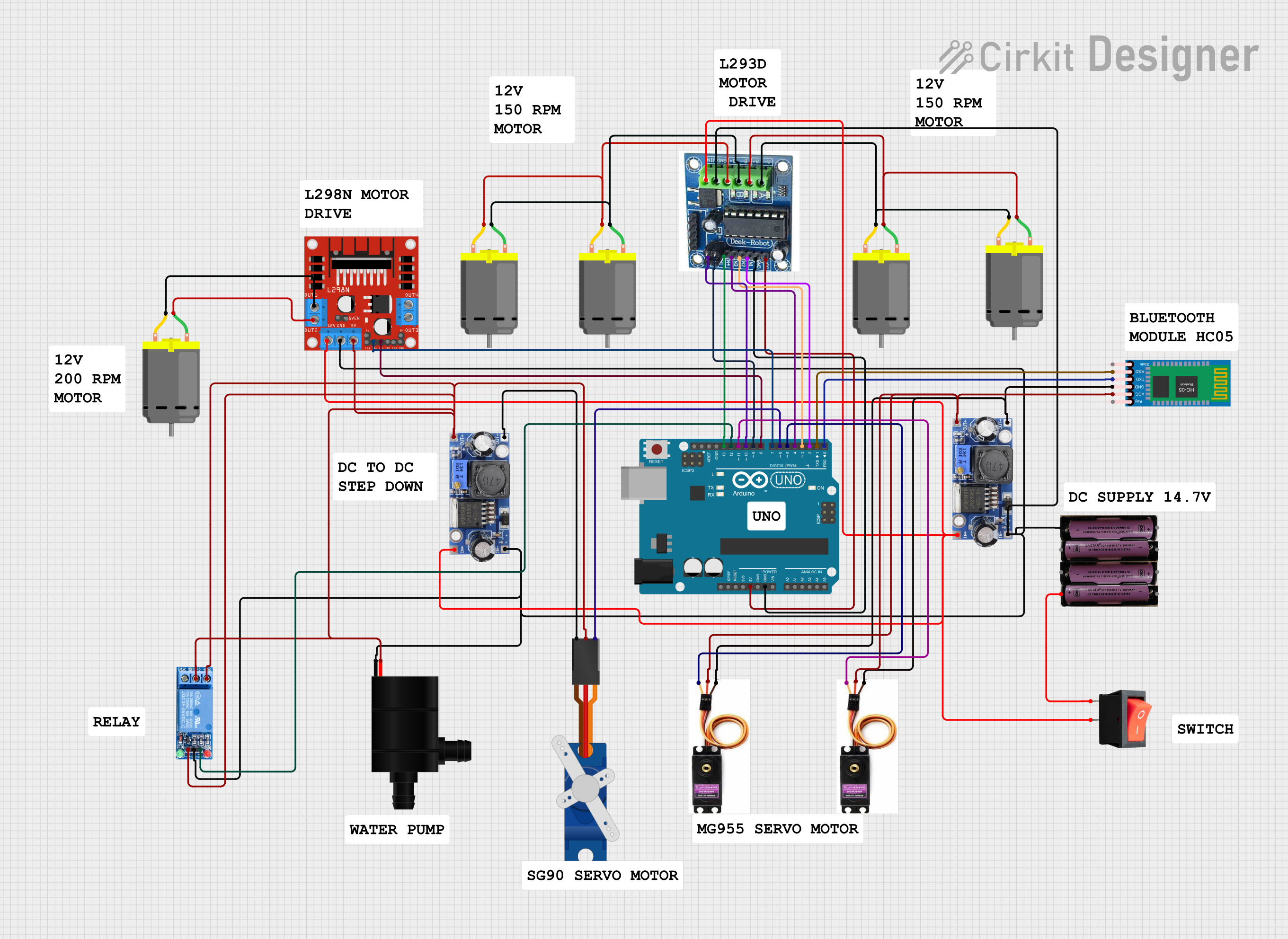
Circuit Documentation
Summary
This document provides a detailed overview of a circuit designed to control various motors and servos using an Arduino UNO. The circuit includes components such as DC motors, servo motors, a Bluetooth module, a relay, and a motor driver. The Arduino UNO is programmed to control these components based on commands received via Bluetooth.
Component List
Arduino UNO
- Description: Microcontroller board based on the ATmega328P.
- Pins: UNUSED, IOREF, Reset, 3.3V, 5V, GND, Vin, A0, A1, A2, A3, A4, A5, SCL, SDA, AREF, D13, D12, D11, D10, D9, D8, D7, D6, D5, D4, D3, D2, D1, D0
DC Motor
- Description: Standard DC motor.
- Pins: pin 1, pin 2
3.7v Battery
- Description: 3.7V battery for power supply.
- Pins: +, -
Rocker Switch
- Description: Switch to control power flow.
- Pins: output, input
HC-05 Bluetooth Module
- Description: Bluetooth module for wireless communication.
- Pins: Key, VCC, TXD, RXD, State, GND
DC-DC Converter
- Description: DC-DC converter for voltage regulation.
- Pins: +VCC IN, GND IN, +VCC OUT, GND OUT
Servo Motor
- Description: Standard servo motor.
- Pins: PWM, GND, VCC
Tower Pro SG90 Servo
- Description: Small servo motor.
- Pins: Signal, +5V, GND
L298N DC Motor Driver
- Description: Dual H-Bridge motor driver.
- Pins: OUT1, OUT2, 12V, GND, 5V, OUT3, OUT4, 5V-ENA-JMP-I, 5V-ENA-JMP-O, +5V-J1, +5V-J2, ENA, IN1, IN2, IN3, IN4, ENB
1 Channel Relay 5V
- Description: Relay module for switching.
- Pins: VCC, GND, IN, NC, COM, NO
Water Pump
- Description: Small water pump.
- Pins: VCC, GND
Wiring Details
Arduino UNO
- 5V connected to 5V VCC of MOTOR DEIVE
- GND connected to GND of MOTOR DEIVE
- D13 connected to IN4 of MOTOR DEIVE
- D12 connected to IN of 1 Channel Relay 5V
- D11 connected to PWM of SERVO MOTOR
- D10 connected to EN2 of MOTOR DEIVE
- D9 connected to EN1 of MOTOR DEIVE
- D8 connected to IN2 of L298N DC motor driver
- D7 connected to IN1 of L298N DC motor driver
- D6 connected to Signal of Tower Pro SG90 servo
- D5 connected to PWM of SERVO MOTOR
- D4 connected to IN3 of MOTOR DEIVE
- D3 connected to IN2 of MOTOR DEIVE
- D2 connected to IN1 of MOTOR DEIVE
- D1 connected to RXD of HC-05 Bluetooth Module
- D0 connected to TXD of HC-05 Bluetooth Module
DC Motor
- pin 1 connected to A+ of MOTOR DEIVE
- pin 2 connected to A- of MOTOR DEIVE
3.7v Battery
- + connected to input of rocker switch
- - connected to GND of MOTOR DEIVE
Rocker Switch
- output connected to 12V VCC of MOTOR DEIVE
HC-05 Bluetooth Module
- VCC connected to +VCC OUT of DC-DC converter
- GND connected to GND OUT of DC-DC converter
DC-DC Converter
- +VCC IN connected to 12V VCC of MOTOR DEIVE
- GND IN connected to GND of MOTOR DEIVE
- +VCC OUT connected to VCC of HC-05 Bluetooth Module
- GND OUT connected to GND of HC-05 Bluetooth Module
Servo Motor
- PWM connected to D11 of Arduino UNO
- GND connected to GND OUT of DC-DC converter
- VCC connected to +VCC OUT of DC-DC converter
Tower Pro SG90 Servo
- Signal connected to D6 of Arduino UNO
- +5V connected to +VCC OUT of DC-DC converter
- GND connected to GND OUT of DC-DC converter
L298N DC Motor Driver
- IN2 connected to D8 of Arduino UNO
- IN1 connected to D7 of Arduino UNO
- OUT1 connected to pin 2 of DC Motor
- OUT2 connected to pin 1 of DC Motor
1 Channel Relay 5V
- IN connected to D12 of Arduino UNO
- VCC connected to +VCC OUT of DC-DC converter
- GND connected to GND OUT of DC-DC converter
Water Pump
- VCC connected to +5V of Tower Pro SG90 servo
- GND connected to GND of MOTOR DEIVE
Documented Code
Arduino UNO Code
#include <Servo.h>

// Pin Definitions
#define LEFT_MOTOR1 2
#define LEFT_MOTOR2 3
#define RIGHT_MOTOR1 4
#define RIGHT_MOTOR2 13
#define LEFT_MOTOR_ENABLE 9
#define RIGHT_MOTOR_ENABLE 10

#define DRILL_MOTOR_IN1 7
#define DRILL_MOTOR_IN2 8

#define PUMP_RELAY_PIN 12
#define SEED_SERVO_PIN 6
#define PLOUGH_SERVO_PIN 11
#define DIGGING_SERVO_PIN 5

// Servo Objects
Servo seedDispenserServo;
Servo ploughToolServo;
Servo diggingSupportServo;

// Bluetooth Command Variable
char command;

// Speed Control Variable
int motorSpeed = 200;

// Forward Declaration for stopMotors
void stopMotors();

void moveForward() {
  analogWrite(LEFT_MOTOR_ENABLE, motorSpeed);
  analogWrite(RIGHT_MOTOR_ENABLE, motorSpeed);
  digitalWrite(LEFT_MOTOR1, LOW);
  digitalWrite(LEFT_MOTOR2, HIGH);
  digitalWrite(RIGHT_MOTOR1, HIGH);
  digitalWrite(RIGHT_MOTOR2, LOW);
}

void moveBackward() {
  analogWrite(LEFT_MOTOR_ENABLE, motorSpeed);
  analogWrite(RIGHT_MOTOR_ENABLE, motorSpeed);
  digitalWrite(LEFT_MOTOR1, HIGH);
  digitalWrite(LEFT_MOTOR2, LOW);
  digitalWrite(RIGHT_MOTOR1, LOW);
  digitalWrite(RIGHT_MOTOR2, HIGH);
}

void turnLeft() {
  analogWrite(LEFT_MOTOR_ENABLE, motorSpeed / 2);
  analogWrite(RIGHT_MOTOR_ENABLE, motorSpeed);
  digitalWrite(LEFT_MOTOR1, HIGH);
  digitalWrite(LEFT_MOTOR2, LOW);
  digitalWrite(RIGHT_MOTOR1, HIGH);
  digitalWrite(RIGHT_MOTOR2, LOW);
  delay(1000);
  stopMotors();
  delay(500);
  moveForward();
}

void turnRight() {
  analogWrite(LEFT_MOTOR_ENABLE, motorSpeed);
  analogWrite(RIGHT_MOTOR_ENABLE, motorSpeed / 2);
  digitalWrite(LEFT_MOTOR1, LOW);
  digitalWrite(LEFT_MOTOR2, HIGH);
  digitalWrite(RIGHT_MOTOR1, LOW);
  digitalWrite(RIGHT_MOTOR2, HIGH);
  delay(1000);
  stopMotors();
  delay(500);
  moveForward();
}

void stopMotors() {
  digitalWrite(LEFT_MOTOR1, LOW);
  digitalWrite(LEFT_MOTOR2, LOW);
  digitalWrite(RIGHT_MOTOR1, LOW);
  digitalWrite(RIGHT_MOTOR2, LOW);

  analogWrite(LEFT_MOTOR_ENABLE, 0);
  analogWrite(RIGHT_MOTOR_ENABLE, 0);
}

void digging() {
  diggingSupportServo.write(0);
  delay(1000);

  digitalWrite(DRILL_MOTOR_IN1, HIGH);
  digitalWrite