
Battery-Powered Arduino UNO with BNO085 IMU and Bluetooth HC-06 for Orientation Tracking
View and Edit Project In Cirkit Designer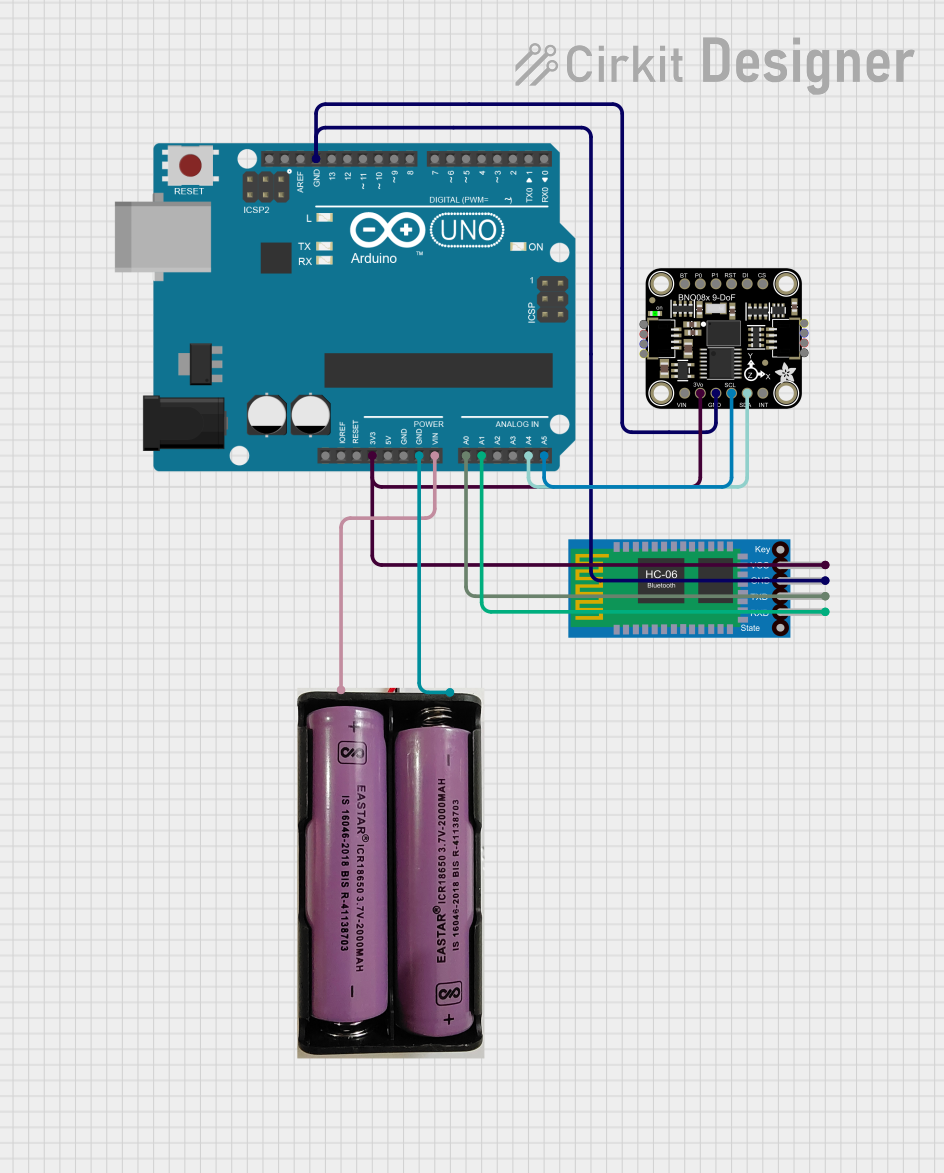
Circuit Documentation
Summary
This document provides a detailed overview of a circuit that includes an Arduino UNO, an Adafruit BNO085 9-DOF Orientation IMU Fusion sensor, a Bluetooth HC-06 module, and a 7.4V power source. The circuit is designed to read orientation data from the IMU sensor and transmit it via Bluetooth.
Component List
Arduino UNO
- Description: A microcontroller board based on the ATmega328P.
- Pins: UNUSED, IOREF, Reset, 3.3V, 5V, GND, Vin, A0, A1, A2, A3, A4, A5, SCL, SDA, AREF, D13, D12, D11, D10, D9, D8, D7, D6, D5, D4, D3, D2, D1, D0
Adafruit BNO085 9-DOF Orientation IMU Fusion
- Description: A 9-DOF sensor that provides orientation data.
- Pins: VCC, 3.3V, GND, SCL/SCK/RX, SDA/MISO/TX, INT, BOOT, PS0, PS1, RST, MOSI, CS
Bluetooth HC-06
- Description: A Bluetooth module for wireless communication.
- Pins: VCC, GND, TXD, RXD
7.4V Power Source
- Description: A 7.4V battery or power supply.
- Pins: +, -
Wiring Details
Arduino UNO
- 3.3V: Connected to 3.3V pin of Adafruit BNO085 and VCC pin of Bluetooth HC-06.
- GND: Connected to GND pin of Adafruit BNO085, GND pin of Bluetooth HC-06, and - pin of 7.4V power source.
- Vin: Connected to + pin of 7.4V power source.
- A0: Connected to TXD pin of Bluetooth HC-06.
- A1: Connected to RXD pin of Bluetooth HC-06.
- A4: Connected to SDA/MISO/TX pin of Adafruit BNO085.
- A5: Connected to SCL/SCK/RX pin of Adafruit BNO085.
Adafruit BNO085 9-DOF Orientation IMU Fusion
- 3.3V: Connected to 3.3V pin of Arduino UNO.
- GND: Connected to GND pin of Arduino UNO.
- SCL/SCK/RX: Connected to A5 pin of Arduino UNO.
- SDA/MISO/TX: Connected to A4 pin of Arduino UNO.
Bluetooth HC-06
- VCC: Connected to 3.3V pin of Arduino UNO.
- GND: Connected to GND pin of Arduino UNO.
- TXD: Connected to A0 pin of Arduino UNO.
- RXD: Connected to A1 pin of Arduino UNO.
7.4V Power Source
- +: Connected to Vin pin of Arduino UNO.
- -: Connected to GND pin of Arduino UNO.
Code Documentation
Arduino UNO Code
#include <Wire.h>
#include <Adafruit_Sensor.h>
#include <Adafruit_BNO08x.h>

Adafruit_BNO08x bno = Adafruit_BNO08x();

void setup() {
  Serial.begin(115200);
  while (!Serial) delay(10); // Wait for Serial Monitor to open

  if (!bno.begin_I2C()) {
    Serial.println("Failed to find BNO085 chip");
    while (1);
  }
  Serial.println("BNO085 Found!");

  bno.enableReport(SH2_TARE_BASIS_ROTATION_VECTOR, 1000); // 1 Hz
}

void loop() {
  sh2_SensorValue_t sensorValue;
  if (bno.getSensorEvent(&sensorValue)) {
    float yaw = sensorValue.un.rotationVector.real; // Assuming yaw is stored in the 'real' field
    Serial.print("Yaw: ");
    Serial.println(yaw);
  }
  delay(1000); // 1 second delay between readings
}
Adafruit BNO085 9-DOF Orientation IMU Fusion Code
void setup() {
  // put your setup code here, to run once:

}

void loop() {
  // put your main code here, to run repeatedly:

}
This document provides a comprehensive overview of the circuit, including the components used, their wiring details, and the code running on the microcontrollers.