
Arduino UNO and TMC2226 Stepper Motor Controller with Current Sensing
View and Edit Project In Cirkit Designer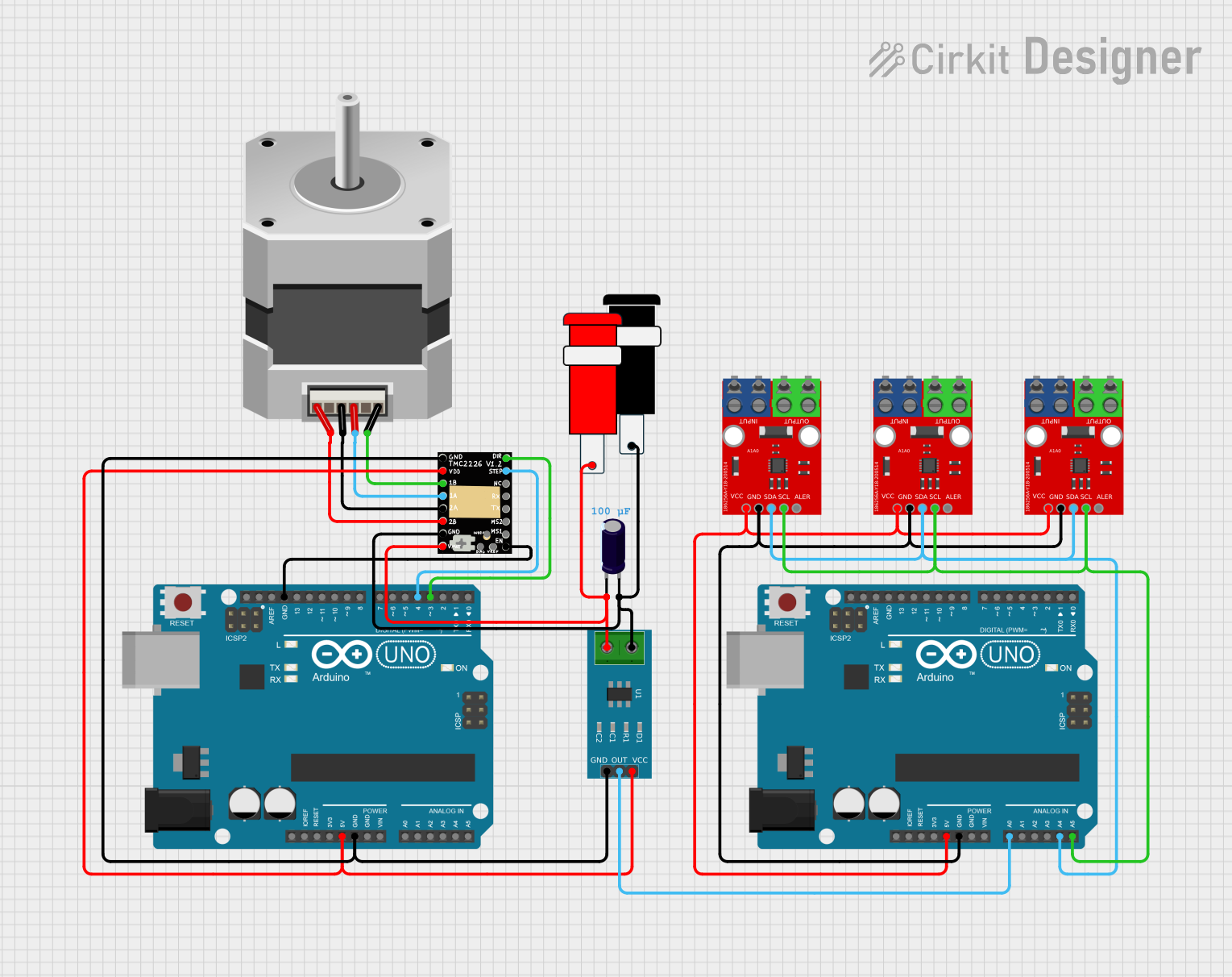
Circuit Documentation
Summary
This circuit involves an Arduino UNO microcontroller, a TMC2226 Stepper Driver, a Current Sensor, a Stepper Motor, and several other components. The circuit is designed to control a stepper motor using the TMC2226 driver, with current sensing capabilities provided by the Current Sensor. The Arduino UNO serves as the main controller, executing the embedded code to manage the motor's operation.
Component List
TMC2226 Stepper Driver
- Description: A stepper motor driver capable of driving bipolar stepper motors.
- Pins: VMOT, 2B, GND, 2A, 1A, 1B, VDD, STEP, DIR, NC, MS2, MS1, EN, TX, RX, DIAG, VREF, INDEX
Current Sensor 5A
- Description: A sensor used to measure current up to 5A.
- Pins: 1, 2, GND, OUT, VCC
Arduino UNO
- Description: A microcontroller board based on the ATmega328P.
- Pins: UNUSED, IOREF, Reset, 3.3V, 5V, GND, Vin, A0, A1, A2, A3, A4, A5, SCL, SDA, AREF, D13, D12, D11, D10, D9, D8, D7, D6, D5, D4, D3, D2, D1, D0
Stepper Motor (Bipolar)
- Description: A bipolar stepper motor.
- Pins: D, B, C, A
Connector 5V
- Description: A connector providing 5V power.
- Pins: GND, VCC
Electrolytic Capacitor
- Description: A capacitor used for filtering and energy storage.
- Pins: -, +
- Properties: Capacitance: 0.0001 Farads
Nazarbayev University
- Description: A custom component with multiple pins.
- Pins: Pin 6, Pin 7, Pin 8, Pin 9, Pin 1, Pin 2, Pin 3, Pin 4, Pin 5
Wiring Details
TMC2226 Stepper Driver
- VMOT: Connected to Connector 5V (VCC), Electrolytic Capacitor (-), Current Sensor 5A (2)
- 2B: Connected to Stepper Motor (A)
- GND: Connected to Connector 5V (GND), Electrolytic Capacitor (+), Current Sensor 5A (1), Arduino UNO (GND)
- 2A: Connected to Stepper Motor (C)
- 1A: Connected to Stepper Motor (B)
- 1B: Connected to Stepper Motor (D)
- VDD: Connected to Arduino UNO (5V), Current Sensor 5A (VCC)
- STEP: Connected to Arduino UNO (D4)
- DIR: Connected to Arduino UNO (D3)
- EN: Connected to Arduino UNO (GND)
Current Sensor 5A
- 1: Connected to Connector 5V (GND), Electrolytic Capacitor (+), TMC2226 Stepper Driver (GND)
- 2: Connected to Connector 5V (VCC), Electrolytic Capacitor (-), TMC2226 Stepper Driver (VMOT)
- GND: Connected to Connector 5V (GND), Electrolytic Capacitor (+), TMC2226 Stepper Driver (GND), Arduino UNO (GND)
- OUT: Connected to Arduino UNO (A0)
- VCC: Connected to Arduino UNO (5V), TMC2226 Stepper Driver (VDD)
Arduino UNO
- 5V: Connected to Current Sensor 5A (VCC), TMC2226 Stepper Driver (VDD)
- GND: Connected to Connector 5V (GND), Electrolytic Capacitor (+), Current Sensor 5A (1), TMC2226 Stepper Driver (GND)
- A0: Connected to Current Sensor 5A (OUT)
- A4: Connected to Nazarbayev University (Pin 3)
- A5: Connected to Nazarbayev University (Pin 4)
- D3: Connected to TMC2226 Stepper Driver (DIR)
- D4: Connected to TMC2226 Stepper Driver (STEP)
Stepper Motor (Bipolar)
- D: Connected to TMC2226 Stepper Driver (1B)
- B: Connected to TMC2226 Stepper Driver (1A)
- C: Connected to TMC2226 Stepper Driver (2A)
- A: Connected to TMC2226 Stepper Driver (2B)
Connector 5V
- VCC: Connected to Electrolytic Capacitor (-), Current Sensor 5A (2), TMC2226 Stepper Driver (VMOT)
- GND: Connected to Electrolytic Capacitor (+), Current Sensor 5A (1), TMC2226 Stepper Driver (GND), Arduino UNO (GND)
Electrolytic Capacitor
- -: Connected to Connector 5V (VCC), Current Sensor 5A (2), TMC2226 Stepper Driver (VMOT)
- +: Connected to Connector 5V (GND), Current Sensor 5A (1), TMC2226 Stepper Driver (GND), Arduino UNO (GND)
Nazarbayev University
- Pin 1: Connected to Nazarbayev University (Pin 1), Arduino UNO (5V)
- Pin 2: Connected to Nazarbayev University (Pin 2), Arduino UNO (GND)
- Pin 3: Connected to Nazarbayev University (Pin 3), Arduino UNO (A4)
- Pin 4: Connected to Nazarbayev University (Pin 4), Arduino UNO (A5)
Documented Code
Arduino UNO (Instance 1)
void setup() {
  // put your setup code here, to run once:

}

void loop() {
  // put your main code here, to run repeatedly:

}
Arduino UNO (Instance 2)
void setup() {
  // put your setup code here, to run once:

}

void loop() {
  // put your main code here, to run repeatedly:

}