
ESP32-Based Smart Notification System with LED Indicators and Buzzer
View and Edit Project In Cirkit Designer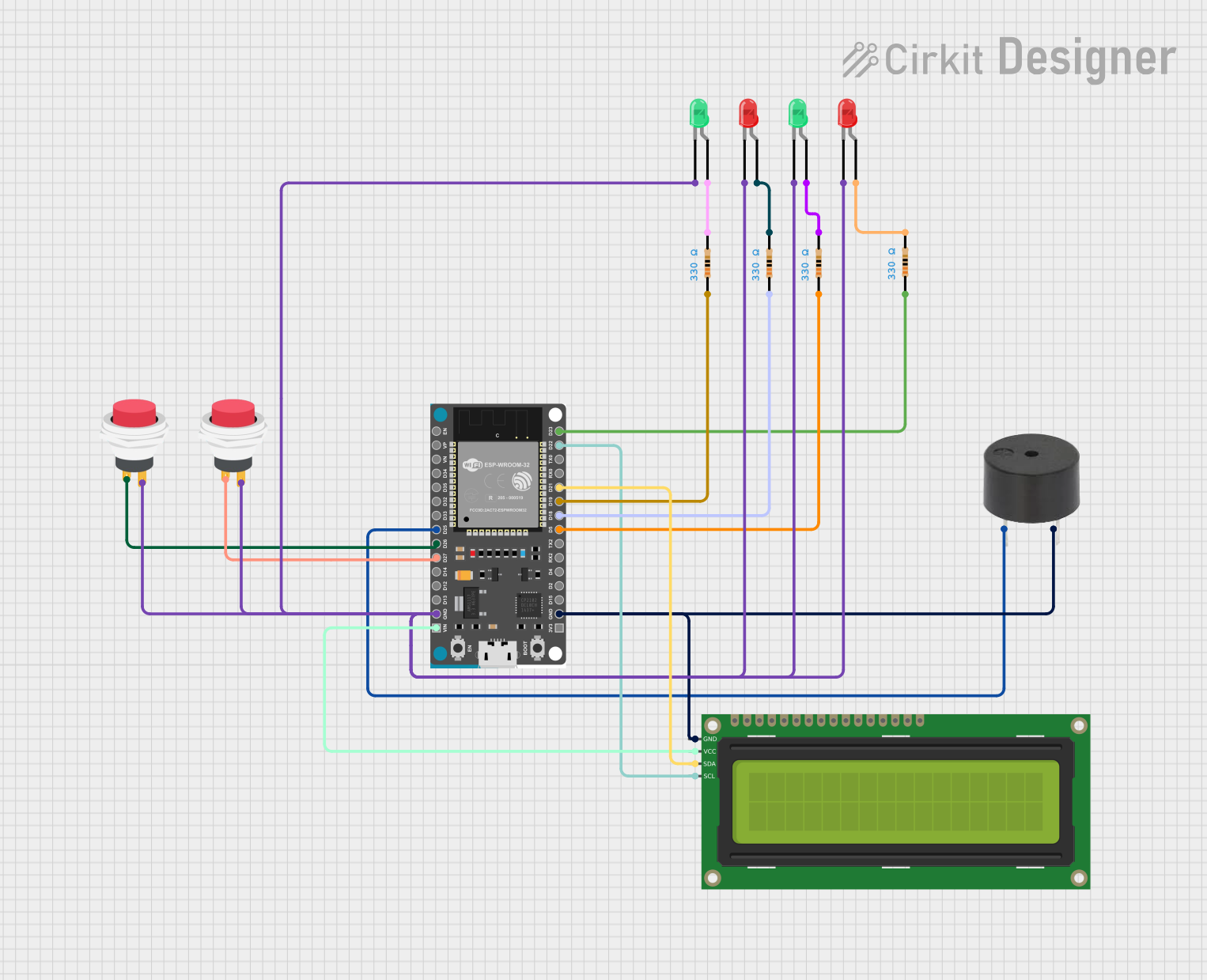
Circuit Documentation
Summary
This circuit is designed to create a notification system using an ESP32 microcontroller, LEDs, a buzzer, push switches, and a 16x2 I2C LCD. The system uses Blynk for remote notifications and control. The LEDs indicate the presence status of individuals, and the buzzer provides audible alerts. The push switches are used to trigger specific notifications.
Component List
Buzzer
- Pins: PIN, GND
- Description: Provides audible alerts.
- Purpose: Used to notify users with sound.
LED: Two Pin (red)
- Pins: cathode, anode
- Description: Red LED.
- Purpose: Indicates the absence of individuals.
LED: Two Pin (green)
- Pins: cathode, anode
- Description: Green LED.
- Purpose: Indicates the presence of individuals.
ESP32 Devkit V1
- Pins: 3V3, GND, D15, D2, D4, RX2, TX2, D5, D18, D19, D21, RX0, TX0, D22, D23, EN, VP, VN, D34, D35, D32, D33, D25, D26, D27, D14, D12, D13, VIN
- Description: Microcontroller.
- Purpose: Central control unit for the circuit.
2Pin Push Switch
- Pins: Input +, Output +
- Description: Push button switch.
- Purpose: Used to trigger specific notifications.
16x2 I2C LCD
- Pins: GND, VCC, SDA, SCL
- Description: LCD display.
- Purpose: Displays status messages.
Resistor (330 Ohms)
- Pins: pin1, pin2
- Description: Resistor.
- Purpose: Current limiting for LEDs.
Wiring Details
Buzzer
- PIN connected to ESP32 Devkit V1 pin D25
- GND connected to ESP32 Devkit V1 pin GND and 16x2 I2C LCD pin GND
LED: Two Pin (red)
- cathode connected to 2Pin Push Switch Output + and ESP32 Devkit V1 pin GND
- anode connected to Resistor pin2
LED: Two Pin (green)
- cathode connected to 2Pin Push Switch Output + and ESP32 Devkit V1 pin GND
- anode connected to Resistor pin2
ESP32 Devkit V1
- GND connected to buzzer GND, 16x2 I2C LCD GND, 2Pin Push Switch Output +, LED: Two Pin (red) cathode, LED: Two Pin (green) cathode
- D25 connected to buzzer PIN
- D5 connected to Resistor pin1
- D18 connected to Resistor pin1
- D19 connected to Resistor pin1
- D21 connected to 16x2 I2C LCD SDA
- D22 connected to 16x2 I2C LCD SCL
- D23 connected to Resistor pin1
- D26 connected to 2Pin Push Switch Input +
- D27 connected to 2Pin Push Switch Input +
- VIN connected to 16x2 I2C LCD VCC
2Pin Push Switch
- Input + connected to ESP32 Devkit V1 pin D26
- Output + connected to LED: Two Pin (red) cathode
2Pin Push Switch
- Input + connected to ESP32 Devkit V1 pin D27
- Output + connected to LED: Two Pin (green) cathode
16x2 I2C LCD
- GND connected to ESP32 Devkit V1 pin GND and buzzer GND
- VCC connected to ESP32 Devkit V1 pin VIN
- SDA connected to ESP32 Devkit V1 pin D21
- SCL connected to ESP32 Devkit V1 pin D22
Resistor (330 Ohms)
- pin1 connected to ESP32 Devkit V1 pin D5
- pin2 connected to LED: Two Pin (red) anode
Resistor (330 Ohms)
- pin1 connected to ESP32 Devkit V1 pin D18
- pin2 connected to LED: Two Pin (green) anode
Resistor (330 Ohms)
- pin1 connected to ESP32 Devkit V1 pin D19
- pin2 connected to LED: Two Pin (red) anode
Resistor (330 Ohms)
- pin1 connected to ESP32 Devkit V1 pin D23
- pin2 connected to LED: Two Pin (green) anode
Documented Code
#define BLYNK_TEMPLATE_ID "TMPL68lOFeQQw"
#define BLYNK_TEMPLATE_NAME "SISTEM NOTIFIKASI KEBERADAAN PENGAJAR DI JABATAN"
#define BLYNK_AUTH_TOKEN "8DoDKWs8kXsOqmrErjOt_xIueKSFkMV0"

#define BLYNK_PRINT Serial
#include <WiFi.h>
#include <WiFiClient.h>
#include <BlynkSimpleEsp32.h>
#include <Wire.h>
#include <LiquidCrystal_I2C.h>
LiquidCrystal_I2C lcd(0x27, 16,2);
#define ledred1   23
#define ledgreen1 19
#define ledred2   18
#define ledgreen2 5
#define buzzer 25

char auth[] = BLYNK_AUTH_TOKEN;
char ssid[] = "Zul";
char pass[] = "zul54321";
int pinData;
int param;

BLYNK_WRITE(V0)
{
  int pinValue = param.asInt();
  if(pinValue == 0){
    lcd.setCursor(0,0);
    lcd.print("AZMAN   - TIADA ");
    digitalWrite(ledred1,HIGH);
    digitalWrite(ledgreen1,LOW);
  }
  else if(pinValue == 1){
    lcd.setCursor(0,0);
    lcd.print("AZMAN   - ADA  ");
    digitalWrite(ledred1,LOW);
    digitalWrite(ledgreen1,HIGH);
  }
  else if(pinValue == 2){
    digitalWrite(buzzer,HIGH);
    lcd.setCursor(0,0);
    lcd.print("AZMAN  - MASUK   ");
    delay(3000);
    digitalWrite(buzzer,LOW);
  }
  else if(pinValue == 3){
    digitalWrite(buzzer,HIGH);
    lcd.setCursor(0,0);
    lcd.print("AZMAN  - SIBUK  ");
    delay(3000);
    digitalWrite(buzzer,LOW);
  }
}
BLYNK_WRITE(V1)
{
  int pinValue = param.asInt();
  if(pinValue == 0){
    lcd.setCursor(0,1);
    lcd.print("SHAKIRAH - TIADA  ");
    digitalWrite(ledred2,HIGH);
    digitalWrite(ledgreen2,LOW);
  }
  else if(pinValue == 1){
    lcd.setCursor(0,1);
    lcd.print("SHAKIRAH - ADA  ");
    digitalWrite(ledred2,LOW);
    digitalWrite(ledgreen2,HIGH);
  }
  else if(pinValue == 2){
    digitalWrite(buzzer,HIGH);
    lcd.setCursor(0,1);
    lcd.print("SHAKIRAH - MASUK   ");
    delay(3000);
    digitalWrite(buzzer,LOW);
  }
  else if(pinValue == 3){
    digitalWrite(buzzer,HIGH);
    lcd.setCursor(0,1);
    lcd.print("SHAKIRAH - SIBUK  ");
    delay(3000);
    digitalWrite(buzzer,LOW);
  }
}
void setup()
{
    Serial.begin(9600);
    Blynk.begin(auth, ssid, pass);
    pinMode(26,INPUT_PULLUP);
    pinMode(27,INPUT_PULLUP);
    pinMode(ledred1,OUTPUT);
    pinMode(ledgreen1,OUTPUT);
    pinMode(ledred2,OUTPUT);
    pinMode(ledgreen2,OUTPUT);
    pinMode(buzzer,OUTPUT);
    lcd.begin();
    lcd.backlight();
    lcd.setCursor(0,0);
    lcd.print("AZMAN   - TIADA");
    lcd.set