
Arduino UNO-Based Smart Home Automation System with Bluetooth Control
View and Edit Project In Cirkit Designer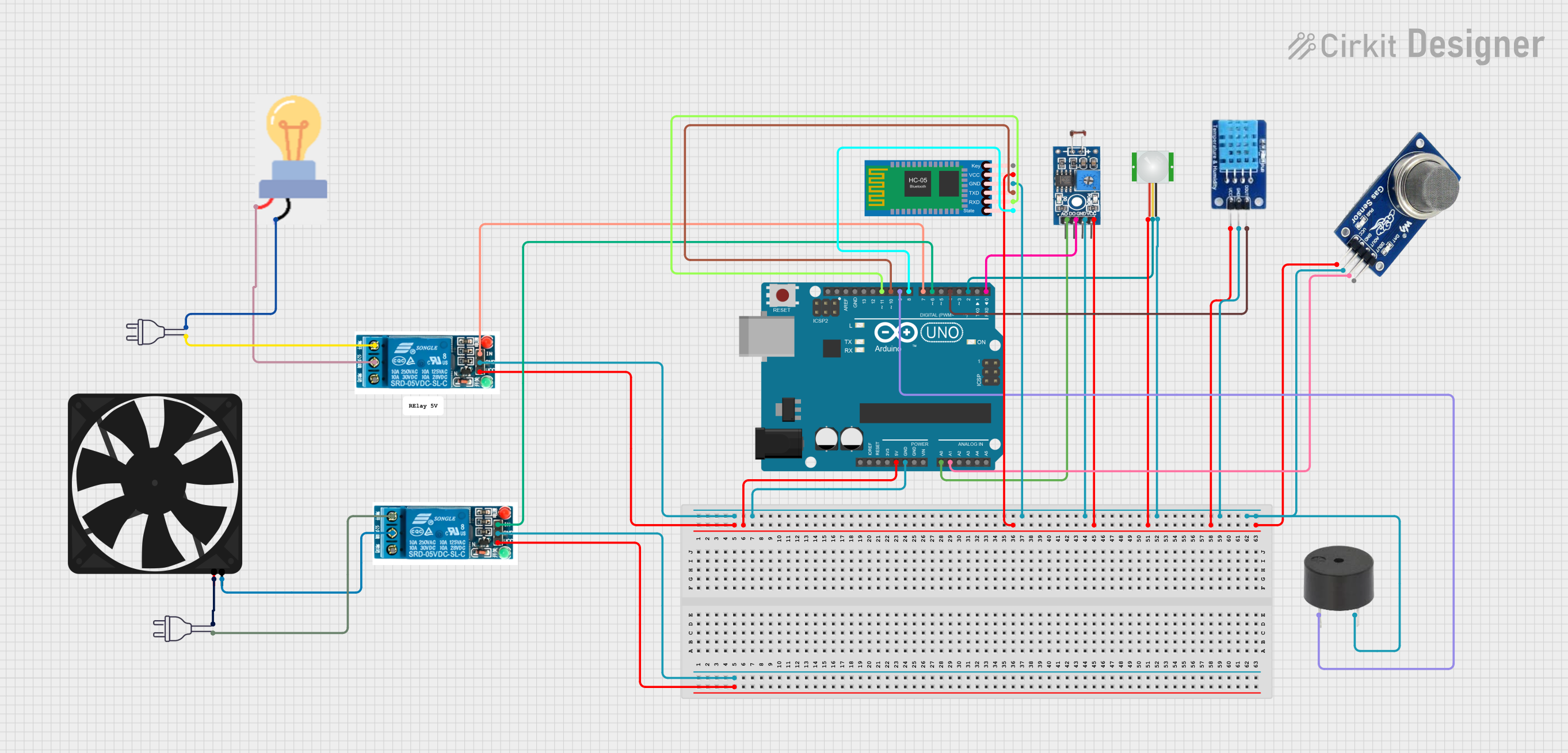
Circuit Documentation
Summary
This circuit is designed to monitor environmental conditions using various sensors and control devices such as a fan, light, and buzzer. The system is managed by an Arduino UNO microcontroller, which processes data from sensors and controls the actuators based on predefined conditions. Additionally, the circuit includes a Bluetooth module for remote control and monitoring.
Component List
Power 220V
- Description: Provides 220V AC power.
- Pins: Hot wire, Neutral wire
Photosensitive Sensor Module Digital Light Intensity Detection
- Description: Detects light intensity.
- Pins: Analog Output, Digital Output, Ground, VCC
MQ2
- Description: Gas sensor for detecting smoke.
- Pins: VCC, GND, AOUT, DOUT
Buzzer
- Description: Emits sound when activated.
- Pins: PIN, GND
Bulb
- Description: Light source controlled by a relay.
- Pins: GND, Power
5V Relay
- Description: Controls high voltage devices.
- Pins: Normally Open, Common terminal, Normally Closed, In, GND, VCC
Arduino UNO
- Description: Microcontroller for processing and control.
- Pins: UNUSED, IOREF, Reset, 3.3V, 5V, GND, Vin, A0, A1, A2, A3, A4, A5, SCL, SDA, AREF, D13, D12, D11, D10, D9, D8, D7, D6, D5, D4, D3, D2, D1, D0
Fan
- Description: Provides air circulation.
- Pins: GND, 5V
PIR Sensor
- Description: Detects motion.
- Pins: VDD, SIG, GND
DHT11
- Description: Measures temperature and humidity.
- Pins: DATA, GND, VCC
HC-05 Bluetooth Module
- Description: Enables Bluetooth communication.
- Pins: Key, VCC, GND, TXD, RXD, State
Wiring Details
Power 220V
- Hot wire: Connected to the Normally Open pin of the 5V relay.
- Neutral wire: Connected to the GND pin of the bulb.
Photosensitive Sensor Module Digital Light Intensity Detection
- Analog Output: Connected to A0 pin of the Arduino UNO.
- Digital Output: Connected to D0 pin of the Arduino UNO.
- Ground: Connected to GND pin of the Arduino UNO.
- VCC: Connected to 5V pin of the Arduino UNO.
MQ2
- VCC: Connected to 5V pin of the Arduino UNO.
- GND: Connected to GND pin of the Arduino UNO.
- AOUT: Connected to A1 pin of the Arduino UNO.
- DOUT: Not connected.
Buzzer
- PIN: Connected to D9 pin of the Arduino UNO.
- GND: Connected to GND pin of the Arduino UNO.
Bulb
- GND: Connected to the neutral wire of the power 220V.
- Power: Connected to the Common terminal of the 5V relay.
5V Relay
- Normally Open: Connected to the hot wire of the power 220V.
- Common terminal: Connected to the power pin of the bulb.
- Normally Closed: Not connected.
- In: Connected to D7 pin of the Arduino UNO.
- GND: Connected to GND pin of the Arduino UNO.
- VCC: Connected to 5V pin of the Arduino UNO.
Arduino UNO
- 5V: Connected to VCC pins of various sensors and modules.
- GND: Connected to GND pins of various sensors and modules.
- A0: Connected to Analog Output pin of the Photosensitive Sensor Module.
- A1: Connected to AOUT pin of the MQ2.
- D0: Connected to Digital Output pin of the Photosensitive Sensor Module.
- D2: Connected to SIG pin of the PIR sensor.
- D4: Connected to DATA pin of the DHT11.
- D6: Connected to In pin of the 5V relay controlling the fan.
- D7: Connected to In pin of the 5V relay controlling the bulb.
- D8: Connected to State pin of the HC-05 Bluetooth Module.
- D9: Connected to PIN of the buzzer.
- D10: Connected to TXD pin of the HC-05 Bluetooth Module.
- D11: Connected to RXD pin of the HC-05 Bluetooth Module.
Fan
- GND: Connected to the Common terminal of the 5V relay.
- 5V: Connected to the neutral wire of the power 220V.
PIR Sensor
- VDD: Connected to 5V pin of the Arduino UNO.
- SIG: Connected to D2 pin of the Arduino UNO.
- GND: Connected to GND pin of the Arduino UNO.
DHT11
- DATA: Connected to D4 pin of the Arduino UNO.
- GND: Connected to GND pin of the Arduino UNO.
- VCC: Connected to 5V pin of the Arduino UNO.
HC-05 Bluetooth Module
- Key: Not connected.
- VCC: Connected to 5V pin of the Arduino UNO.
- GND: Connected to GND pin of the Arduino UNO.
- TXD: Connected to D10 pin of the Arduino UNO.
- RXD: Connected to D11 pin of the Arduino UNO.
- State: Connected to D8 pin of the Arduino UNO.
Documented Code
#include <SoftwareSerial.h>
#include <DHT.h>

#define MP2pin A1    // Cảm biến MQ-2 nối vào cổng A1
#define buzzerPin 9  // Buzzer nối vào cổng digital D9

// Khai báo chân và loại cảm biến nhiệt độ
#define DHTPIN 4       // Chân DATA của cảm biến nhiệt
#define DHTTYPE DHT11  // Loại cảm biến: DHT11 hoặc DHT22
DHT dht(DHTPIN, DHTTYPE);

// Khai báo chân cảm biến
const int lightSensorPin = A0;  // Chân cảm biến ánh sáng
const int motionSensorPin = 2;  // Chân cảm biến chuyển động
const int relayFanPin = 6;      // Chân relay điều khiển quạt
const int relayLightPin = 7;    // Chân relay điều khiển đèn

float smokeValue;  // Biến để lưu giá trị cảm biến khói

// Chân trạng thái kết nối Bluetooth
const int bluetoothStatePin = 8;

// Khai báo SoftwareSerial cho HC-05
SoftwareSerial Bluetooth(10, 11);  // RX, TX

// Biến trạng thái
bool bluetoothConnected = false;
bool fanState = false;    // Trạng thái quạt
bool lightState = false;  // Trạng thái đèn

void setup() {
  // Khởi tạo cảm biến
  pinMode(motionSensorPin, INPUT);
  pinMode(relayFanPin, OUTPUT);
  pinMode(relayLightPin, OUTPUT);
  pinMode(bluetoothStatePin, INPUT);
  pinMode(buzzerPin, OUTPUT);

  // Tắt quạt và đèn ban đầu
  digitalWrite(relayFanPin, LOW);
  digitalWrite(relayLightPin, LOW);

  // Khởi tạo giao tiếp
  Serial.begin(9600);
  Bluetooth.begin(9600);

  // Khởi tạo cảm biến nhiệt
  dht.begin();

  Serial.println("System initialized. Waiting for commands...");
}

void loop() {
  smokeValue = analogRead(MP2pin);  // Đọc giá trị từ cảm biến MQ-2 (Khói)
  // Đọc giá trị cảm biến ánh sáng
  int lightLevel = analogRead(lightSensorPin);

  // Đọc giá trị cảm biến nhiệt độ
  float temperature = dht.readTemperature();
  float humidity = dht.readHumidity();

  // Hiển thị dữ liệu cảm biến lên Serial Monitor
  Serial.print("Light Level: ");
  Serial.print(lightLevel);
  Serial.println(" (0-1023)");

  Serial.print("Temperature: ");
  Serial.print(temperature);
  Serial.println(" °C");

  Serial.print("Humidity: ");
  Serial.print(humidity);
  Serial.println(" %");

  Serial.print("Smoke Sensor Value: ");
  Serial.println(smokeValue);  // In giá trị cảm biến ra Serial Monitor

  // Gửi dữ liệu qua Bluetooth (nếu cần)
  Bluetooth.print("Light: ");
  Bluetooth.print(lightLevel);
  Bluetooth.print(" | Temp: ");
  Bluetooth.print(temperature);
  Bluetooth.print(" °C | Humidity: ");
  Bluetooth.print(humidity);
  Bluetooth