
Arduino UNO Based Environmental Monitoring System with RFID Authentication
View and Edit Project In Cirkit Designer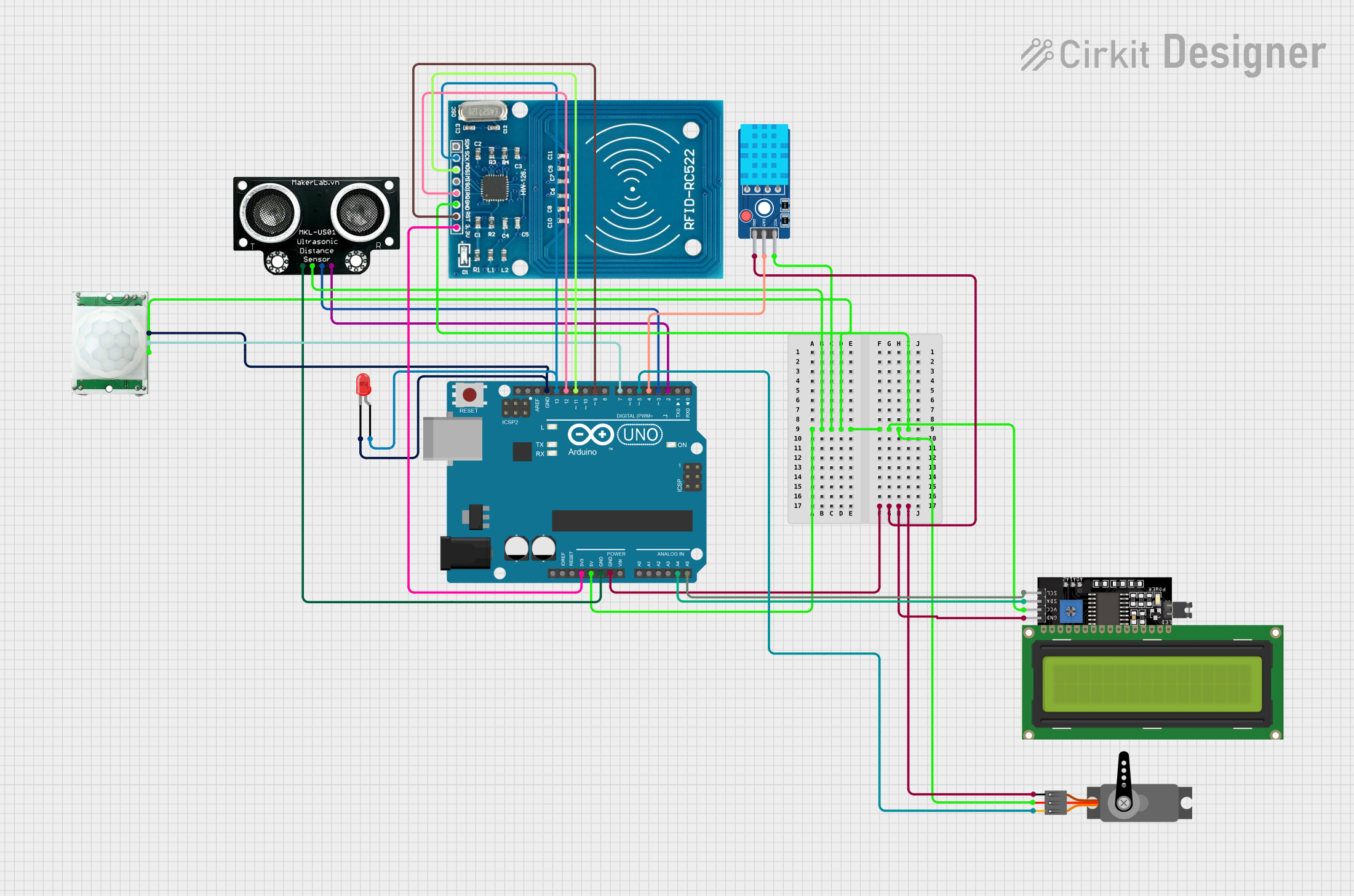
Circuit Documentation
Summary
This circuit is designed to interface an Arduino UNO with various sensors and modules, including a DHT11 temperature and humidity sensor, an MKE-S01 ultrasonic distance sensor, a PIR motion sensor, a red LED, an LCD Display (16x4) with I2C interface, a servo motor, and an RFID-RC522 module. The Arduino UNO acts as the central processing unit, reading sensor data, controlling the LED and servo, and communicating with the RFID reader and LCD display. The provided code is responsible for reading data from the ultrasonic and DHT11 sensors and outputting the information to the Serial Monitor.
Component List
- Arduino UNO: A microcontroller board based on the ATmega328P, featuring digital and analog I/O pins.
- DHT11 Sensor V2: A basic, low-cost digital temperature and humidity sensor.
- MKE-S01 Ultrasonic Distance Sensor: A sensor for measuring distance using ultrasonic waves.
- PIR/Motion Sensor: A sensor that detects motion via changes in infrared levels.
- LED: Two Pin (red): A basic red LED for indicating status or events.
- LCD Display 16x4 I2C: A 16x4 character LCD display with an I2C interface for displaying data.
- Servo: A rotary actuator or motor that allows for precise control of angular position.
- RFID-RC522: An RFID reader/writer module for contactless communication using radio frequency.
Wiring Details
Arduino UNO
- 3.3V: Powers the RFID-RC522 module.
- 5V: Powers the DHT11 sensor, MKE-S01 ultrasonic sensor, LCD display, servo, and PIR motion sensor.
- GND: Common ground for all components.
- A4 (SDA): I2C data line for the LCD display.
- A5 (SCL): I2C clock line for the LCD display.
- D2: Connected to the ECHO pin of the MKE-S01 ultrasonic sensor.
- D3: Connected to the TRIG pin of the MKE-S01 ultrasonic sensor.
- D4: Connected to the DAT pin of the DHT11 sensor.
- D5: PWM control for the servo.
- D7: Connected to the OUTPUT pin of the PIR motion sensor.
- D9: Connected to the RST pin of the RFID-RC522 module.
- D11: Connected to the MOSI pin of the RFID-RC522 module.
- D12: Connected to the IRQ pin of the RFID-RC522 module.
- D13: Connected to the SCK pin of the RFID-RC522 module and the anode of the red LED.
DHT11 Sensor V2
- VCC: Powered by the 5V output from the Arduino UNO.
- GND: Connected to the common ground.
- DAT: Data pin connected to D4 on the Arduino UNO.
MKE-S01 Ultrasonic Distance Sensor
- 5V: Powered by the 5V output from the Arduino UNO.
- GND: Connected to the common ground.
- TRIG: Trigger pin connected to D3 on the Arduino UNO.
- ECHO: Echo pin connected to D2 on the Arduino UNO.
PIR/Motion Sensor
- VCC: Powered by the 5V output from the Arduino UNO.
- GND: Connected to the common ground.
- OUTPUT: Output pin connected to D7 on the Arduino UNO.
LED: Two Pin (red)
- cathode: Connected to the common ground.
- anode: Connected to D13 on the Arduino UNO.
LCD Display 16x4 I2C
- SCL: I2C clock line connected to A5 on the Arduino UNO.
- SDA: I2C data line connected to A4 on the Arduino UNO.
- VCC: Powered by the 5V output from the Arduino UNO.
- GND: Connected to the common ground.
Servo
- VCC: Powered by the 5V output from the Arduino UNO.
- GND: Connected to the common ground.
- PWM: PWM control pin connected to D5 on the Arduino UNO.
RFID-RC522
- VCC (3.3V): Powered by the 3.3V output from the Arduino UNO.
- RST: Reset pin connected to D9 on the Arduino UNO.
- GND: Connected to the common ground.
- IRQ: Interrupt request pin connected to D12 on the Arduino UNO.
- MISO: Master In Slave Out, not explicitly connected in this circuit.
- MOSI: Master Out Slave In pin connected to D11 on the Arduino UNO.
- SCK: Serial Clock pin connected to D13 on the Arduino UNO.
- SDA: Serial Data pin, not explicitly connected in this circuit.
Documented Code
/*
 * This Arduino sketch reads data from an ultrasonic distance sensor and a
 * DHT11 temperature and humidity sensor. The distance is measured in
 * centimeters and printed to the Serial Monitor. The temperature and
 * humidity values are also read and printed to the Serial Monitor.
 */

#include <DHT.h>

// Define pins for the ultrasonic sensor
const int trigPin = 3;  // Trigger pin connected to D3
const int echoPin = 2;  // Echo pin connected to D2

// Define pins for the DHT11 sensor
#define DHTPIN 4       // DHT11 data pin connected to D4
#define DHTTYPE DHT11  // DHT11 sensor type

// Initialize DHT sensor
DHT dht(DHTPIN, DHTTYPE);

// Variables to store duration and distance
long duration;
int distance;

void setup() {
  // Setup serial communication to print values to the Serial Monitor
  Serial.begin(9600);

  // Set the trigPin as OUTPUT (to send the pulse)
  pinMode(trigPin, OUTPUT);

  // Set the echoPin as INPUT (to receive the pulse)
  pinMode(echoPin, INPUT);

  // Initialize the DHT sensor
  dht.begin();
}

void loop() {
  // Clear the trigPin
  digitalWrite(trigPin, LOW);
  delayMicroseconds(2);

  // Set the trigPin HIGH for 10 microseconds to send the pulse
  digitalWrite(trigPin, HIGH);
  delayMicroseconds(10);
  digitalWrite(trigPin, LOW);

  // Read the pulse duration from the echoPin
  duration = pulseIn(echoPin, HIGH);

  // Calculate the distance in centimeters
  distance = duration * 0.034 / 2;

  // Read temperature and humidity from DHT11 sensor
  float h = dht.readHumidity();
  float t = dht.readTemperature();

  // Check if any reads failed and exit early (to try again)
  if (isnan(h) || isnan(t)) {
    Serial.println("Failed to read from DHT sensor!");
    return;
  }

  // Print the distance to the Serial Monitor
  Serial.print("Distance: ");
  Serial.print(distance);
  Serial.println(" cm");

  // Print the temperature and humidity to the Serial Monitor
  Serial.print("Humidity: ");
  Serial.print(h);
  Serial.print(" %\t");
  Serial.print("Temperature: ");
  Serial.print(t);
  Serial.println(" *C");

  // Short delay before the next measurement
  delay(2000);
}
This code is designed to be uploaded to the Arduino UNO microcontroller. It initializes the sensors, reads their data, and outputs the information to the Serial Monitor. The ultrasonic sensor measures distance, and the DHT11 sensor measures temperature and humidity. The code includes error checking for failed sensor reads and prints the results every two seconds.