
Arduino UNO-Based Motion Detection System with Buzzer and LCD Display
View and Edit Project In Cirkit Designer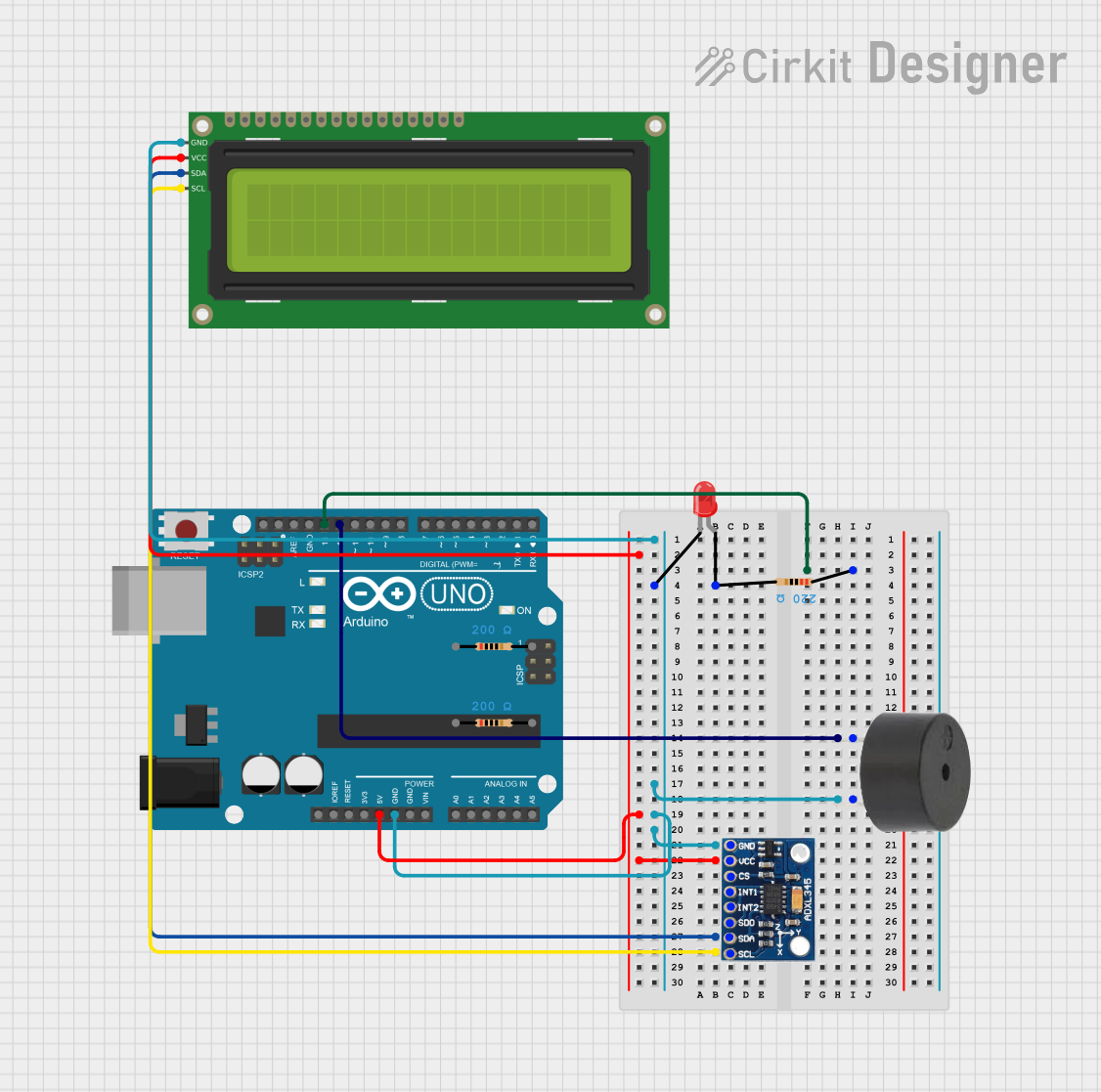
Circuit Documentation
Summary
This circuit involves three Arduino UNO microcontrollers, a buzzer, a red LED, three resistors, an ADXL345 accelerometer, and a 16x2 I2C LCD. The components are interconnected to perform various functions, including driving the LED and buzzer, and displaying data on the LCD.
Component List
Arduino UNO
- Description: A microcontroller board based on the ATmega328P.
- Pins: UNUSED, IOREF, Reset, 3.3V, 5V, GND, Vin, A0, A1, A2, A3, A4, A5, SCL, SDA, AREF, D13, D12, D11, D10, D9, D8, D7, D6, D5, D4, D3, D2, D1, D0
Buzzer
- Description: A simple piezoelectric buzzer.
- Pins: PIN, GND
LED: Two Pin (red)
- Description: A red LED with two pins.
- Pins: cathode, anode
Resistor (200 Ohms)
- Description: A resistor with a resistance of 200 Ohms.
- Pins: pin1, pin2
Resistor (220 Ohms)
- Description: A resistor with a resistance of 220 Ohms.
- Pins: pin1, pin2
ADXL345
- Description: A 3-axis accelerometer.
- Pins: GND, VCC, CS, INT1, INT2, SDO, SDA, SCL
16x2 I2C LCD
- Description: A 16x2 character LCD with I2C interface.
- Pins: GND, VCC, SDA, SCL
Wiring Details
Arduino UNO
D13 is connected to:
- Resistor (220 Ohms) pin1
- Another Arduino UNO D13
D12 is connected to:
- Buzzer PIN
GND is connected to:
- Buzzer GND
- LED cathode
- ADXL345 GND
- 16x2 I2C LCD GND
5V is connected to:
- ADXL345 VCC
- 16x2 I2C LCD VCC
Buzzer
PIN is connected to:
- Arduino UNO D12
GND is connected to:
- Arduino UNO GND
- LED cathode
- ADXL345 GND
- 16x2 I2C LCD GND
LED: Two Pin (red)
cathode is connected to:
- Arduino UNO GND
- Buzzer GND
- ADXL345 GND
- 16x2 I2C LCD GND
anode is connected to:
- Resistor (220 Ohms) pin2
Resistor (220 Ohms)
pin1 is connected to:
- Arduino UNO D13
pin2 is connected to:
- LED anode
ADXL345
GND is connected to:
- Arduino UNO GND
- Buzzer GND
- LED cathode
- 16x2 I2C LCD GND
VCC is connected to:
- Arduino UNO 5V
- 16x2 I2C LCD VCC
SDA is connected to:
- 16x2 I2C LCD SDA
SCL is connected to:
- 16x2 I2C LCD SCL
16x2 I2C LCD
GND is connected to:
- Arduino UNO GND
- Buzzer GND
- LED cathode
- ADXL345 GND
VCC is connected to:
- Arduino UNO 5V
- ADXL345 VCC
SDA is connected to:
- ADXL345 SDA
SCL is connected to:
- ADXL345 SCL
Documented Code
Arduino UNO 1
void setup() {
  // put your setup code here, to run once:

}

void loop() {
  // put your main code here, to run repeatedly:

}
Arduino UNO 2
void setup() {
  // put your setup code here, to run once:

}

void loop() {
  // put your main code here, to run repeatedly:

}
Arduino UNO 3
void setup() {
  // put your setup code here, to run once:

}

void loop() {
  // put your main code here, to run repeatedly:

}