
Arduino Mega 2560-Based Multi-Sensor Monitoring System with LCD Display
View and Edit Project In Cirkit Designer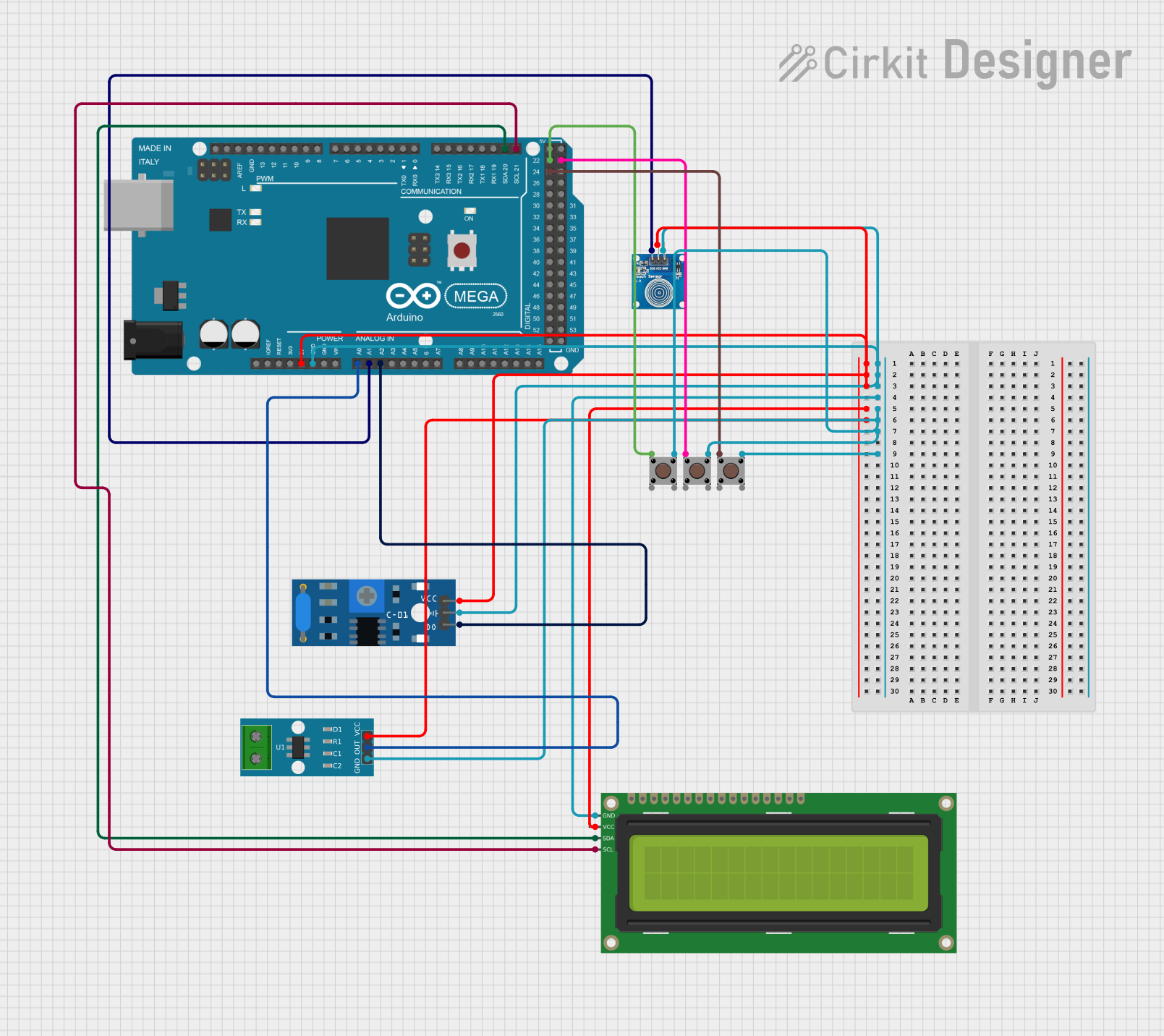
Circuit Documentation
Summary
This circuit involves an Arduino Mega 2560 microcontroller interfacing with various sensors and a display. The components include pushbuttons, a vibration sensor, a touch sensor, a current sensor, and a 16x2 I2C LCD display. The Arduino Mega 2560 serves as the central controller, reading inputs from the sensors and displaying information on the LCD.
Component List
Pushbutton
- Description: A simple pushbutton used for user input.
- Pins: Pin 1 (in), Pin 2 (in), Pin 3 (out), Pin 4 (out)
SW-420 Vibration Sensor
- Description: A sensor that detects vibrations.
- Pins: vcc, Ground, Digital output
Touch Sensor
- Description: A sensor that detects touch.
- Pins: IO, VCC, GND
ACS712 Current Sensor 5A 20A 30A
- Description: A sensor that measures current.
- Pins: 1, 2, GND, OUT, VCC
16x2 I2C LCD
- Description: A 16x2 character LCD display with I2C interface.
- Pins: GND, VCC, SDA, SCL
Arduino Mega 2560
- Description: A microcontroller board based on the ATmega2560.
- Pins: IOREF, RESET, 3V3, 5V, GND, VIN, A0-A15, D0-D53, SDA, SCL, AREF
Wiring Details
Pushbutton 1
- Pin 1 (in): Connected to Arduino Mega 2560 pin D22
- Pin 3 (out): Connected to Ground
Pushbutton 2
- Pin 1 (in): Connected to Arduino Mega 2560 pin D23
- Pin 3 (out): Connected to Ground
Pushbutton 3
- Pin 1 (in): Connected to Arduino Mega 2560 pin D24
- Pin 3 (out): Connected to Ground
SW-420 Vibration Sensor
- vcc: Connected to Arduino Mega 2560 pin 5V
- Ground: Connected to Ground
- Digital output: Connected to Arduino Mega 2560 pin A2
Touch Sensor
- VCC: Connected to Arduino Mega 2560 pin 5V
- GND: Connected to Ground
- IO: Connected to Arduino Mega 2560 pin A1
ACS712 Current Sensor 5A 20A 30A
- VCC: Connected to Arduino Mega 2560 pin 5V
- GND: Connected to Ground
- OUT: Connected to Arduino Mega 2560 pin A0
16x2 I2C LCD
- VCC: Connected to Arduino Mega 2560 pin 5V
- GND: Connected to Ground
- SDA: Connected to Arduino Mega 2560 pin D20/SDA
- SCL: Connected to Arduino Mega 2560 pin D21/SCL
Arduino Mega 2560
- 5V: Connected to VCC of SW-420 Vibration Sensor, Touch Sensor, 16x2 I2C LCD, and ACS712 Current Sensor
- GND: Connected to Ground of SW-420 Vibration Sensor, Touch Sensor, 16x2 I2C LCD, ACS712 Current Sensor, and Pushbuttons
- D22: Connected to Pin 1 (in) of Pushbutton 1
- D23: Connected to Pin 1 (in) of Pushbutton 2
- D24: Connected to Pin 1 (in) of Pushbutton 3
- A2: Connected to Digital output of SW-420 Vibration Sensor
- A1: Connected to IO of Touch Sensor
- A0: Connected to OUT of ACS712 Current Sensor
- D20/SDA: Connected to SDA of 16x2 I2C LCD
- D21/SCL: Connected to SCL of 16x2 I2C LCD
Code Documentation
Arduino Mega 2560 Code
void setup() {
  // put your setup code here, to run once:

}

void loop() {
  // put your main code here, to run repeatedly:

}
This code is a basic template for the Arduino Mega 2560. The setup() function is where you initialize your components and settings, and the loop() function is where the main logic of your program runs repeatedly.