
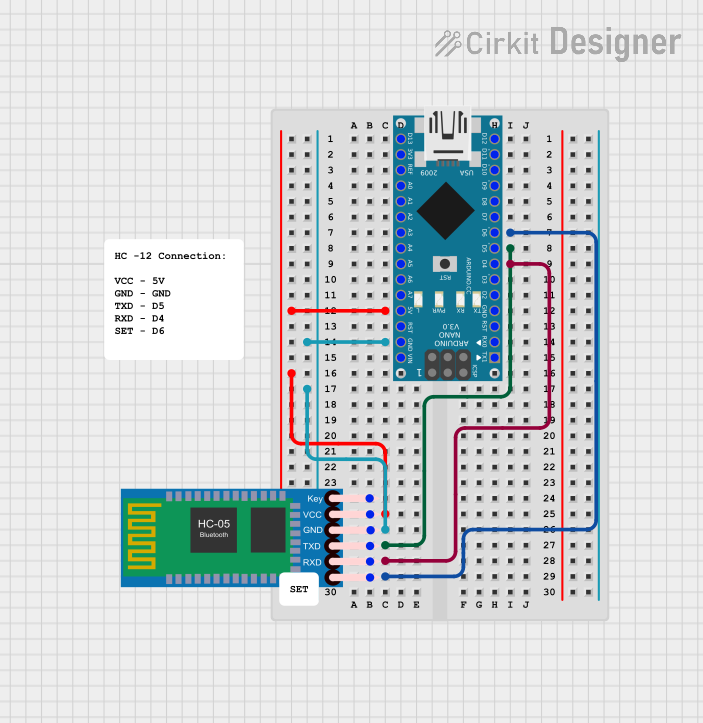
Circuit Documentation
Summary
This circuit integrates an Arduino Nano microcontroller with an HC-05 Bluetooth Module to enable wireless communication capabilities. The Arduino Nano serves as the central processing unit, while the HC-05 Bluetooth Module allows for Bluetooth connectivity. The circuit is designed to establish a serial communication link between the Arduino Nano and the HC-05 module, facilitating data exchange over Bluetooth.
Component List
Arduino Nano
- Description: A compact microcontroller board based on the ATmega328P.
- Pins: D1/TX, D0/RX, RESET, GND, D2, D3, D4, D5, D6, D7, D8, D9, D10, D11/MOSI, D12/MISO, VIN, 5V, A7, A6, A5, A4, A3, A2, A1, A0, AREF, 3V3, D13/SCK.
- Purpose: Acts as the main controller for the circuit, executing the embedded code and managing Bluetooth communication through the HC-05 module.
HC-05 Bluetooth Module
- Description: A widely-used Bluetooth module for wireless communication.
- Pins: Key, VCC, TXD, RXD, State, GND.
- Purpose: Provides Bluetooth connectivity to the circuit, allowing it to communicate with other Bluetooth-enabled devices.
Comments
- Description: Placeholder for additional notes or documentation.
- Pins: N/A.
- Purpose: Used to add comments or annotations within the circuit design for clarity or future reference.
Wiring Details
Arduino Nano
- 5V: Provides power to the HC-05 Bluetooth Module.
- GND: Common ground with the HC-05 Bluetooth Module.
- D4: Connected to RXD on the HC-05 Bluetooth Module for serial communication.
- D5: Connected to TXD on the HC-05 Bluetooth Module for serial communication.
- D6: Connected to the State pin on the HC-05 Bluetooth Module to monitor the connection status.
HC-05 Bluetooth Module
- VCC: Powered by the 5V output from the Arduino Nano.
- GND: Common ground with the Arduino Nano.
- TXD: Transmits data to the D5 pin on the Arduino Nano.
- RXD: Receives data from the D4 pin on the Arduino Nano.
- State: Connection status output to the D6 pin on the Arduino Nano.
Documented Code
Arduino Nano Code (sketch.ino)
void setup() {
  // put your setup code here, to run once:

}

void loop() {
  // put your main code here, to run repeatedly:

}
This code serves as a template for the Arduino Nano. The setup() function is called once when the microcontroller is powered on or reset. It is typically used to initialize variables, pin modes, start using libraries, etc. The loop() function is called repeatedly and contains the main logic of the code. It is where the microcontroller will spend most of its time.
Additional Files
- documentation.txt: This file is intended for additional documentation and notes related to the code. It is currently empty.
The provided code is a basic template and does not include specific functionality for Bluetooth communication or other operations. Further development is required to implement the desired features and behaviors.