
Arduino UNO and ILI9341 Display-Based Interactive Game Console
View and Edit Project In Cirkit Designer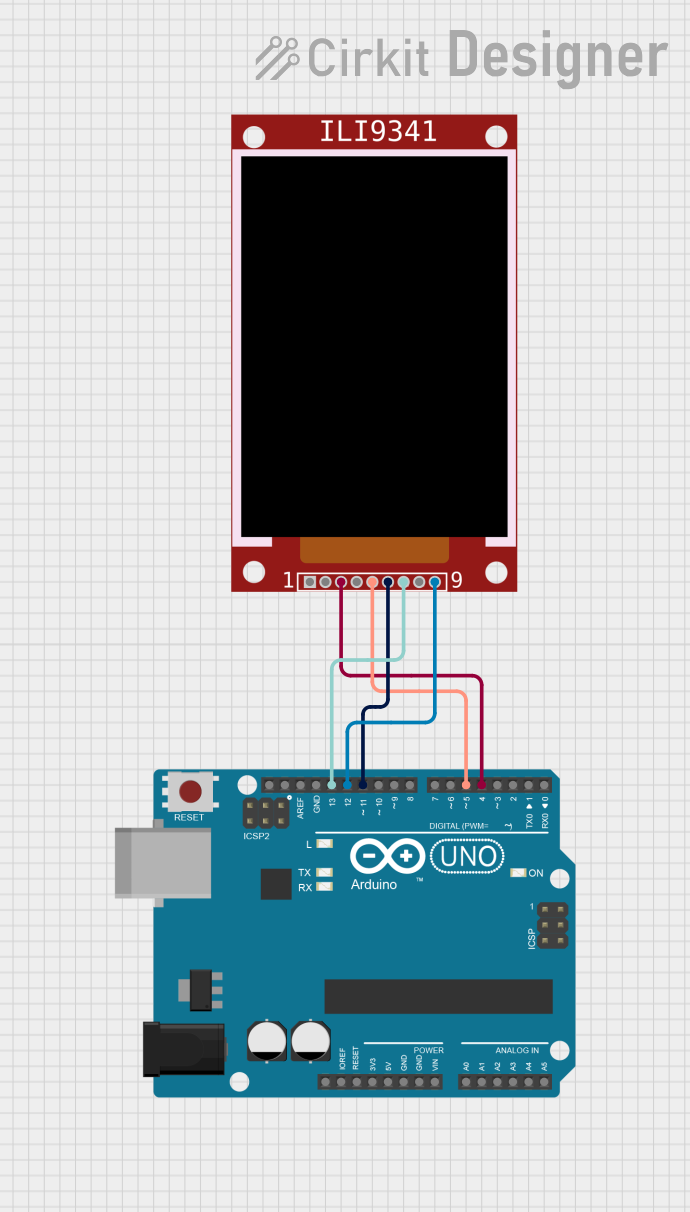
Circuit Documentation
Summary
This document provides a detailed overview of a circuit that interfaces an ILI9341 TFT display with an Arduino UNO microcontroller. The circuit is designed to display graphics and run a game using the ILI9341 display, controlled by the Arduino UNO. The document includes a list of components, wiring details, and the embedded code used in the microcontroller.
Component List
ILI9341 TFT Display
- Component Name: ILI9341
- Description: A 2.8-inch TFT LCD display with a resolution of 240x320 pixels. It supports SPI communication.
- Pins: VCC, GND, CS, RST, D/C, MOSI, SCK, LED, MISO
Arduino UNO
- Component Name: Arduino UNO
- Description: A microcontroller board based on the ATmega328P. It has 14 digital input/output pins, 6 analog inputs, and a 16 MHz quartz crystal.
- Pins: UNUSED, IOREF, Reset, 3.3V, 5V, GND, Vin, A0, A1, A2, A3, A4, A5, SCL, SDA, AREF, D13, D12, D11, D10, D9, D8, D7, D6, D5, D4, D3, D2, D1, D0
Wiring Details
ILI9341 TFT Display
- CS (Chip Select): Connected to Arduino UNO pin D4
- D/C (Data/Command): Connected to Arduino UNO pin D5
- MOSI (Master Out Slave In): Connected to Arduino UNO pin D11
- SCK (Serial Clock): Connected to Arduino UNO pin D13
- MISO (Master In Slave Out): Connected to Arduino UNO pin D12
Arduino UNO
- D4: Connected to ILI9341 CS pin
- D5: Connected to ILI9341 D/C pin
- D11: Connected to ILI9341 MOSI pin
- D13: Connected to ILI9341 SCK pin
- D12: Connected to ILI9341 MISO pin
Embedded Code
sketch.ino
/*
    MIT License

    Copyright (c) 2018-2019, Alexey Dynda

    Permission is hereby granted, free of charge, to any person obtaining a copy
    of this software and associated documentation files (the "Software"), to deal
    in the Software without restriction, including without limitation the rights
    to use, copy, modify, merge, publish, distribute, sublicense, and/or sell
    copies of the Software, and to permit persons to whom the Software is
    furnished to do so, subject to the following conditions:

    The above copyright notice and this permission notice shall be included in all
    copies or substantial portions of the Software.

    THE SOFTWARE IS PROVIDED "AS IS", WITHOUT WARRANTY OF ANY KIND, EXPRESS OR
    IMPLIED, INCLUDING BUT NOT LIMITED TO THE WARRANTIES OF MERCHANTABILITY,
    FITNESS FOR A PARTICULAR PURPOSE AND NONINFRINGEMENT. IN NO EVENT SHALL THE
    AUTHORS OR COPYRIGHT HOLDERS BE LIABLE FOR ANY CLAIM, DAMAGES OR OTHER
    LIABILITY, WHETHER IN AN ACTION OF CONTRACT, TORT OR OTHERWISE, ARISING FROM,
    OUT OF OR IN CONNECTION WITH THE SOFTWARE OR THE USE OR OTHER DEALINGS IN THE
    SOFTWARE.
*/
/*
 *   Attiny85 PINS
 *             ____
 *   RESET   -|_|  |- 3V
 *   SCL (3) -|    |- (2)
 *   SDA (4) -|    |- (1) - BUZZER
 *   GND     -|____|- (0) - BUTTONS module
 *
 *   Atmega328 PINS with i2c SSD1306 to A4/A5, BUZZER on D8,
 *   Z-keypad ADC module on A0 pin.
 *   If you want to use GPIO keys, uncomment USE_GPIO_BUTTONS below
 *
 *   Atmega328 PINS with spi Nokia 5110 LCD:
 *   LCD RST to D3
 *   LCD CES to D4
 *   LCD DC to  D5
 *   LCD DIN to D11
 *   LCD CLK to D13
 *   LCD BL to  VCC
 */

#include "game_basic.h"
#include "ninja.h"
#include "sprites.h"

// Uncomment if you want to use gpio buttons
#define USE_GPIO_BUTTONS

#if defined(__AVR_ATtiny25__) | defined(__AVR_ATtiny45__) | defined(__AVR_ATtiny85__)
#define BUZZER      1
#define BUTTON_PIN  0
#else // For Arduino Nano/Atmega328 we use different pins
#define BUZZER      3
#define BUTTON_PIN  0
#ifdef USE_GPIO_BUTTONS
static const uint8_t g_buttonsPins[6] = { 2, 6, 7, 8, 9, 12 };
#endif

#endif

const NanoRect game_window = { {0, 64}, {239, 319} };
// Commented line is for 90 degree
//const NanoRect game_window = { {64, 64}, {319, 239} };

uint16_t blockColors[] = {
    RGB_COLOR16(255,96,0),
    RGB_COLOR16(255,255,192),
    RGB_COLOR16(255,255,255),
    RGB_COLOR16(255,255,64),
    RGB_COLOR16(128,128,128),
};

/**
 * Just produces some sound depending on params
 */
void beep(int bCount,int bDelay);

class Player: public NanoFixedSprite<GraphicsEngine::TilerT>
{
public:
    using NanoFixedSprite<GraphicsEngine::TilerT>::NanoFixedSprite;

    void draw() override
    {
        getTiler().getCanvas().setColor(RGB_COLOR16(64,255,255));
        NanoFixedSprite<GraphicsEngine::TilerT>::draw();
    }
};

Player player( { 8, 8 }, { 8, 8 }, playerFlyingImage[0][0] );

/* The variable is used for player animation      *
 * The graphics defined for the hero has 2 images *
 * for each direction. So, the variable is either *
 * 0 or 1. */
uint8_t  playerAnimation = 0;

/* Timestamp when playerAnimation was changed last time */
uint16_t playerAnimationTs = 0;

/* Number of coins collected */
uint8_t  goldCollection = 0;

void showGameInfo()
{
    engine.getCanvas().setMode(CANVAS_MODE_TRANSPARENT);
    engine.getCanvas().setColor(RGB_COLOR16(0,0,0));
    engine.getCanvas().drawBitmap1(1, 1, 8, 8, coinImage);
    engine.getCanvas().setColor(RGB_COLOR16(255,255,0));
    engine.getCanvas().drawBitmap1(0, 0, 8, 8, coinImage);

    engine.getCanvas().setFixedFont(digital_font5x7_AB);
    char score[3] = { goldCollection/10 + '0', goldCollection%10 + '0', 0 };
    engine.getCanvas().setColor(RGB_COLOR16(0,0,0));
    engine.getCanvas().printFixed(9,1,score);
    engine.getCanvas().setColor(RGB_COLOR16(255,255,255));
    engine.getCanvas().printFixed(8,0,score);
    engine.getCanvas().setFixedFont(digital_font5x7_AB);
}

static bool onDraw()
{
    engine.getCanvas().clear();
    engine.getCanvas().setMode(CANVAS_MODE_BASIC);
    engine.localCoordinates();
    if (game_window.containsPartOf( engine.getCanvas().rect() ))
    {
        engine.worldCoordinates();
        NanoRect blocks = rect_to_blocks( engine.getCanvas().rect() );
        for (uint8_t row = max(0,blocks.p1.y);
                     row <= min(13,blocks.p2.y); row++)
        {
            for (uint8_t col = max(0,blocks.p1.x);
                         col <= min((B_WIDTH-1),blocks.p2.x); col++)
            {
                uint8_t blockType = block_value({col,row});
                if (blockType != 0)
                {
                    engine.getCanvas().setColor(blockColors[blockType - 1]);
                    NanoPoint pos = block_to_pos({col,row});
                    engine.getCanvas().drawBitmap1(pos.x, pos.y,
                                          8, 8, bgSprites[blockType - 1]);
                }
            }
        }
        engine.localCoordinates();
    }
    showGameInfo();
    engine.worldCoordinates();
    engine.getCanvas().setMode(CANVAS_MODE_TRANSPARENT);
    return true;
}

static NanoPoint calc_new_screen_position()
{
    NanoPoint position = engine.getPosition() + game_window.p1;
    if (player.x() - position.x >= game_window.width() - 24)
    {
        position.x = min(player.x() - (game_window.width() - 24), 128);
    }
    else if (player.x() - position.x < 24)
    {
        position.x = max(0, player.x() - 24);
    }
    if (player.y()