
ESP32-Controlled Multi-Stepper Motor System with Audio Playback
View and Edit Project In Cirkit Designer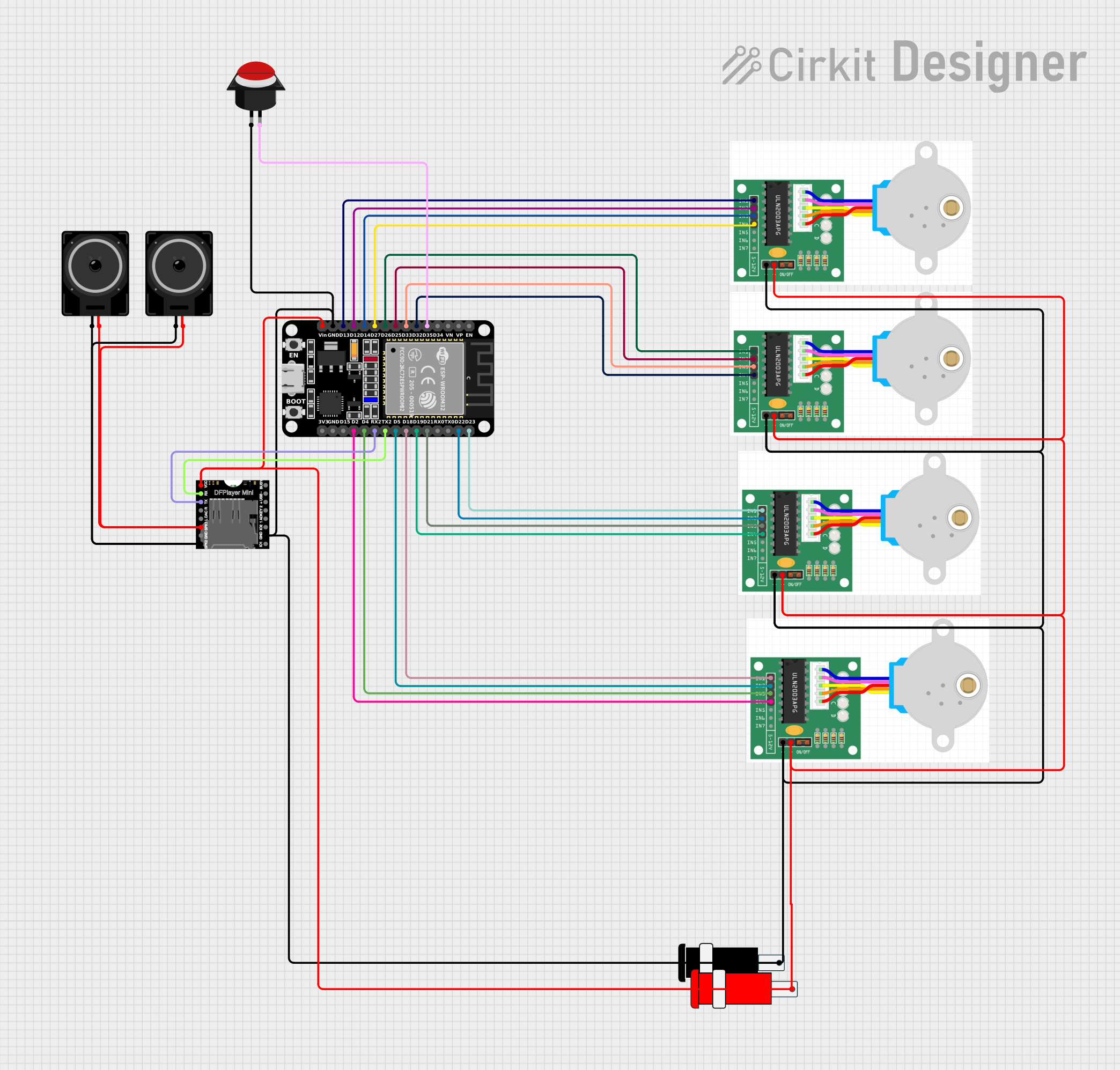
Circuit Documentation
Summary
This circuit involves an ESP32 microcontroller controlling four stepper motors and a DFPlayer Mini module. The stepper motors are connected to the ESP32, and the DFPlayer Mini is connected to a pair of loudspeakers. Additionally, a push button is connected to the ESP32 for user input. The circuit is powered by a 5V connector.
Component List
ESP32 (30 pin)
- Description: A powerful microcontroller with built-in Wi-Fi and Bluetooth capabilities.
- Pins: EN, VP, VN, D34, D35, D32, D33, D25, D26, D27, D14, D12, D13, GND, Vin, D23, D22, TX0, RX0, D21, D19, D18, D5, TX2, RX2, D4, D2, D15, 3V3
Stepper Motor
- Description: A 28BYJ-48 stepper motor controlled via ULN2003 drivers.
- Pins: IN1, IN2, IN3, IN4, +, -
DFPlayer MINI
- Description: A small MP3 player module that can be controlled via serial communication.
- Pins: VCC, BUSY, RX, USB -, TX, USB +, DAC_R, K2/ADC_KEY, DAC_L, K1/ADC_KEY, SPK1, IO 2, GND, SPK2, IO 1
Loudspeaker
- Description: A simple loudspeaker for audio output.
- Pins: pin1, pin2
Connector 5V
- Description: A connector providing 5V power supply.
- Pins: GND, VCC
Push Button Round
- Description: A round push button for user input.
- Pins: leg0, leg1
Wiring Details
ESP32 (30 pin)
- D35 connected to Push Button Round leg1
- D32 connected to Stepper Motor IN4
- D33 connected to Stepper Motor IN3
- D25 connected to Stepper Motor IN2
- D26 connected to Stepper Motor IN1
- D27 connected to Stepper Motor IN4
- D14 connected to Stepper Motor IN3
- D12 connected to Stepper Motor IN2
- D13 connected to Stepper Motor IN1
- D23 connected to Stepper Motor IN1
- D22 connected to Stepper Motor IN2
- D21 connected to Stepper Motor IN3
- D19 connected to Stepper Motor IN4
- D18 connected to Stepper Motor IN1
- D5 connected to Stepper Motor IN2
- D4 connected to Stepper Motor IN3
- D2 connected to Stepper Motor IN4
- TX2 connected to DFPlayer MINI RX
- RX2 connected to DFPlayer MINI TX
- GND connected to Stepper Motor -, DFPlayer MINI GND, Push Button Round leg0, Connector 5V GND
- Vin connected to Stepper Motor +, DFPlayer MINI VCC, Connector 5V VCC
Stepper Motor
- IN1 connected to ESP32 D13, ESP32 D26, ESP32 D23, ESP32 D18
- IN2 connected to ESP32 D12, ESP32 D25, ESP32 D22, ESP32 D5
- IN3 connected to ESP32 D14, ESP32 D33, ESP32 D21, ESP32 D4
- IN4 connected to ESP32 D27, ESP32 D32, ESP32 D19, ESP32 D2
- + connected to ESP32 Vin, Connector 5V VCC
- - connected to ESP32 GND, Connector 5V GND
DFPlayer MINI
- RX connected to ESP32 TX2
- TX connected to ESP32 RX2
- GND connected to ESP32 GND, Connector 5V GND
- VCC connected to ESP32 Vin, Connector 5V VCC
- SPK1 connected to Loudspeaker pin2
- SPK2 connected to Loudspeaker pin1
Loudspeaker
- pin1 connected to DFPlayer MINI SPK2
- pin2 connected to DFPlayer MINI SPK1
Connector 5V
- GND connected to ESP32 GND, Stepper Motor -, DFPlayer MINI GND, Push Button Round leg0
- VCC connected to ESP32 Vin, Stepper Motor +, DFPlayer MINI VCC
Push Button Round
- leg0 connected to ESP32 GND, Connector 5V GND
- leg1 connected to ESP32 D35
Documented Code
ESP32 (30 pin)
/*
 * This Arduino Sketch controls four 28BYJ-48 stepper motors using ULN2003 drivers
 * with an ESP32 microcontroller. The motors are connected to the ESP32 as follows:
 * Motor 1: IN1 -> D13, IN2 -> D12, IN3 -> D14, IN4 -> D27
 * Motor 2: IN1 -> D26, IN2 -> D25, IN3 -> D33, IN4 -> D32
 * Motor 3: IN1 -> D23, IN2 -> D22, IN3 -> D21, IN4 -> D19
 * Motor 4: IN1 -> D18, IN2 -> D5, IN3 -> D4, IN4 -> D2
 * The code initializes the motors and rotates them in a sequence.
 */

#include <AccelStepper.h>

// Define stepper motor connections and interface type
#define Motor1_IN1 13
#define Motor1_IN2 12
#define Motor1_IN3 14
#define Motor1_IN4 27
#define Motor2_IN1 26
#define Motor2_IN2 25
#define Motor2_IN3 33
#define Motor2_IN4 32
#define Motor3_IN1 23
#define Motor3_IN2 22
#define Motor3_IN3 21
#define Motor3_IN4 19
#define Motor4_IN1 18
#define Motor4_IN2 5
#define Motor4_IN3 4
#define Motor4_IN4 2

AccelStepper stepper1(AccelStepper::FULL4WIRE, Motor1_IN1, Motor1_IN3, Motor1_IN2, Motor1_IN4);
AccelStepper stepper2(AccelStepper::FULL4WIRE, Motor2_IN1, Motor2_IN3, Motor2_IN2, Motor2_IN4);
AccelStepper stepper3(AccelStepper::FULL4WIRE, Motor3_IN1, Motor3_IN3, Motor3_IN2, Motor3_IN4);
AccelStepper stepper4(AccelStepper::FULL4WIRE, Motor4_IN1, Motor4_IN3, Motor4_IN2, Motor4_IN4);

void setup() {
  // Set the maximum speed and acceleration for each stepper motor
  stepper1.setMaxSpeed(1000.0);
  stepper1.setAcceleration(500.0);
  stepper2.setMaxSpeed(1000.0);
  stepper2.setAcceleration(500.0);
  stepper3.setMaxSpeed(1000.0);
  stepper3.setAcceleration(500.0);
  stepper4.setMaxSpeed(1000.0);
  stepper4.setAcceleration(500.0);
}

void loop() {
  // Move each stepper motor to a new position
  stepper1.moveTo(200);
  stepper2.moveTo(200);
  stepper3.moveTo(200);
  stepper4.moveTo(200);

  // Run the motors to the new position
  stepper1.runToPosition();
  stepper2.runToPosition();
  stepper3.runToPosition();
  stepper4.runToPosition();

  // Move back to the original position
  stepper1.moveTo(0);
  stepper2.moveTo(0);
  stepper3.moveTo(0);
  stepper4.moveTo(0);

  // Run the motors back to the original position
  stepper1.runToPosition();
  stepper2.runToPosition();
  stepper3.runToPosition();
  stepper4.runToPosition();
}
Stepper Motor
#include <AccelStepper.h>
#include <MultiStepper.h>
void setup() {
  // put your setup code here, to run once:

}

void loop() {
  // put your main code here, to run repeatedly:

}
DFPlayer MINI
void setup() {
  // put your setup code here, to run once:

}

void loop() {
  //