
Arduino UNO GPS Navigation Robot with Bluetooth and Obstacle Avoidance
View and Edit Project In Cirkit Designer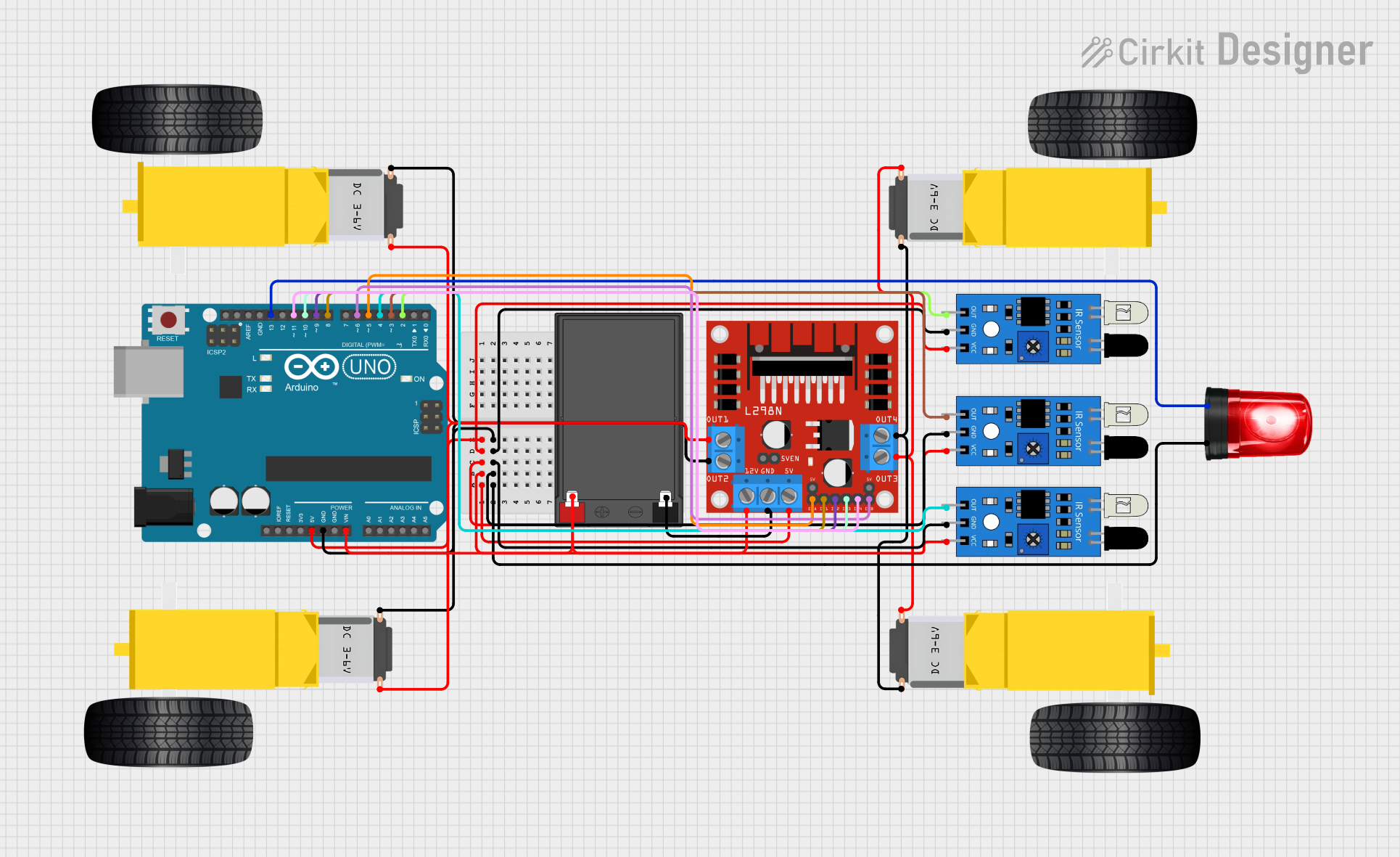
Circuit Documentation
Summary
This document provides a detailed overview of a GPS navigation robot circuit. The circuit includes various components such as DC gear motors, an L298N motor driver, a 12V battery, IR sensors, a siren, and an Arduino UNO microcontroller. The robot is designed to navigate to a target location using GPS coordinates and can be controlled via Bluetooth. It also includes obstacle detection using ultrasonic sensors.
Component List
Gearmotor DC Wheels Right
- Description: DC motor for driving the right wheels of the robot.
- Pins: PIN1, PIN2
Gearmotor DC Wheels Left
- Description: DC motor for driving the left wheels of the robot.
- Pins: PIN1, PIN2
L298N DC Motor Driver
- Description: Motor driver for controlling the DC motors.
- Pins: OUT1, OUT2, 12V, GND, 5V, OUT3, OUT4, 5V-ENA-JMP-I, 5V-ENA-JMP-O, +5V-J1, +5V-J2, ENA, IN1, IN2, IN3, IN4, ENB
12V 7Ah Battery
- Description: Power source for the circuit.
- Pins: 12v +, 12v -
IR Sensor
- Description: Infrared sensor for obstacle detection.
- Pins: out, gnd, vcc
Siren
- Description: Siren for audio alerts.
- Pins: Positive, Ground
Arduino UNO
- Description: Microcontroller for controlling the robot.
- Pins: UNUSED, IOREF, Reset, 3.3V, 5V, GND, Vin, A0, A1, A2, A3, A4, A5, SCL, SDA, AREF, D13, D12, D11, D10, D9, D8, D7, D6, D5, D4, D3, D2, D1, D0
Wiring Details
Gearmotor DC Wheels Right
- PIN1: Connected to L298N DC motor driver OUT3
- PIN2: Connected to L298N DC motor driver OUT4
Gearmotor DC Wheels Left
- PIN1: Connected to L298N DC motor driver OUT1
- PIN2: Connected to L298N DC motor driver OUT2
L298N DC Motor Driver
- OUT1: Connected to Gearmotor DC Wheels Left PIN1
- OUT2: Connected to Gearmotor DC Wheels Left PIN2
- OUT3: Connected to Gearmotor DC Wheels Right PIN1
- OUT4: Connected to Gearmotor DC Wheels Right PIN2
- 12V: Connected to 12V 7Ah Battery 12v +
- GND: Connected to 12V 7Ah Battery 12v -
- 5V: Connected to Arduino UNO 5V, IR Sensor vcc
- IN1: Connected to Arduino UNO D8
- IN2: Connected to Arduino UNO D9
- IN3: Connected to Arduino UNO D10
- IN4: Connected to Arduino UNO D11
- ENA: Connected to Arduino UNO D5
- ENB: Connected to Arduino UNO D6
12V 7Ah Battery
- 12v +: Connected to L298N DC motor driver 12V
- 12v -: Connected to L298N DC motor driver GND
IR Sensor
- vcc: Connected to L298N DC motor driver 5V
- gnd: Connected to Arduino UNO GND
- out: Connected to Arduino UNO D2, D3, D4
Siren
- Positive: Connected to Arduino UNO D13
- Ground: Connected to Arduino UNO GND
Arduino UNO
- 5V: Connected to L298N DC motor driver 5V
- GND: Connected to IR Sensor gnd, Siren Ground
- Vin: Connected to 12V 7Ah Battery 12v +
- D2: Connected to IR Sensor out
- D3: Connected to IR Sensor out
- D4: Connected to IR Sensor out
- D5: Connected to L298N DC motor driver ENA
- D6: Connected to L298N DC motor driver ENB
- D8: Connected to L298N DC motor driver IN1
- D9: Connected to L298N DC motor driver IN2
- D10: Connected to L298N DC motor driver IN3
- D11: Connected to L298N DC motor driver IN4
- D13: Connected to Siren Positive
Documented Code
#include <SoftwareSerial.h>
#include <TinyGPS++.h>

// Pin Definitions for Motors and Sensors
#define motorA1 8
#define motorA2 9
#define motorB1 10
#define motorB2 11
#define trigPin 6
#define echoPin 7

TinyGPSPlus gps;
SoftwareSerial gpsSerial(0, 1); // RX, TX for GPS
SoftwareSerial bluetooth(3, 4); // RX, TX for Bluetooth

// Target coordinates (latitude and longitude)
double targetLatitude = 37.7749;
double targetLongitude = -122.4194;

void setup() {
  // Motor pins setup
  pinMode(motorA1, OUTPUT);
  pinMode(motorA2, OUTPUT);
  pinMode(motorB1, OUTPUT);
  pinMode(motorB2, OUTPUT);

  // Ultrasonic Sensor setup
  pinMode(trigPin, OUTPUT);
  pinMode(echoPin, INPUT);

  // Serial communication setup
  Serial.begin(9600);
  gpsSerial.begin(9600);    // GPS module
  bluetooth.begin(9600);    // Bluetooth module

  Serial.println("GPS Navigation Robot with Bluetooth Starting...");
}

void loop() {
  // Reading GPS data
  while (gpsSerial.available() > 0) {
    if (gps.encode(gpsSerial.read())) {
      double distanceToTarget = calculateDistance(gps.location.lat(), gps.location.lng(), targetLatitude, targetLongitude);
      Serial.print("Distance to Target: ");
      Serial.println(distanceToTarget);

      if (distanceToTarget > 5) {
        moveForward();
      } else {
        stopRobot();
        Serial.println("Arrived at destination!");
      }
    }
  }

  // Ultrasonic obstacle detection
  long duration = getDistance();
  if (duration < 20) { // If obstacle detected
    avoidObstacle();
  }

  // Bluetooth control
  if (bluetooth.available()) {
    char command = bluetooth.read();
    controlRobot(command);
  }
}

// Function to calculate distance to target (Haversine formula)
double calculateDistance(double lat1, double lon1, double lat2, double lon2) {
  const double R = 6371e3; // Earth radius in meters
  double phi1 = radians(lat1);
  double phi2 = radians(lat2);
  double deltaPhi = radians(lat2 - lat1);
  double deltaLambda = radians(lon2 - lon1);

  double a = sin(deltaPhi/2) * sin(deltaPhi/2) +
             cos(phi1) * cos(phi2) * sin(deltaLambda/2) * sin(deltaLambda/2);
  double c = 2 * atan2(sqrt(a), sqrt(1-a));

  return R * c; // Distance in meters
}

// Function to move the robot forward
void moveForward() {
  digitalWrite(motorA1, HIGH);
  digitalWrite(motorA2, LOW);
  digitalWrite(motorB1, HIGH);
  digitalWrite(motorB2, LOW);
}

// Function to stop the robot
void stopRobot() {
  digitalWrite(motorA1, LOW);
  digitalWrite(motorA2, LOW);
  digitalWrite(motorB1, LOW);
  digitalWrite(motorB2, LOW);
}

// Function to get ultrasonic distance
long getDistance() {
  digitalWrite(trigPin, LOW);
  delayMicroseconds(2);
  digitalWrite(trigPin, HIGH);
  delayMicroseconds(10);
  digitalWrite(trigPin, LOW);

  long duration = pulseIn(echoPin, HIGH);
  long distance = (duration * 0.034) / 2; // Distance in cm
  return distance;
}

// Function to avoid obstacles
void avoidObstacle() {
  stopRobot();
  delay(1000); // Stop for 1 second
  // Implement additional logic to avoid obstacle
}

// Function to control robot via Bluetooth
void controlRobot(char command) {
  switch (command) {
    case 'F': // Move Forward
      moveForward();
      break;
    case 'B': // Move Backward
      moveBackward();
      break;
    case 'L': // Turn Left
      turnLeft();
      break;
    case 'R': // Turn Right
      turnRight();
      break;
    case 'S': // Stop
      stopRobot();
      break;
  }
}

// Function to move the robot backward
void moveBackward() {
  digitalWrite(motorA1, LOW);
  digitalWrite(motorA2, HIGH);
  digital