
Arduino UNO Obstacle Avoidance Robot with Ultrasonic Sensor and Servo
View and Edit Project In Cirkit Designer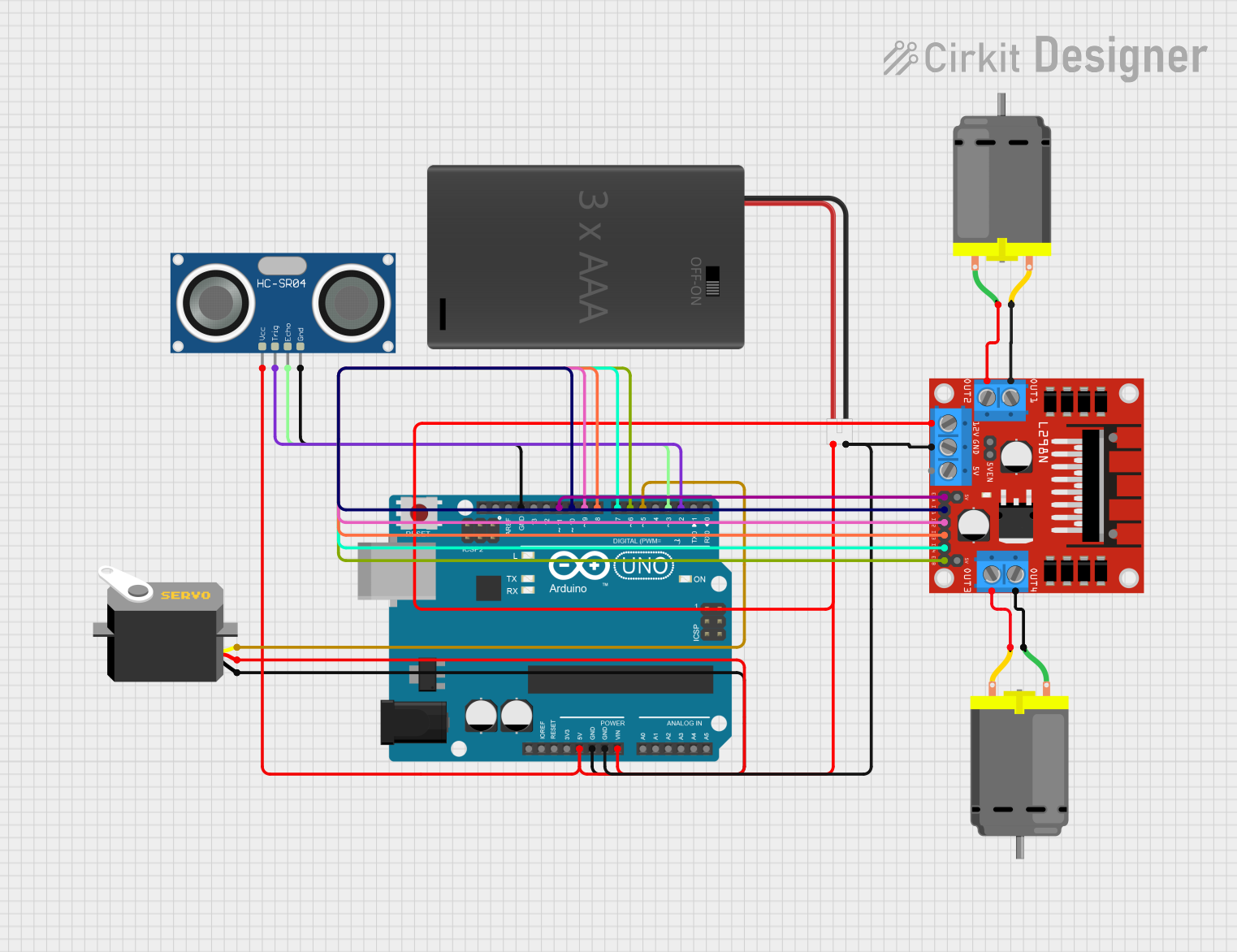
Circuit Documentation
Summary
This document describes an obstacle avoidance robot circuit. The circuit includes an Arduino UNO microcontroller, two DC motors, a servo motor, an ultrasonic sensor, a motor driver, and a battery pack. The robot moves forward until an obstacle is detected. When an obstacle is detected, the robot stops, the servo rotates to scan for a clear path, and the robot turns in the direction of the clear path.
Component List
Arduino UNO
- Description: Microcontroller board based on the ATmega328P.
- Pins: UNUSED, IOREF, Reset, 3.3V, 5V, GND, Vin, A0, A1, A2, A3, A4, A5, SCL, SDA, AREF, D13, D12, D11, D10, D9, D8, D7, D6, D5, D4, D3, D2, D1, D0
DC Motor (Motor 1)
- Description: Standard DC motor.
- Pins: pin 1, pin 2
DC Motor (Motor 2)
- Description: Standard DC motor.
- Pins: pin 1, pin 2
3xAAA Battery Pack with Switch and JST
- Description: Battery pack providing power to the circuit.
- Pins: POS, NEG
Servo
- Description: Servo motor for rotating to scan for obstacles.
- Pins: gnd, vcc, pulse
HC-SR04 Ultrasonic Sensor
- Description: Ultrasonic sensor for detecting obstacles.
- Pins: VCC, TRIG, ECHO, GND
L298N DC Motor Driver
- Description: Motor driver for controlling the DC motors.
- Pins: OUT1, OUT2, 12V, GND, 5V, OUT3, OUT4, 5V-ENA-JMP-I, 5V-ENA-JMP-O, +5V-J1, +5V-J2, ENA, IN1, IN2, IN3, IN4, ENB
Wiring Details
Arduino UNO
- 5V: Connected to VCC of Servo and VCC of HC-SR04 Ultrasonic Sensor.
- GND: Connected to GND of Servo, GND of HC-SR04 Ultrasonic Sensor, GND of L298N DC Motor Driver, and NEG of 3xAAA Battery Pack.
- Vin: Connected to POS of 3xAAA Battery Pack.
- D11: Connected to ENA of L298N DC Motor Driver.
- D10: Connected to IN1 of L298N DC Motor Driver.
- D9: Connected to IN2 of L298N DC Motor Driver.
- D8: Connected to IN3 of L298N DC Motor Driver.
- D7: Connected to IN4 of L298N DC Motor Driver.
- D6: Connected to ENB of L298N DC Motor Driver.
- D5: Connected to pulse of Servo.
- D3: Connected to ECHO of HC-SR04 Ultrasonic Sensor.
- D2: Connected to TRIG of HC-SR04 Ultrasonic Sensor.
DC Motor (Motor 1)
- pin 1: Connected to OUT4 of L298N DC Motor Driver.
- pin 2: Connected to OUT3 of L298N DC Motor Driver.
DC Motor (Motor 2)
- pin 1: Connected to OUT2 of L298N DC Motor Driver.
- pin 2: Connected to OUT1 of L298N DC Motor Driver.
3xAAA Battery Pack with Switch and JST
- POS: Connected to 12V of L298N DC Motor Driver and Vin of Arduino UNO.
- NEG: Connected to GND of L298N DC Motor Driver and GND of Arduino UNO.
Servo
- vcc: Connected to 5V of Arduino UNO.
- gnd: Connected to GND of Arduino UNO.
- pulse: Connected to D5 of Arduino UNO.
HC-SR04 Ultrasonic Sensor
- VCC: Connected to 5V of Arduino UNO.
- GND: Connected to GND of Arduino UNO.
- ECHO: Connected to D3 of Arduino UNO.
- TRIG: Connected to D2 of Arduino UNO.
L298N DC Motor Driver
- GND: Connected to NEG of 3xAAA Battery Pack and GND of Arduino UNO.
- 12V: Connected to POS of 3xAAA Battery Pack.
- ENA: Connected to D11 of Arduino UNO.
- IN1: Connected to D10 of Arduino UNO.
- IN2: Connected to D9 of Arduino UNO.
- IN3: Connected to D8 of Arduino UNO.
- IN4: Connected to D7 of Arduino UNO.
- ENB: Connected to D6 of Arduino UNO.
- OUT1: Connected to pin 2 of DC Motor (Motor 2).
- OUT2: Connected to pin 1 of DC Motor (Motor 2).
- OUT3: Connected to pin 2 of DC Motor (Motor 1).
- OUT4: Connected to pin 1 of DC Motor (Motor 1).
Code Documentation
/*
 * Obstacle Avoidance Robot with Servo
 * This Arduino sketch controls two DC motors, a servo motor, and an ultrasonic
 * sensor to create an obstacle avoidance robot. The robot moves forward until
 * an obstacle is detected. When an obstacle is detected, the robot stops, the
 * servo rotates to scan for a clear path, and the robot turns in the direction
 * of the clear path.
 */

#include <Servo.h>

// Pin definitions
const int motor1Pin1 = 10;
const int motor1Pin2 = 9;
const int motor2Pin1 = 8;
const int motor2Pin2 = 7;
const int enA = 11;
const int enB = 6;
const int trigPin = 2;
const int echoPin = 3;
Servo myServo;

void setup() {
  // Initialize the digital pins as outputs
  pinMode(motor1Pin1, OUTPUT);
  pinMode(motor1Pin2, OUTPUT);
  pinMode(motor2Pin1, OUTPUT);
  pinMode(motor2Pin2, OUTPUT);
  pinMode(enA, OUTPUT);
  pinMode(enB, OUTPUT);
  pinMode(trigPin, OUTPUT);
  pinMode(echoPin, INPUT);
  myServo.attach(5); // Servo connected to pin 5
  Serial.begin(9600);
}

long readUltrasonicDistance() {
  digitalWrite(trigPin, LOW);
  delayMicroseconds(2);
  digitalWrite(trigPin, HIGH);
  delayMicroseconds(10);
  digitalWrite(trigPin, LOW);
  return pulseIn(echoPin, HIGH) / 58.2; // Convert to cm
}

void moveForward() {
  digitalWrite(motor1Pin1, HIGH);
  digitalWrite(motor1Pin2, LOW);
  digitalWrite(motor2Pin1, HIGH);
  digitalWrite(motor2Pin2, LOW);
  analogWrite(enA, 255);
  analogWrite(enB, 255);
}

void moveBackward() {
  digitalWrite(motor1Pin1, LOW);
  digitalWrite(motor1Pin2, HIGH);
  digitalWrite(motor2Pin1, LOW);
  digitalWrite(motor2Pin2, HIGH);
  analogWrite(enA, 255);
  analogWrite(enB, 255);
}

void stopMotors() {
  digitalWrite(motor1Pin1, LOW);
  digitalWrite(motor1Pin2, LOW);
  digitalWrite(motor2Pin1, LOW);
  digitalWrite(motor2Pin2, LOW);
}

void turnLeft() {
  digitalWrite(motor1Pin1, LOW);
  digitalWrite(motor1Pin2, HIGH);
  digitalWrite(motor2Pin1, HIGH);
  digitalWrite(motor2Pin2, LOW);
  analogWrite(enA, 255);
  analogWrite(enB, 255);
}

void turnRight() {
  digitalWrite(motor1Pin1, HIGH);
  digitalWrite(motor1Pin2, LOW);
  digitalWrite(motor2Pin1, LOW);
  digitalWrite(motor2Pin2, HIGH);
  analogWrite(enA, 255);
  analogWrite(enB, 255);
}

void loop() {
  long distance = readUltrasonicDistance();
  if (distance < 20) { // If obstacle is closer than 20 cm
    stopMotors();
    delay(500);
    myServo.write(30); // Rotate servo to 30 degrees
    delay(500);
    long distanceLeft = readUltrasonicDistance();
    myServo.write(150); // Rotate servo to 150 degrees
    delay(500);
    long distanceRight = readUltrasonicDistance();
    myServo.write(90); // Center servo
    delay(500);
    if (distanceLeft > distanceRight) {