
Circuit Documentation
Summary
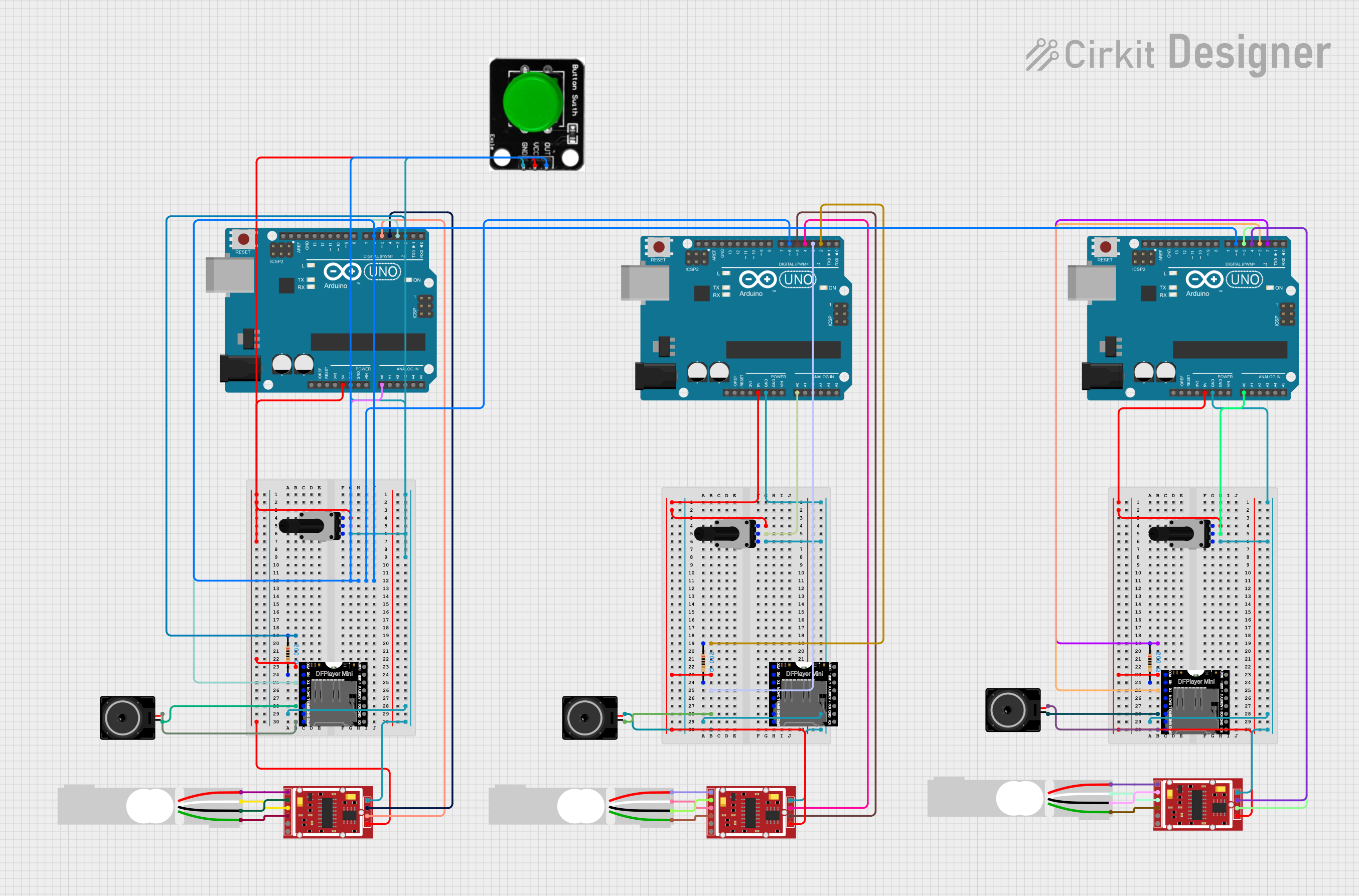
The circuit in question appears to be a complex system involving multiple microcontrollers (Arduino UNOs), sensor modules (HX711 Weighing Sensor Modules), audio playback modules (DFPlayer MINI), load cells, potentiometers, resistors, loudspeakers, and a button. The circuit's functionality seems to be centered around weight measurement, user input adjustment via potentiometers, audio output control, and possibly user interaction through a button. The microcontrollers are likely used to process sensor data, control audio playback, and manage user inputs.
Component List
Microcontrollers
- Arduino UNO: A microcontroller board based on the ATmega328P. It has digital input/output pins, analog inputs, a USB connection for programming, and power management features.
Sensors
- HX711 Weighing Sensor Module: A precision 24-bit analog-to-digital converter (ADC) designed for weigh scales and industrial control applications to interface directly with a bridge sensor.
Audio Components
- DFPlayer MINI: A small and low-cost MP3 module that can directly connect to the speaker. It supports common audio formats and also has an onboard microSD card slot.
Input Devices
- Rotary Potentiometer: A three-terminal resistor with a rotating contact that forms an adjustable voltage divider. It can be used for adjusting volume, position control, etc.
- Green Button: A simple push-button switch that can be used for user input.
Output Devices
- Loudspeaker: An electroacoustic transducer that converts an electrical audio signal into a corresponding sound.
Passive Components
- Resistor: A passive two-terminal electrical component that implements electrical resistance as a circuit element.
- Load Cell - Red/white/black/green: A transducer that converts force into an electrical signal. It is commonly used for weight measurement.
Wiring Details
Arduino UNO
- Connected to 5V and GND for power.
- Analog inputs (e.g., A0) are connected to potentiometer wipers for variable input.
- Digital I/O pins (e.g., D2, D3, D4, D5, D6) are connected to various components for control and data acquisition.
HX711 Weighing Sensor Module
- Powered by VCC and GND.
- E+, E-, A+, and A- pins are connected to corresponding pins on load cells for weight measurement.
- CK/TX and DO/RX pins are connected to digital I/O pins on the Arduino UNO for data communication.
DFPlayer MINI
- Powered by VCC and GND.
- RX and TX pins are connected to digital I/O pins on the Arduino UNO for serial communication.
- SPK1 and SPK2 are connected to the loudspeaker for audio output.
Rotary Potentiometer
- One leg connected to 5V, the other to GND, and the wiper to an analog input on the Arduino UNO for variable voltage input.
Resistor
- Connected in series with the DFPlayer MINI's RX pin and an Arduino UNO's digital I/O pin for signal level adjustment.
Loudspeaker
- Connected to SPK1 and SPK2 on the DFPlayer MINI for audio output.
Green Button
- One side connected to GND, the other to a digital I/O pin on the Arduino UNO for user input detection.
Documented Code
Arduino UNO (First Instance)
void setup() {
  // put your setup code here, to run once:

}

void loop() {
  // put your main code here, to run repeatedly:

}
Arduino UNO (Second Instance)
void setup() {
  // put your setup code here, to run once:

}

void loop() {
  // put your main code here, to run repeatedly:

}
Arduino UNO (Third Instance)
void setup() {
  // put your setup code here, to run once:

}

void loop() {
  // put your main code here, to run repeatedly:

}
Note: The provided code for all Arduino UNO instances is a template with no specific functionality. It is expected that the user will add the necessary code to interact with the connected components as per the circuit's requirements.