
Arduino UNO-Based Water Level and Distance Monitoring System with LCD Display and Buzzer Alert
View and Edit Project In Cirkit Designer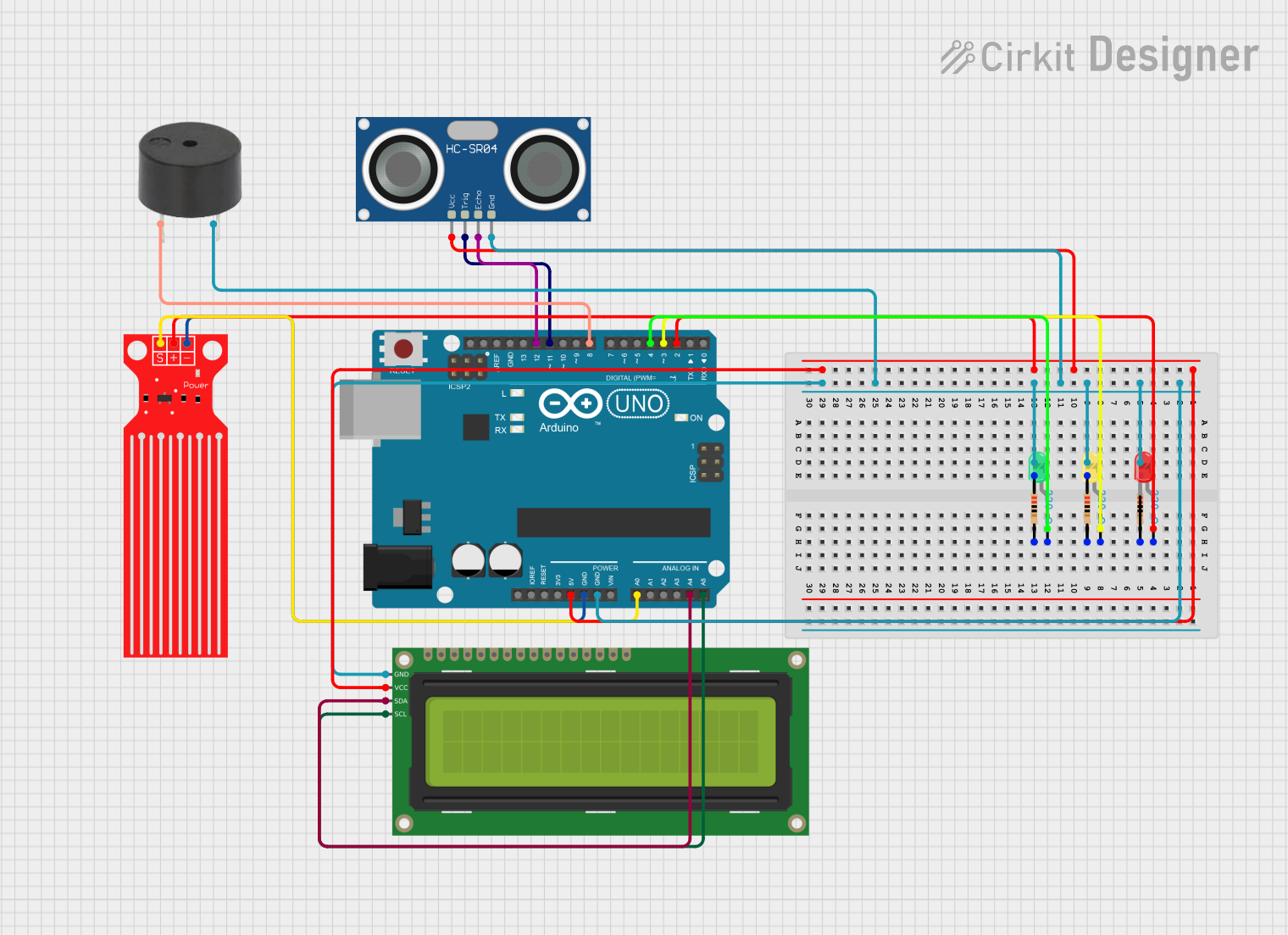
Circuit Documentation
Summary
This circuit is designed to monitor water levels and detect proximity using an ultrasonic sensor. It uses an Arduino UNO microcontroller to process sensor data and control various output devices, including LEDs, a buzzer, and an LCD display. The water level sensor detects the presence of water, while the ultrasonic sensor measures distance. The system provides visual and auditory alerts based on the sensor readings.
Component List
Water Level Sensor
- Pins: SIG, VCC, GND
- Description: Detects the presence of water.
- Purpose: Monitors water levels.
Arduino UNO
- Pins: UNUSED, IOREF, Reset, 3.3V, 5V, GND, Vin, A0, A1, A2, A3, A4, A5, SCL, SDA, AREF, D13, D12, D11, D10, D9, D8, D7, D6, D5, D4, D3, D2, D1, D0
- Description: Microcontroller board.
- Purpose: Central processing unit for the circuit.
HC-SR04 Ultrasonic Sensor
- Pins: VCC, TRIG, ECHO, GND
- Description: Measures distance using ultrasonic waves.
- Purpose: Detects proximity.
Buzzer
- Pins: PIN, GND
- Description: Emits sound.
- Purpose: Provides auditory alerts.
16x2 I2C LCD
- Pins: GND, VCC, SDA, SCL
- Description: Displays text.
- Purpose: Provides visual feedback.
LED: Two Pin (green)
- Pins: cathode, anode
- Description: Green LED.
- Purpose: Indicates safe condition.
LED: Two Pin (yellow)
- Pins: cathode, anode
- Description: Yellow LED.
- Purpose: Indicates alert condition.
LED: Two Pin (red)
- Pins: cathode, anode
- Description: Red LED.
- Purpose: Indicates danger condition.
Resistor (220 Ohms)
- Pins: pin1, pin2
- Description: Limits current.
- Purpose: Protects LEDs from excessive current.
Wiring Details
Water Level Sensor
- SIG to Arduino UNO A0
- VCC to Arduino UNO 5V
- GND to Arduino UNO GND
Arduino UNO
- 5V to HC-SR04 Ultrasonic Sensor VCC
- 5V to Water Level Sensor VCC
- 5V to 16x2 I2C LCD VCC
- GND to Resistor pin1
- GND to HC-SR04 Ultrasonic Sensor GND
- GND to Buzzer GND
- GND to 16x2 I2C LCD GND
- GND to Water Level Sensor GND
- D2 to LED (red) anode
- D3 to LED (yellow) anode
- D4 to LED (green) anode
- D8 to Buzzer PIN
- D11 to HC-SR04 Ultrasonic Sensor TRIG
- D12 to HC-SR04 Ultrasonic Sensor ECHO
- A4 to 16x2 I2C LCD SDA
- A5 to 16x2 I2C LCD SCL
HC-SR04 Ultrasonic Sensor
- VCC to Arduino UNO 5V
- TRIG to Arduino UNO D11
- ECHO to Arduino UNO D12
- GND to Arduino UNO GND
Buzzer
- PIN to Arduino UNO D8
- GND to Arduino UNO GND
16x2 I2C LCD
- GND to Arduino UNO GND
- VCC to Arduino UNO 5V
- SDA to Arduino UNO A4
- SCL to Arduino UNO A5
LED: Two Pin (green)
- anode to Arduino UNO D4
- cathode to Resistor pin2
LED: Two Pin (yellow)
- anode to Arduino UNO D3
- cathode to Resistor pin2
LED: Two Pin (red)
- anode to Arduino UNO D2
- cathode to Resistor pin2
Resistor (220 Ohms)
- pin1 to Arduino UNO GND
- pin2 to LED (green) cathode
- pin2 to LED (yellow) cathode
- pin2 to LED (red) cathode
Code Documentation
#include <LiquidCrystal_I2C.h>

// Inisialisasi LCD
LiquidCrystal_I2C lcd(0x27, 16, 2);

// Konstanta dan variabel
const int waterSensor = A0;  // Pin analog untuk sensor air
const int buzzer = 8;        // Pin digital untuk buzzer
const int greenLed = 4;      // Pin LED hijau (Aman)
const int yellowLed = 3;     // Pin LED kuning (Siaga)
const int redLed = 2;        // Pin LED merah (Bahaya)
const int threshold = 600;   // Ambang batas untuk mendeteksi basah (disesuaikan dengan sensor)

// Pin untuk Sensor Ultrasonik
const int trigPin = 11;      // Pin Trigger HC-SR04
const int echoPin = 12;       // Pin Echo HC-SR04

int waterValue = 0;

// Variabel untuk jarak
long duration;
int distance;

void setup() {
  lcd.init();              // Inisialisasi LCD
  lcd.backlight();         // Aktifkan lampu latar LCD
  lcd.setCursor(0, 0);
  lcd.print("Water Sensor"); // Tampilkan judul di LCD

  // Set pin LED dan buzzer sebagai OUTPUT
  pinMode(greenLed, OUTPUT);
  pinMode(yellowLed, OUTPUT);
  pinMode(redLed, OUTPUT);
  pinMode(buzzer, OUTPUT);

  // Set pin untuk sensor ultrasonik
  pinMode(trigPin, OUTPUT);
  pinMode(echoPin, INPUT);

  // Matikan LED dan buzzer di awal
  digitalWrite(greenLed, LOW);
  digitalWrite(yellowLed, LOW);
  digitalWrite(redLed, LOW);
  digitalWrite(buzzer, LOW);
}

void loop() {
  // Membaca nilai dari sensor air
  waterValue = analogRead(waterSensor);

  // Menghitung jarak menggunakan sensor ultrasonik
  digitalWrite(trigPin, LOW);
  delayMicroseconds(2);
  digitalWrite(trigPin, HIGH);
  delayMicroseconds(10);
  digitalWrite(trigPin, LOW);

  duration = pulseIn(echoPin, HIGH);
  distance = duration * 0.0344 / 2;  // Menghitung jarak dalam cm

  // Menampilkan nilai jarak pada LCD
  lcd.setCursor(0, 1);
  lcd.print("Dist: ");
  lcd.print(distance);
  lcd.print(" cm    ");  // Menampilkan jarak dalam cm

  // Logika untuk mengontrol LED dan buzzer berdasarkan jarak
  if (distance <= 10) { // Jika jarak sangat dekat, misalnya 10 cm atau kurang
    digitalWrite(buzzer, HIGH);  // Nyalakan buzzer
    lcd.setCursor(0, 0);
    lcd.print("Danger - Very Close");
  } else if (distance <= 20) { // Jarak cukup dekat, misalnya 20 cm
    digitalWrite(buzzer, HIGH);  // Nyalakan buzzer
    lcd.setCursor(0, 0);
    lcd.print("Alert - Close");
  } else {
    digitalWrite(buzzer, LOW);   // Matikan buzzer
    lcd.setCursor(0, 0);
    lcd.print("Safe - Far Away");
  }

  // Logika untuk LED berdasarkan kondisi sensor air
  if (waterValue > threshold) {
    // Bahaya (Merah)
    digitalWrite(redLed, HIGH);        // Menyalakan LED merah
    digitalWrite(yellowLed, LOW);    // Mematikan LED kuning
    digitalWrite(greenLed, LOW);     // Mematikan LED hijau
    digitalWrite(buzzer, HIGH);        // Nyalakan buzzer
    lcd.setCursor(0, 1);
   // Tampilkan pesan bahaya di LCD
  } else if (waterValue > (threshold - 500)) {
    // Siaga (Kuning