
Circuit Documentation
Summary
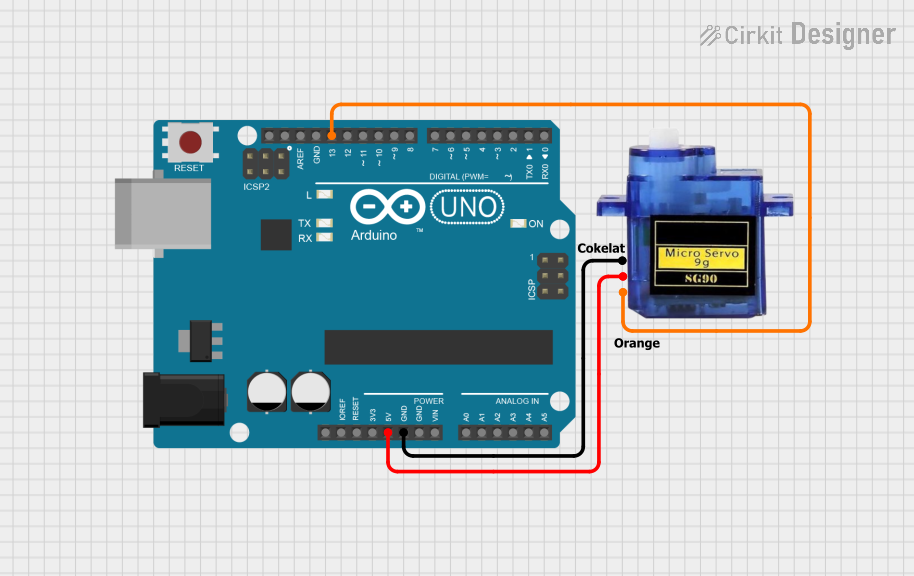
This circuit consists of an Arduino UNO microcontroller and a Micro servo 9G. The Arduino UNO is used to control the servo motor, which is connected to the Arduino's digital and power pins. The provided code initializes the servo and reads analog input values, which can be used to control the servo's position.
Component List
Arduino UNO
- Description: A microcontroller board based on the ATmega328P.
- Pins: UNUSED, IOREF, Reset, 3.3V, 5V, GND, Vin, A0, A1, A2, A3, A4, A5, SCL, SDA, AREF, D13, D12, D11, D10, D9, D8, D7, D6, D5, D4, D3, D2, D1, D0
Micro servo 9G
- Description: A small servo motor used for precise control of angular position.
- Pins: GND, +5V, PWM
Comment
- Description: Placeholder for comments in the circuit design.
- Pins: None
Wiring Details
Arduino UNO
- 5V: Connected to +5V of Micro servo 9G
- GND: Connected to GND of Micro servo 9G
- D13: Connected to PWM of Micro servo 9G
Micro servo 9G
- +5V: Connected to 5V of Arduino UNO
- GND: Connected to GND of Arduino UNO
- PWM: Connected to D13 of Arduino UNO
Code Documentation
Arduino UNO Code
#include <Servo.h>

Servo penggerak;

void setup() {
  Serial.begin(9600);
  penggerak.attach(8);
  penggerak.write(90);
}

void loop() {
  int gerak = analogRead(js);
  Serial.println(gerak);
}
Description:
- Libraries: Includes the Servo library for controlling the servo motor.
- Servo Initialization: Creates a Servo object named
penggerak. - Setup Function:
- Initializes serial communication at 9600 baud.
- Attaches the servo to pin 8 (Note: The code mentions pin 8, but the wiring details connect the servo to pin D13. This discrepancy should be resolved in the actual implementation).
- Sets the servo to a neutral position (90 degrees).
- Loop Function:
- Reads an analog value from a joystick (variable
js). - Prints the analog value to the serial monitor.
- Reads an analog value from a joystick (variable
This documentation provides a comprehensive overview of the circuit, including the components used, their connections, and the code running on the Arduino UNO.