
Arduino UNO Line Following Robot with IR Sensors and L298N Motor Driver
View and Edit Project In Cirkit Designer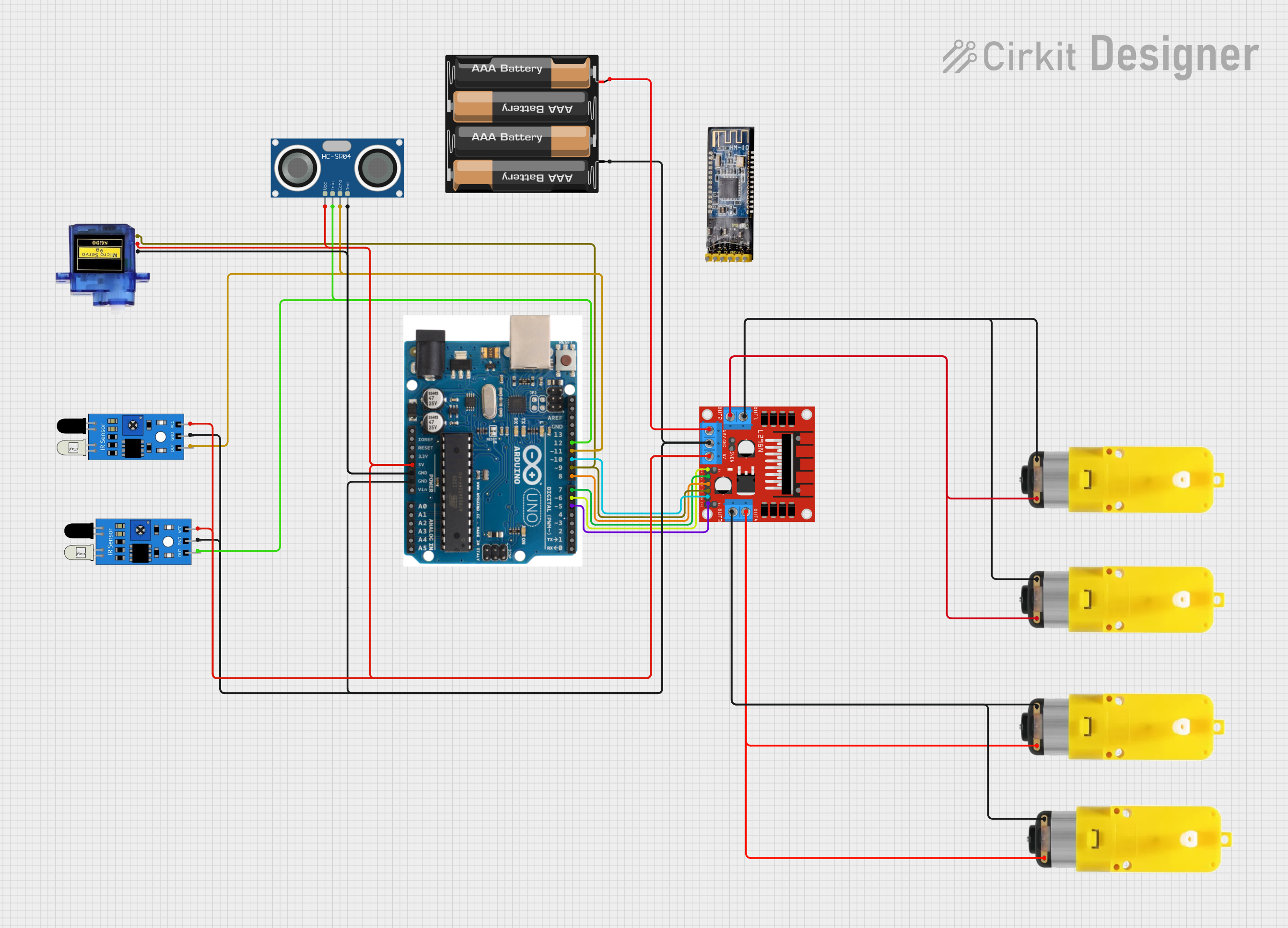
Circuit Documentation
Summary
This document provides a detailed overview of a circuit designed to control a robot using an Arduino UNO microcontroller. The circuit includes various sensors, motor drivers, and motors to enable the robot to detect obstacles and follow lines. The Arduino UNO is programmed to read sensor inputs and control the motors accordingly.
Component List
L298N DC Motor Driver
- Pins: OUT1, OUT2, 12V, GND, 5V, OUT3, OUT4, 5V-ENA-JMP-I, 5V-ENA-JMP-O, +5V-J1, +5V-J2, ENA, IN1, IN2, IN3, IN4, ENB
- Description: Motor driver used to control the speed and direction of the motors.
IR Sensor (Right)
- Pins: out, gnd, vcc
- Description: Infrared sensor used to detect the presence of a line.
IR Sensor (Left)
- Pins: out, gnd, vcc
- Description: Infrared sensor used to detect the presence of a line.
Motor with Reducer (Right)
- Pins: 3 - 6 VCC, GND
- Description: Motor with a gear reducer to control the speed and torque.
Motor with Reducer (Left)
- Pins: 3 - 6 VCC, GND
- Description: Motor with a gear reducer to control the speed and torque.
Arduino UNO
- Pins: SDA, AREF, GND, 13, 12, 11, 10, 9, 8, 7, 6, 5, 4, 3, 2, 1, 0, A5, A4, A3, A2, A1, A0, Vin, 5V, 3.3V, RESET, IOREF, SCL
- Description: Microcontroller used to control the entire circuit.
Micro Servo 9G
- Pins: GND, +5V, PWM
- Description: Small servo motor used for precise control of angular position.
HC-SR04 Ultrasonic Sensor
- Pins: VCC, TRIG, ECHO, GND
- Description: Ultrasonic sensor used to measure distance to obstacles.
4 x AAA Battery Mount
- Pins: -, +
- Description: Battery holder for four AAA batteries to power the circuit.
Bluetooth Module HM-10
- Pins: BRK, RX, TX, GND, VCC, State
- Description: Bluetooth module used for wireless communication.
Wiring Details
L298N DC Motor Driver
- IN4 to Arduino UNO pin 10
- IN3 to Arduino UNO pin 9
- IN2 to Arduino UNO pin 8
- IN1 to Arduino UNO pin 7
- ENA to Arduino UNO pin 6
- ENB to Arduino UNO pin 5
- GND to 4 x AAA Battery Mount (-), IR Sensor (Left) gnd, Arduino UNO GND, IR Sensor (Right) gnd
- 5V to HC-SR04 Ultrasonic Sensor VCC, Micro Servo 9G +5V, IR Sensor (Left) vcc, Arduino UNO 5V, IR Sensor (Right) vcc
- OUT1 to Motor with Reducer (Right) GND, Motor with Reducer (Left) GND
- OUT2 to Motor with Reducer (Right) 3 - 6 VCC, Motor with Reducer (Left) 3 - 6 VCC
- OUT3 to Motor with Reducer (Right) GND, Motor with Reducer (Left) GND
- OUT4 to Motor with Reducer (Right) 3 - 6 VCC, Motor with Reducer (Left) 3 - 6 VCC
- 12V to 4 x AAA Battery Mount (+)
IR Sensor (Right)
- out to Arduino UNO pin 12
- gnd to L298N DC Motor Driver GND
- vcc to L298N DC Motor Driver 5V
IR Sensor (Left)
- out to Arduino UNO pin 11
- gnd to L298N DC Motor Driver GND
- vcc to L298N DC Motor Driver 5V
Motor with Reducer (Right)
- 3 - 6 VCC to L298N DC Motor Driver OUT2
- GND to L298N DC Motor Driver OUT1
Motor with Reducer (Left)
- 3 - 6 VCC to L298N DC Motor Driver OUT4
- GND to L298N DC Motor Driver OUT3
Arduino UNO
- GND to L298N DC Motor Driver GND
- 5V to L298N DC Motor Driver 5V
- 12 to HC-SR04 Ultrasonic Sensor TRIG, IR Sensor (Right) out
- 11 to HC-SR04 Ultrasonic Sensor ECHO, IR Sensor (Left) out
- 10 to L298N DC Motor Driver IN4
- 9 to L298N DC Motor Driver IN3, Micro Servo 9G PWM
- 8 to L298N DC Motor Driver IN2
- 7 to L298N DC Motor Driver IN1
- 6 to L298N DC Motor Driver ENA
- 5 to L298N DC Motor Driver ENB
Micro Servo 9G
- GND to Arduino UNO GND
- +5V to L298N DC Motor Driver 5V
- PWM to Arduino UNO pin 9
HC-SR04 Ultrasonic Sensor
- VCC to L298N DC Motor Driver 5V
- TRIG to Arduino UNO pin 12
- ECHO to Arduino UNO pin 11
- GND to Arduino UNO GND
4 x AAA Battery Mount
- - to L298N DC Motor Driver GND
- + to L298N DC Motor Driver 12V
Bluetooth Module HM-10
- BRK: Not connected
- RX: Not connected
- TX: Not connected
- GND: Not connected
- VCC: Not connected
- State: Not connected
Documented Code
#define IR_SENSOR_RIGHT 11
#define IR_SENSOR_LEFT 12
#define MOTOR_SPEED 180

//Right motor
int enableRightMotor=6;
int rightMotorPin1=7;
int rightMotorPin2=8;

//Left motor
int enableLeftMotor=5;
int leftMotorPin1=9;
int leftMotorPin2=10;

void setup()
{
  //The problem with TT gear motors is that, at very low pwm value it does not even rotate.
  //If we increase the PWM value then it rotates faster and our robot is not controlled in that speed and goes out of line.
  //For that we need to increase the frequency of analogWrite.
  //Below line is important to change the frequency of PWM signal on pin D5 and D6
  //Because of this, motor runs in controlled manner (lower speed) at high PWM value.
  //This sets frequecny as 7812.5 hz.
  TCCR0B = TCCR0B & B11111000 | B00000010 ;

  // put your setup code here, to run once:
  pinMode(enableRightMotor, OUTPUT);
  pinMode(rightMotorPin1, OUTPUT);
  pinMode(rightMotorPin2, OUTPUT);

  pinMode(enableLeftMotor, OUTPUT);
  pinMode(leftMotorPin1, OUTPUT);
  pinMode(leftMotorPin2, OUTPUT);

  pinMode(IR_SENSOR_RIGHT, INPUT);
  pinMode(IR_SENSOR_LEFT, INPUT);
  rotateMotor(0,0);
}

void loop()
{
  int rightIRSensorValue = digitalRead(IR_SENSOR_RIGHT);
  int leftIRSensorValue = digitalRead(IR_SENSOR_LEFT);

  //If none of the sensors detects black line, then go straight
  if (rightIRSensorValue == LOW && leftIRSensorValue == LOW)
  {
    rotateMotor(MOTOR_SPEED, MOTOR_SPEED);
  }
  //If right sensor detects black line, then turn right
  else if (rightIRSensorValue == HIGH && leftIRSensorValue == LOW )
  {
      rotateMotor(-MOTOR_SPEED, MOTOR_SPEED);
  }
  //If left sensor detects black line, then turn left
  else if (rightIRSensorValue == LOW && leftIRSensorValue == HIGH )
  {
      rotateMotor(MOTOR_SPEED, -MOTOR_SPEED);
  }
  //If both the sensors detect black line, then stop
  else
  {
    rotateMotor(0, 0);
  }
}

void rotateMotor(int rightMotorSpeed, int leftMotorSpeed