
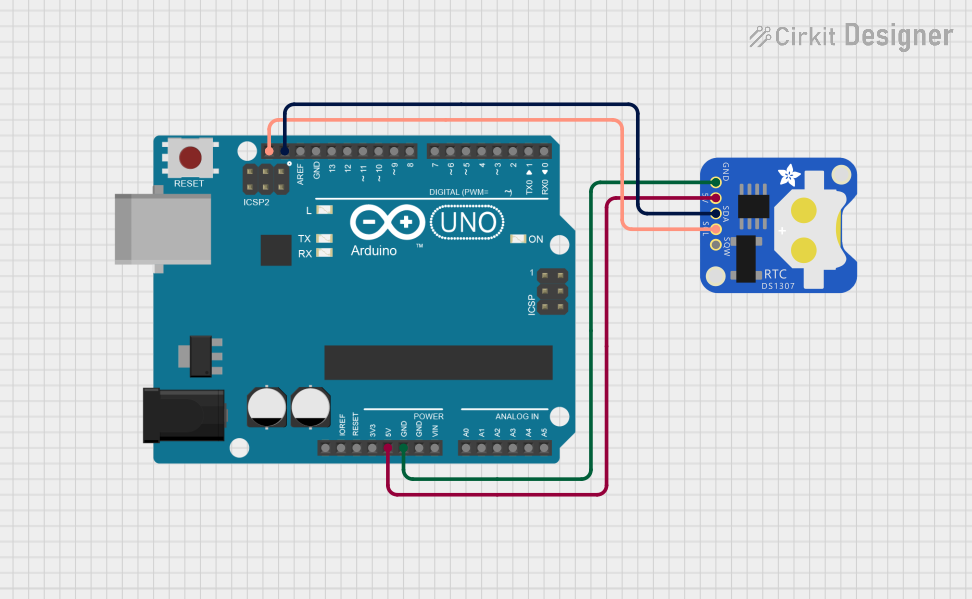
Circuit Documentation
Summary
This circuit consists of an Arduino UNO microcontroller and a DS1307 Real-Time Clock (RTC) module. The Arduino UNO serves as the main control unit, while the DS1307 RTC provides accurate timekeeping functionality. The two components are connected via I2C communication, utilizing the SDA and SCL pins for data transfer. The circuit is powered by a common 5V supply, and both components share a common ground.
Component List
Arduino UNO
- Description: A microcontroller board based on the ATmega328P. It is widely used for various electronic projects due to its ease of use and extensive community support.
- Purpose: Acts as the main control unit for the circuit, handling data from the RTC and managing the overall operation of the system.
DS1307 RTC
- Description: A real-time clock module that keeps track of the current time and date. It communicates with the Arduino via I2C.
- Purpose: Provides accurate timekeeping capabilities to the circuit, allowing the Arduino to retrieve the current date and time.
Wiring Details
Arduino UNO
5V Pin: Connected to the 5V pin of the DS1307 RTC for power supply.
GND Pin: Connected to the GND pin of the DS1307 RTC to establish a common ground.
SCL Pin: Connected to the SCL pin of the DS1307 RTC for I2C clock signal.
SDA Pin: Connected to the SDA pin of the DS1307 RTC for I2C data signal.
DS1307 RTC
5V Pin: Connected to the 5V pin of the Arduino UNO for power supply.
GND Pin: Connected to the GND pin of the Arduino UNO to establish a common ground.
SCL Pin: Connected to the SCL pin of the Arduino UNO for I2C clock signal.
SDA Pin: Connected to the SDA pin of the Arduino UNO for I2C data signal.
Documented Code
Arduino Code
#include <Wire.h>
#include <RTClib.h>

RTC_DS1307 rtc;

void setup() {
  Serial.begin(9600);
  Wire.begin();

  if (!rtc.begin()) {
    Serial.println("Couldn't find RTC");
    while (1);
  }

  if (!rtc.isrunning()) {
    Serial.println("RTC is NOT running, let's set the time!");
    // This line sets the RTC to the date & time this sketch was compiled
    rtc.adjust(DateTime(F(__DATE__), F(__TIME__)));
  }
}

void loop() {
  DateTime now = rtc.now();

  Serial.print(now.year(), DEC);
  Serial.print('/');
  Serial.print(now.month(), DEC);
  Serial.print('/');
  Serial.print(now.day(), DEC);
  Serial.print(" ");
  Serial.print(now.hour(), DEC);
  Serial.print(':');
  Serial.print(now.minute(), DEC);
  Serial.print(':');
  Serial.print(now.second(), DEC);
  Serial.println();

  delay(1000); // Wait for 1 second before printing again
}
Documentation Code
(Note: The documentation code section is empty as per the provided input.)
This concludes the documentation for the circuit.