
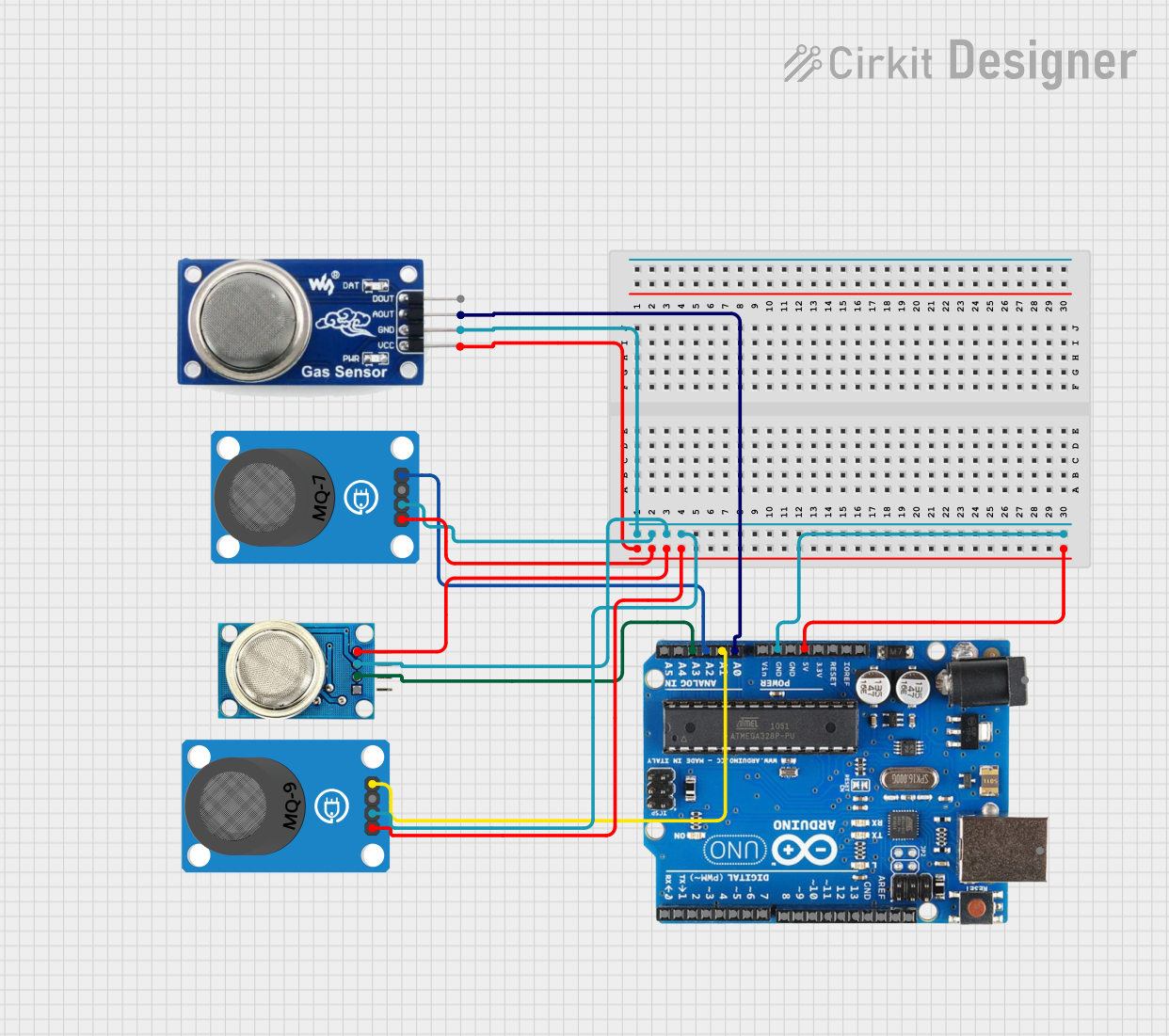
Multi-Gas Sensor Project Documentation
Summary
This project involves a multi-gas sensor system that uses an Arduino Uno R3 to read analog values from four different gas sensors: MQ-135, MQ-7, MQ-8, and MQ-9. The sensor values are then printed to the Serial Monitor. The sensors are connected to the Arduino's analog input pins, and the system is powered through the Arduino's 5V and GND pins.
Component List
MQ 135
- Description: Gas sensor for detecting air quality.
- Pins: D OUT, A OUT, GND, VCC
MQ-7 Breakout
- Description: Gas sensor for detecting carbon monoxide.
- Pins: VCC, GND, DO, AO
MQ-8
- Description: Gas sensor for detecting hydrogen.
- Pins: VCC, GND, AO, DO
MQ-9 Breakout
- Description: Gas sensor for detecting carbon monoxide and flammable gases.
- Pins: VCC, GND, DO, AO
Arduino Uno R3
- Description: Microcontroller board based on the ATmega328P.
- Pins: D8, D9, D10, D11, D12, D13, GND, AREF, SDA, SCL, D0/RX, D1/Tx, D2, D3, D4, D5, 6, D7, A5/SCL, A4/SDA, A3, A2, A1, A0, Vin, 5V, 3.3V, RESET, IOREF, NONE, USB Jack, Power Jack
Wiring Details
MQ 135
- A OUT connected to A0 on Arduino Uno R3
- GND connected to GND on Arduino Uno R3
- VCC connected to 5V on Arduino Uno R3
MQ-7 Breakout
- AO connected to A2 on Arduino Uno R3
- GND connected to GND on Arduino Uno R3
- VCC connected to 5V on Arduino Uno R3
MQ-8
- AO connected to A3 on Arduino Uno R3
- GND connected to GND on Arduino Uno R3
- VCC connected to 5V on Arduino Uno R3
MQ-9 Breakout
- AO connected to A1 on Arduino Uno R3
- GND connected to GND on Arduino Uno R3
- VCC connected to 5V on Arduino Uno R3
Code
/*
 * Multi-Gas Sensor Project
 * This code reads analog values from multiple gas sensors and prints them
 * to the Serial Monitor. The sensors used are MQ-135, MQ-7, MQ-8, and MQ-9.
 */

void setup() {
  // Initialize serial communication at 9600 baud
  Serial.begin(9600);
}

void loop() {
  // Read analog values from the sensors
  int mq135Value = analogRead(A0); // Assuming MQ-135 is connected to A0
  int mq7Value = analogRead(A1);   // Assuming MQ-7 is connected to A1
  int mq8Value = analogRead(A2);   // Assuming MQ-8 is connected to A2
  int mq9Value = analogRead(A3);   // Assuming MQ-9 is connected to A3

  // Print the sensor values to the Serial Monitor
  Serial.print("MQ-135: ");
  Serial.print(mq135Value);
  Serial.print("\tMQ-7: ");
  Serial.print(mq7Value);
  Serial.print("\tMQ-8: ");
  Serial.print(mq8Value);
  Serial.print("\tMQ-9: ");
  Serial.println(mq9Value);

  // Wait for 1 second before the next reading
  delay(1000);
}
This code initializes the serial communication at 9600 baud in the setup() function. In the loop() function, it reads the analog values from the sensors connected to the analog pins A0, A1, A2, and A3 of the Arduino Uno R3. The sensor values are then printed to the Serial Monitor, and the loop repeats every second.