
Raspberry Pi 4B-based Payment Kiosk with Coin and Bill Acceptors
View and Edit Project In Cirkit Designer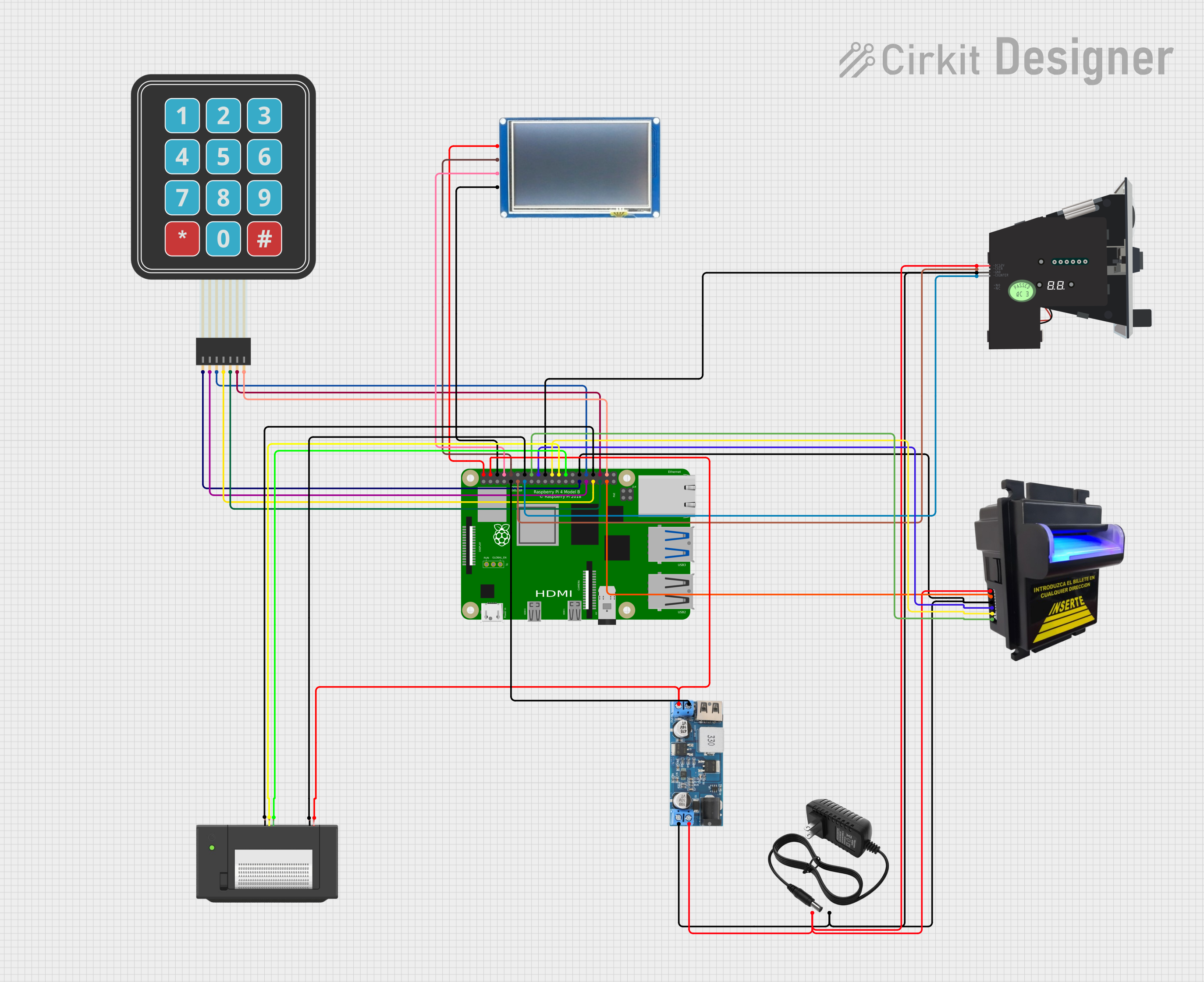
Circuit Documentation
Summary
The circuit in question appears to be designed for a payment processing system, incorporating a Raspberry Pi 4B as the central processing unit. It interfaces with various peripherals including a bill acceptor, a multi-coin acceptor, a touch display, a thermal printer, and a membrane matrix keypad. Power is supplied by a 12V power supply, with a 12V to 5V step-down converter used to provide the appropriate voltage levels to certain components. The Raspberry Pi 4B manages input and output through its GPIO pins, facilitating user interaction and payment processing.
Component List
12V Power Supply
- Description: Provides a 12V power source for the circuit.
- Pins:
+,-
Raspberry Pi 4B
- Description: Acts as the central processing unit for the circuit, controlling peripherals and managing data.
- Pins:
3V3,5V,GPIO2,GPIO3,GND,GPIO4,GPIO14,GPIO15,GPIO17,GPIO18,GPIO27,GPIO22,GPIO23,GPIO24,GPIO10,GPIO9,GPIO25,GPIO11,GPIO8,GPIO7,ID_SD,GPIO5,GPIO6,GPIO12,GPIO13,GPIO19,GPIO16,GPIO26,GPIO20,GPIO21,ID_SC,TR01_TAP,TR00_TAP,TR03_TAP,TR02_TAP,RUN,GLOBAL_EN
Multi Coin Acceptor
- Description: Accepts and validates multiple coin types for transactions.
- Pins:
COIN,DC12V,GND,COUNTER
12V to 5V Step Down Power Converter
- Description: Converts the 12V power supply down to 5V for components requiring lower voltage.
- Pins:
VIN 9v-36v,VIN+,VIN-,USB OUTPUT 5V,5v OUTPUT,GND
Touch Display
- Description: Provides a user interface for displaying information and receiving touch input.
- Pins:
VCC,TX,RX,GND
Membrane Matrix Keypad
- Description: Allows for user input through a simple button interface.
- Pins:
Row 1,Row 2,Row 3,Row 4,Column 1,Column 2,Column 3
Bill Acceptor
- Description: Accepts and validates paper currency for transactions.
- Pins:
RED,GND,GREEN,BLUE,YELLOW,ORANGE
Thermal Printer
- Description: Prints receipts or other transaction-related information.
- Pins:
GND,RX,TX,VH
Wiring Details
12V Power Supply
+connected to Bill AcceptorRED, Multi Coin AcceptorDC12V, and 12V to 5V Step Down Power ConverterVIN+-connected to Raspberry Pi 4BGND, Bill AcceptorGND, Multi Coin AcceptorGND, and 12V to 5V Step Down Power ConverterVIN-
Raspberry Pi 4B
5Vconnected to Touch DisplayVCCand Thermal PrinterVHthrough 12V to 5V Step Down Power Converter5v OUTPUTGNDconnected to Touch DisplayGND, Thermal PrinterGND, and 12V to 5V Step Down Power ConverterGNDGPIO14connected to Touch DisplayRXGPIO15connected to Touch DisplayTXGPIO17connected to Multi Coin AcceptorCOINGPIO27connected to Multi Coin AcceptorCOUNTERGPIO23connected to Bill AcceptorGREENGPIO24connected to Bill AcceptorBLUEGPIO25connected to Bill AcceptorYELLOWGPIO8connected to Thermal PrinterRXGPIO7connected to Thermal PrinterTXGPIO5connected to Membrane Matrix KeypadRow 1GPIO6connected to Membrane Matrix KeypadRow 2GPIO12connected to Membrane Matrix KeypadRow 3GPIO13connected to Membrane Matrix KeypadRow 4GPIO19connected to Membrane Matrix KeypadColumn 1GPIO16connected to Membrane Matrix KeypadColumn 2GPIO26connected to Bill AcceptorORANGEGPIO20connected to Membrane Matrix KeypadColumn 3
Multi Coin Acceptor
COINconnected to Raspberry Pi 4BGPIO17DC12Vconnected to 12V Power Supply+GNDconnected to Raspberry Pi 4BGNDCOUNTERconnected to Raspberry Pi 4BGPIO27
12V to 5V Step Down Power Converter
VIN+connected to 12V Power Supply+VIN-connected to 12V Power Supply-5v OUTPUTconnected to Raspberry Pi 4B5V, Touch DisplayVCC, and Thermal PrinterVHGNDconnected to Raspberry Pi 4BGND
Touch Display
VCCconnected to Raspberry Pi 4B5Vthrough 12V to 5V Step Down Power Converter5v OUTPUTTXconnected to Raspberry Pi 4BGPIO15RXconnected to Raspberry Pi 4BGPIO14GNDconnected to Raspberry Pi 4BGND
Membrane Matrix Keypad
Row 1connected to Raspberry Pi 4BGPIO5Row 2connected to Raspberry Pi 4BGPIO6Row 3connected to Raspberry Pi 4BGPIO12Row 4connected to Raspberry Pi 4BGPIO13Column 1connected to Raspberry Pi 4BGPIO19Column 2connected to Raspberry Pi 4BGPIO16Column 3connected to Raspberry Pi 4BGPIO20
Bill Acceptor
REDconnected to 12V Power Supply+GNDconnected to Raspberry Pi 4BGNDGREENconnected to Raspberry Pi 4BGPIO23BLUEconnected to Raspberry Pi 4BGPIO24YELLOWconnected to Raspberry Pi 4BGPIO25ORANGEconnected to Raspberry Pi 4BGPIO26
Thermal Printer
GNDconnected to Raspberry Pi 4BGNDRXconnected to Raspberry Pi 4BGPIO8TXconnected to Raspberry Pi 4BGPIO7VHconnected to Raspberry Pi 4B5Vthrough 12V to 5V Step Down Power Converter5v OUTPUT
Documented Code
No code was provided for the microcontrollers in the circuit. For the Raspberry Pi 4B, code would typically be required to manage the interactions between the GPIO pins and the connected peripherals. This would include handling the input from the membrane matrix keypad, processing signals from the bill and coin acceptors, controlling the touch display, and managing the thermal printer for output. Since no code is available, it is recommended to develop software that can handle these tasks according to the specific requirements of the application.