
Arduino UNO Controlled Dual Servo System with NPN Proximity Sensor
View and Edit Project In Cirkit Designer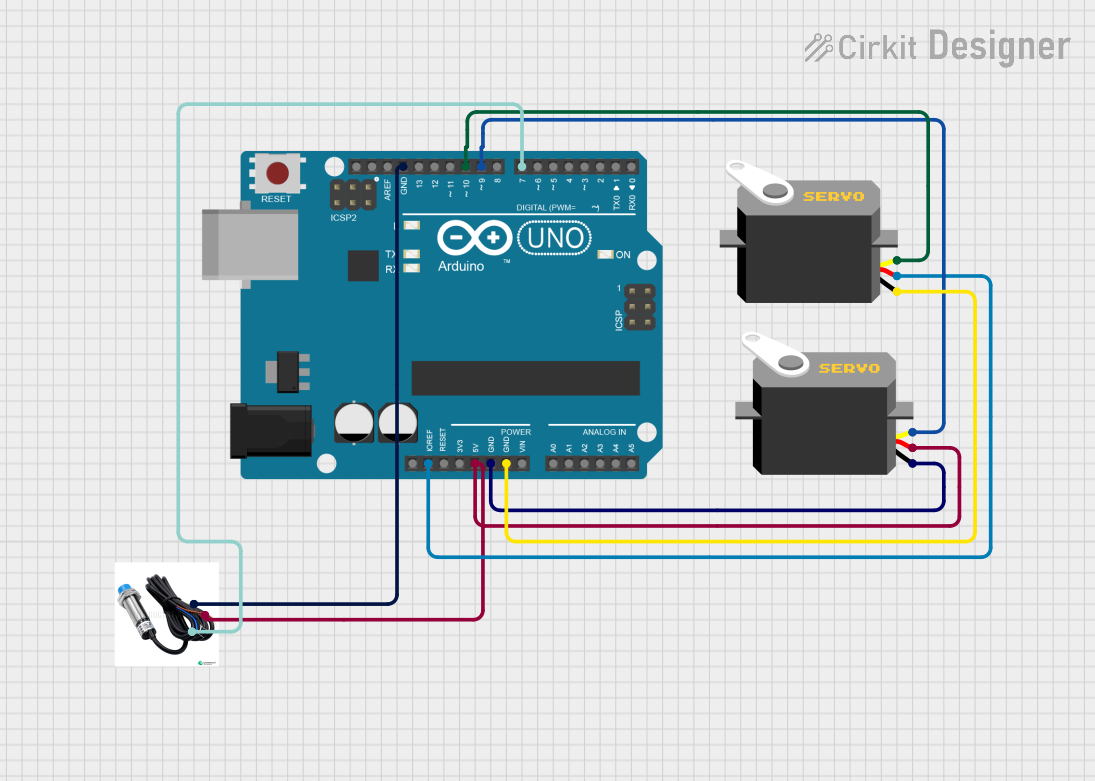
Circuit Documentation
Summary
This document provides a detailed overview of a circuit involving an Arduino UNO, two Servo motors, and an NPN Proximity Sensor. The circuit is designed to control the Servo motors based on the input from the proximity sensor, with all components powered and controlled by the Arduino UNO.
Component List
Arduino UNO
- Description: A microcontroller board based on the ATmega328P.
- Pins: UNUSED, IOREF, Reset, 3.3V, 5V, GND, Vin, A0, A1, A2, A3, A4, A5, SCL, SDA, AREF, D13, D12, D11, D10, D9, D8, D7, D6, D5, D4, D3, D2, D1, D0
Servo Motor 1
- Description: A standard servo motor.
- Pins: gnd, vcc, pulse
Servo Motor 2
- Description: A standard servo motor.
- Pins: gnd, vcc, pulse
NPN Proximity Sensor
- Description: A sensor that detects the presence of nearby objects without physical contact.
- Pins: GND, Power, PMW
Wiring Details
Arduino UNO
- IOREF: Connected to vcc of Servo Motor 1
- 5V: Connected to vcc of Servo Motor 2 and Power of NPN Proximity Sensor
- GND: Connected to gnd of Servo Motor 1, Servo Motor 2, and GND of NPN Proximity Sensor
- D10: Connected to pulse of Servo Motor 1
- D9: Connected to pulse of Servo Motor 2
- D7: Connected to PMW of NPN Proximity Sensor
Servo Motor 1
- vcc: Connected to IOREF of Arduino UNO
- gnd: Connected to GND of Arduino UNO
- pulse: Connected to D10 of Arduino UNO
Servo Motor 2
- vcc: Connected to 5V of Arduino UNO
- gnd: Connected to GND of Arduino UNO
- pulse: Connected to D9 of Arduino UNO
NPN Proximity Sensor
- Power: Connected to 5V of Arduino UNO
- GND: Connected to GND of Arduino UNO
- PMW: Connected to D7 of Arduino UNO
Code Documentation
Arduino UNO Code
void setup() {
  // put your setup code here, to run once:

}

void loop() {
  // put your main code here, to run repeatedly:

}
This code is a basic template for the Arduino UNO. The setup() function is where you initialize your components and settings, and the loop() function is where the main logic of your program runs repeatedly.
Additional Documentation
This section is reserved for any additional documentation or notes related to the code or circuit.