
Arduino UNO Controlled Security System with Bluetooth, Servos, and Sensors
View and Edit Project In Cirkit Designer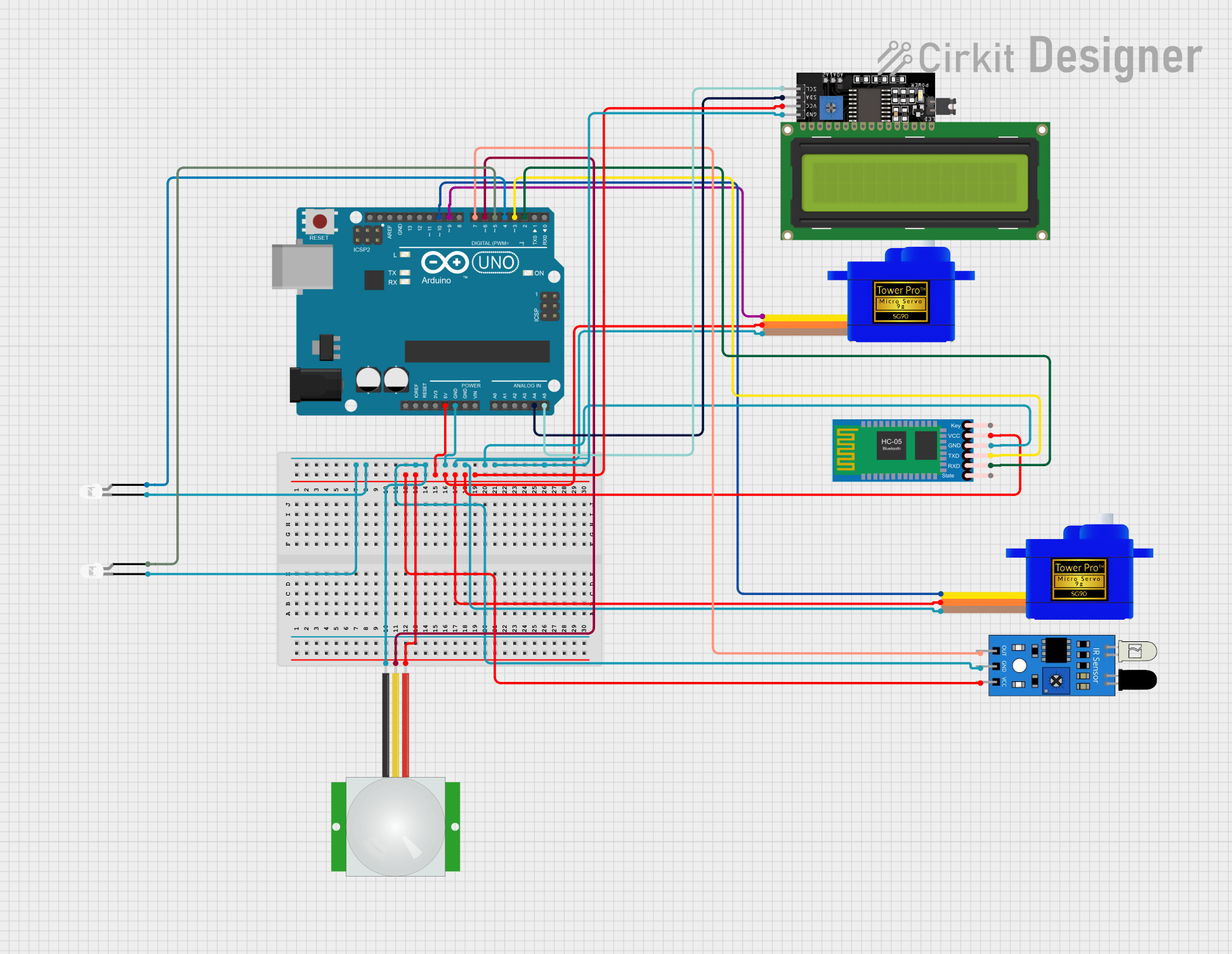
Circuit Documentation
Summary
The circuit in question is designed to interface an Arduino UNO with various peripherals including servomotors, sensors, a Bluetooth module, and an LCD display. The Arduino UNO serves as the central processing unit, controlling servomotors based on sensor inputs and Bluetooth commands, displaying information on the LCD, and driving LEDs. The circuit is powered by the Arduino's 5V output, and ground connections are shared across all components.
Component List
- Arduino UNO: A microcontroller board based on the ATmega328P. It has digital input/output pins, analog inputs, a USB connection for programming, and power management features.
- Servomotor SG90 (x2): Small and lightweight servomotors for precise control of motion.
- HC-05 Bluetooth Module: A wireless communication module that allows for Bluetooth connectivity.
- PIR Sensor: A passive infrared sensor used for detecting motion.
- IR Sensor: An infrared sensor used for detecting proximity or object presence.
- LCD Display 16x4 I2C: A liquid crystal display with an I2C interface for showing text and numbers.
- LED: Two Pin (white) (x2): Basic white LEDs for indicating status or events.
Wiring Details
Arduino UNO
- 5V: Powers the IR sensor, PIR sensor, servomotors, Bluetooth module, and LCD display.
- GND: Common ground for LEDs, IR sensor, PIR sensor, servomotors, Bluetooth module, and LCD display.
- A4 (SDA): I2C data line connected to the LCD display.
- A5 (SCL): I2C clock line connected to the LCD display.
- D2: Connected to the RXD pin of the HC-05 Bluetooth Module.
- D3: Connected to the TXD pin of the HC-05 Bluetooth Module.
- D4: Connected to the anode of one white LED.
- D5: Connected to the anode of another white LED.
- D6: Connected to the SIG pin of the PIR sensor.
- D7: Connected to the out pin of the IR sensor.
- D9: Connected to the SIG pin of one Servomotor SG90.
- D10: Connected to the SIG pin of another Servomotor SG90.
Servomotor SG90
- SIG: Signal input from the Arduino UNO (D9 or D10).
- VCC: Power supply from the Arduino UNO 5V.
- GND: Ground connection to the Arduino UNO GND.
HC-05 Bluetooth Module
- TXD: Transmit data to Arduino UNO D3.
- RXD: Receive data from Arduino UNO D2.
- VCC: Power supply from the Arduino UNO 5V.
- GND: Ground connection to the Arduino UNO GND.
PIR Sensor
- SIG: Signal output to Arduino UNO D6.
- VDD: Power supply from the Arduino UNO 5V.
- GND: Ground connection to the Arduino UNO GND.
IR Sensor
- out: Signal output to Arduino UNO D7.
- vcc: Power supply from the Arduino UNO 5V.
- gnd: Ground connection to the Arduino UNO GND.
LCD Display 16x4 I2C
- SDA: I2C data line connected to Arduino UNO A4.
- SCL: I2C clock line connected to Arduino UNO A5.
- VCC: Power supply from the Arduino UNO 5V.
- GND: Ground connection to the Arduino UNO GND.
LED: Two Pin (white)
- anode: Connected to Arduino UNO D4 or D5.
- cathode: Ground connection to the Arduino UNO GND.
Documented Code
#include <Servo.h>
#include <SoftwareSerial.h>
#include <Wire.h>
#include <LiquidCrystal_I2C.h>

#define MINUTE 60000  // For converting milliseconds to a minute
#define SECOND 1000   // For converting milliseconds to a second

// Bluetooth setup
SoftwareSerial bluetooth(2, 3);  // RX = pin 2, TX = pin 3

// Servo setup
Servo servo1;
Servo servo2;
int servo1Pin = 9;   // Pin to control servo 1
int servo2Pin = 10;  // Pin to control servo 2

// LED setup
int ledPin1 = 4;     // Pin for the first LED
int ledPin2 = 5;     // Pin for the second LED

// Sensor setup
int pirPin = 6;      // Signal pin of the PIR sensor
int irSensorPin = 7; // Signal pin of the IR sensor

// Variables
int pirVal;                       // PIR sensor value
bool irMotionDetected = false;    // To track IR sensor status
int lastPirVal = LOW;             // The last value of the PIR sensor
char bluetoothData;               // Variable to store received Bluetooth data
unsigned long myTime;             // Time tracking
char printBuffer[128];            // Buffer for serial prints

// Password setup
String password = "1234";          // Correct password
String inputPassword = "";         // User entered password

// LCD setup
LiquidCrystal_I2C lcd(0x27, 16, 2); // Set the LCD I2C address

void setup() {
  // Initialize servos
  servo1.attach(servo1Pin);
  servo2.attach(servo2Pin);

  // Initialize pins for LEDs and sensors
  pinMode(ledPin1, OUTPUT);
  pinMode(ledPin2, OUTPUT);
  pinMode(pirPin, INPUT);
  pinMode(irSensorPin, INPUT);

  // Start Bluetooth and Serial communication
  bluetooth.begin(9600);
  Serial.begin(9600);

  // Initialize LCD
  lcd.init();
  lcd.backlight();
  lcd.setCursor(0, 0);
  lcd.print("Enter Password");

  // Initial positions for servos
  servo1.write(90); // Start at middle (90 degrees)
  servo2.write(90); // Start at middle (90 degrees)

  Serial.println("System Initialized");
  Serial.println("Waiting for Bluetooth commands...");
}

void loop() {
  // PIR sensor logic for LEDs
  pirVal = digitalRead(pirPin);  // Read current PIR sensor value
  if (pirVal == HIGH) {
    digitalWrite(ledPin1, HIGH);  // Turn on LED1
    digitalWrite(ledPin2, HIGH);  // Turn on LED2
    if (lastPirVal == LOW) {      // If no motion was detected before
      myTime = millis();
      sprintf(printBuffer, "%lu min %lu sec: Motion detected by PIR!", myTime / MINUTE, myTime % MINUTE / SECOND);
      Serial.println(printBuffer);
      lastPirVal = HIGH;
    }
  } else {
    digitalWrite(ledPin1, LOW);   // Turn off LED1
    digitalWrite(ledPin2, LOW);   // Turn off LED2
    if (lastPirVal == HIGH) {     // If there was motion before
      myTime = millis();
      sprintf(printBuffer, "%lu min %lu sec: Motion ended by PIR!", myTime / MINUTE, myTime % MINUTE / SECOND);
      Serial.println(printBuffer);
      lastPirVal = LOW;
    }
  }

  // Bluetooth control logic
  if (bluetooth.available() > 0) {
    char incomingChar = bluetooth.read(); // Read incoming Bluetooth data

    // Check if the input is a valid digit and add to password
    if (incomingChar >= '0' && incomingChar <= '9') {
      inputPassword += incomingChar; // Append digit to the input password
      Serial.print("Entered digit: ");
      Serial.println(incomingChar);
    }

    // If the '#' character is received, check the password
    if (incomingChar == '#') {
      Serial.println("Checking password...");
      checkPassword();
    }

    // Control Servo 2 based on IR sensor and Bluetooth command 'A'
    if (incomingChar == 'A') {
      Serial.println("Received Bluetooth command: 'A'");

      // Read IR sensor value and check if motion is detected
      irMotionDetected = digitalRead(irSensorPin) == LOW; // IR sensor HIGH means motion detected

      if (irMotionDetected) {
        Serial.println("Motion detected by IR sensor.");
        lcd.clear();
        lcd.setCursor(0, 0);
        lcd.print("Door Opened");

        // Move Servo 2 to open the door
        servo2.write(0);    // Move servo2 to 0 degrees (unlock)
        Serial.println("Servo 2 moved to 0 degrees (Door Opened).");
        delay(2000);        // Hold the door open for 2 seconds
        servo2.write(90);   // Return servo2 to locked position
        Serial.println("Servo 2 returned to 90 degrees (Locked).");

        lcd.clear();
        lcd.setCursor(0, 0);
        lcd.print("Enter Password");
      }