
Circuit Documentation
Summary of the Circuit
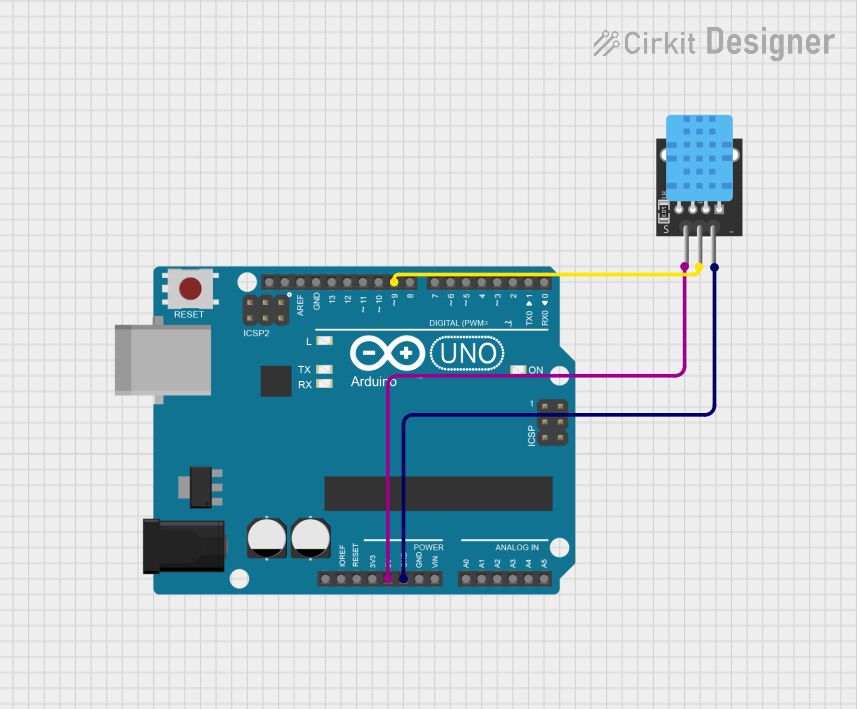
This circuit consists of an Arduino UNO microcontroller board interfaced with a KY-015 DHT11 temperature and humidity sensor. The Arduino UNO is responsible for reading the environmental data captured by the DHT11 sensor and outputting the information to the serial monitor. The sensor operates on a 5V supply, which is provided by the Arduino, and communicates with the Arduino through one of its digital pins.
Component List
Arduino UNO
- Description: A microcontroller board based on the ATmega328P.
- Pins: UNUSED, IOREF, Reset, 3.3V, 5V, GND, Vin, A0-A5, SCL, SDA, AREF, D13-D0.
- Purpose: Acts as the central processing unit of the circuit, reading sensor data and running the main control software.
KY-015 DHT11 Temperature and Humidity Sensor
- Description: A basic, ultra-low-cost digital temperature and humidity sensor.
- Pins: 5V, S (Signal), GND.
- Purpose: Measures the ambient temperature and humidity and provides the data to the Arduino UNO.
Wiring Details
Arduino UNO
- 5V: Provides power to the KY-015 DHT11 sensor.
- D9: Acts as the data signal pin connected to the signal pin of the DHT11 sensor.
- GND: Common ground with the KY-015 DHT11 sensor.
KY-015 DHT11 Temperature and Humidity Sensor
- 5V: Receives power from the 5V pin of the Arduino UNO.
- S (Signal): Connected to digital pin D9 on the Arduino UNO to send data.
- GND: Connected to the ground pin on the Arduino UNO to complete the circuit.
Documented Code
The following code is written for the Arduino UNO to interface with the KY-015 DHT11 temperature and humidity sensor. The code initializes the sensor and reads the temperature and humidity values, which are then printed to the serial monitor.
#include <Adafruit_Sensor.h>
#include <DHT.h>
#define DHTPIN 7     // Digital pin connected to the DHT sensor
#define DHTTYPE DHT11   // DHT 11
DHT dht(DHTPIN, DHTTYPE);

void setup() {
  // Initialize serial communication at 9600 bits per second:
  Serial.begin(9600);
  // Initialize the DHT sensor.
  dht.begin();
}

void loop() {
  // Wait a few seconds between measurements.
  delay(2000);

  // Reading temperature or humidity takes about 250 milliseconds!
  // Sensor readings may also be up to 2 seconds 'old' (its a very slow sensor)
  float h = dht.readHumidity();
  // Read temperature as Celsius (the default)
  float t = dht.readTemperature();

  // Check if any reads failed and exit early (to try again).
  if (isnan(h) || isnan(t)) {
    Serial.println(F("Failed to read from DHT sensor!"));
    return;
  }

  // Compute heat index in Celsius (isFahrenheit = false)
  float hic = dht.computeHeatIndex(t, h, false);

  // Print the results to the serial monitor.
  Serial.print(F("Humidity: "));
  Serial.print(h);
  Serial.print(F("%  Temperature: "));
  Serial.print(t);
  Serial.print(F("°C "));
  Serial.print(F("Heat index: "));
  Serial.print(hic);
  Serial.println(F("°C "));
}
Note: The code defines DHTPIN as pin 7, which is a placeholder. In the actual circuit, the DHT sensor's signal pin is connected to pin D9 of the Arduino UNO. The code should be updated to reflect the correct pin number used in the circuit before uploading it to the Arduino.