
Arduino UNO Temperature Monitoring System with MAX6675 and LM35DT
View and Edit Project In Cirkit Designer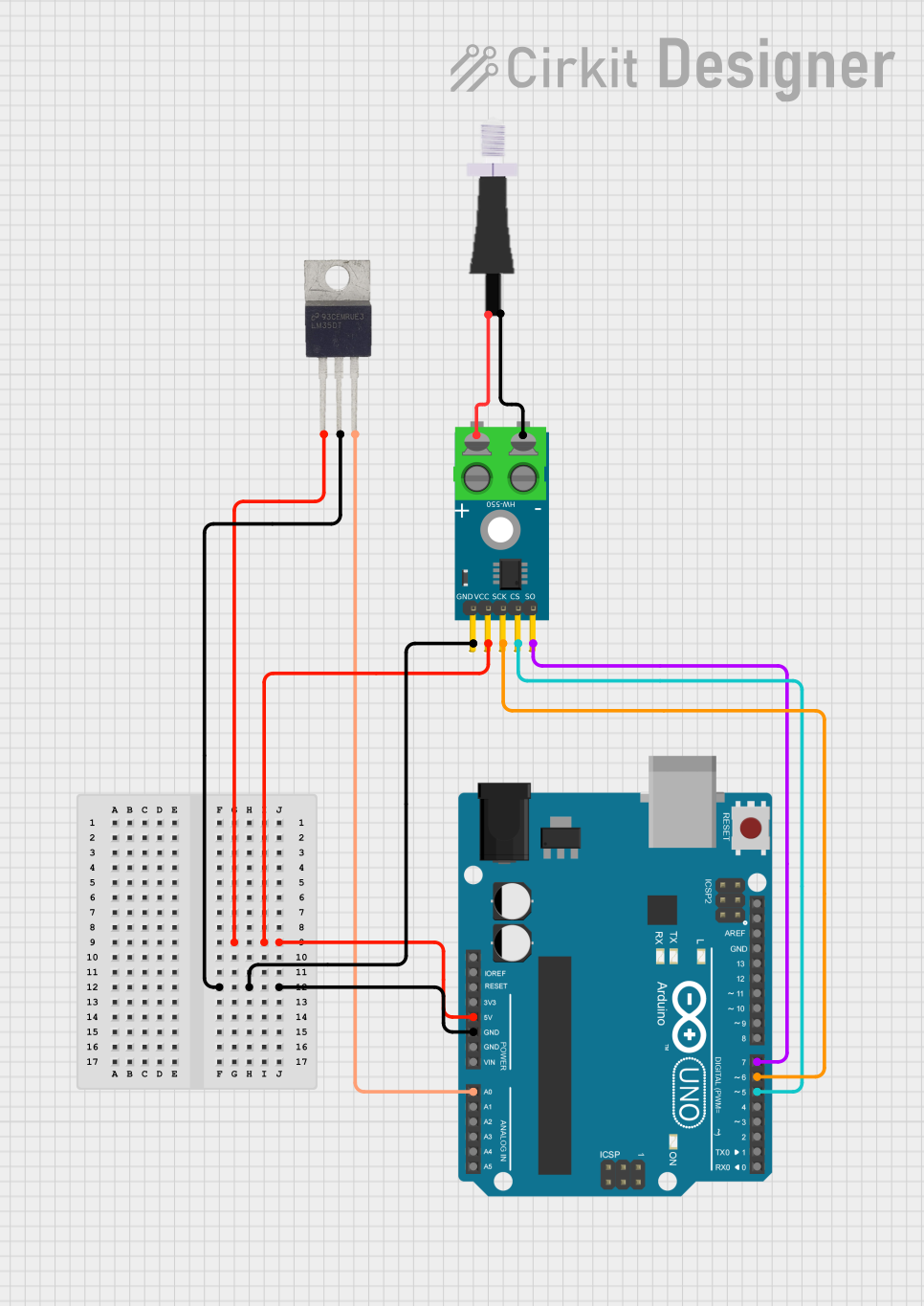
Circuit Documentation
Summary
This circuit involves an Arduino UNO microcontroller interfacing with a MAX6675 thermocouple module and an LM35 temperature sensor. The circuit is designed to read temperature data from both the thermocouple and the LM35 sensor and process this data using the Arduino UNO.
Component List
Arduino UNO
- Description: A microcontroller board based on the ATmega328P.
- Pins: UNUSED, IOREF, Reset, 3.3V, 5V, GND, Vin, A0, A1, A2, A3, A4, A5, SCL, SDA, AREF, D13, D12, D11, D10, D9, D8, D7, D6, D5, D4, D3, D2, D1, D0
MAX6675 Module
- Description: A digital thermocouple sensor module.
- Pins: GND, VCC, SCK, CS, SO, -, +
Thermopar
- Description: A thermocouple sensor.
- Pins: +, -
LM35DT
- Description: A precision centigrade temperature sensor.
- Pins: Vs, GND, OUT
Wiring Details
Arduino UNO
- 5V: Connected to VCC of MAX6675 Module and Vs of LM35DT
- GND: Connected to GND of MAX6675 Module and GND of LM35DT
- A0: Connected to OUT of LM35DT
- D7: Connected to SO of MAX6675 Module
- D6: Connected to SCK of MAX6675 Module
- D5: Connected to CS of MAX6675 Module
MAX6675 Module
- VCC: Connected to 5V of Arduino UNO
- GND: Connected to GND of Arduino UNO
- SCK: Connected to D6 of Arduino UNO
- CS: Connected to D5 of Arduino UNO
- SO: Connected to D7 of Arduino UNO
- -: Connected to - of Thermopar
- +: Connected to + of Thermopar
Thermopar
- -: Connected to - of MAX6675 Module
- +: Connected to + of MAX6675 Module
LM35DT
- Vs: Connected to 5V of Arduino UNO
- GND: Connected to GND of Arduino UNO
- OUT: Connected to A0 of Arduino UNO
Code Documentation
Arduino UNO Code
sketch.ino
void setup() {
  // put your setup code here, to run once:

}

void loop() {
  // put your main code here, to run repeatedly:

}
documentation.txt