
Arduino Nano Line Follower Robot with Obstacle Avoidance and PID Control
View and Edit Project In Cirkit Designer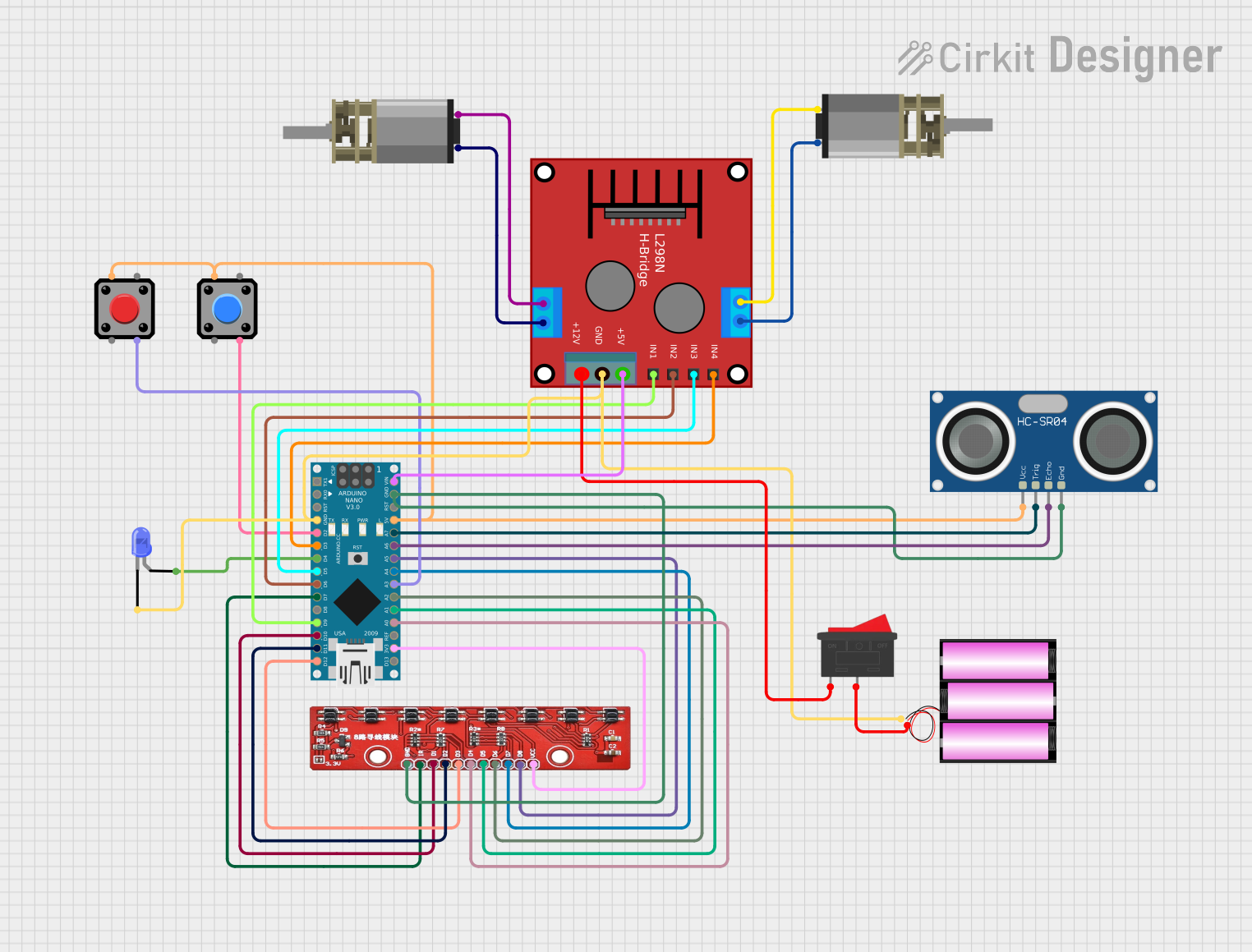
Circuit Documentation
Summary
This document provides a detailed overview of a line follower robot with obstacle avoidance capabilities. The robot uses an 8-array IR sensor to follow a line and an ultrasonic sensor to detect and avoid obstacles. The control logic is implemented using an Arduino Nano microcontroller. The robot also features two pushbuttons for calibration and starting the robot, and a blue LED to indicate calibration status. The motors are controlled via an H-bridge motor driver.
Component List
Arduino Nano
- Description: Microcontroller board based on the ATmega328P.
- Pins: D1/TX, D0/RX, RESET, GND, D2, D3, D4, D5, D6, D7, D8, D9, D10, D11/MOSI, D12/MISO, VIN, 5V, A7, A6, A5, A4, A3, A2, A1, A0, AREF, 3V3, D13/SCK
H-Bridge Motor Driver (Ponte H)
- Description: Motor driver for controlling two DC motors.
- Pins: OUT4-Motor2, OUT3-Motor2, OUT2-Motor1, OUT1-Motor1, 5V, GND, 12V, IN3, IN1, IN2, IN4
HC-SR04 Ultrasonic Sensor
- Description: Ultrasonic distance sensor for obstacle detection.
- Pins: VCC, TRIG, ECHO, GND
DC Mini Metal Gear Motor
- Description: Small DC motor with metal gears.
- Pins: IN1, IN2
8-Array IR Sensor
- Description: Infrared sensor array for line following.
- Pins: GND, IR, D1, D2, D3, D4, D5, D6, D7, D8, VCC
LED: Two Pin (Blue)
- Description: Blue LED for indicating calibration status.
- Pins: cathode, anode
Pushbutton
- Description: Pushbutton for user input.
- Pins: Pin 2, Pin 1, Pin 3, Pin 4
Battery 12V
- Description: 12V battery for powering the circuit.
- Pins: +, -
Rocker Switch
- Description: On/Off switch for the circuit.
- Pins: 1, 2
Wiring Details
Arduino Nano
- GND: Connected to GND of H-Bridge Motor Driver, GND of 12V Battery, GND of HC-SR04 Ultrasonic Sensor, GND of 8-Array IR Sensor, and cathode of Blue LED.
- D2: Connected to Pin 3 of Pushbutton.
- D3: Connected to IN4 of H-Bridge Motor Driver.
- D4: Connected to anode of Blue LED.
- D5: Connected to IN3 of H-Bridge Motor Driver.
- D6: Connected to IN2 of H-Bridge Motor Driver.
- D7: Connected to IR of 8-Array IR Sensor.
- D9: Connected to IN1 of H-Bridge Motor Driver.
- D10: Connected to D1 of 8-Array IR Sensor.
- D11/MOSI: Connected to D2 of 8-Array IR Sensor.
- D12/MISO: Connected to D3 of 8-Array IR Sensor.
- VIN: Connected to 5V of H-Bridge Motor Driver.
- 5V: Connected to Pin 1 of Pushbutton, VCC of HC-SR04 Ultrasonic Sensor, and Pin 1 of another Pushbutton.
- A7: Connected to TRIG of HC-SR04 Ultrasonic Sensor.
- A6: Connected to ECHO of HC-SR04 Ultrasonic Sensor.
- A5: Connected to D8 of 8-Array IR Sensor.
- A4: Connected to D7 of 8-Array IR Sensor.
- A3: Connected to Pin 3 of another Pushbutton.
- A2: Connected to D6 of 8-Array IR Sensor.
- A1: Connected to D5 of 8-Array IR Sensor.
- A0: Connected to D4 of 8-Array IR Sensor.
- 3V3: Connected to VCC of 8-Array IR Sensor.
H-Bridge Motor Driver (Ponte H)
- GND: Connected to GND of Arduino Nano and GND of 12V Battery.
- IN4: Connected to D3 of Arduino Nano.
- IN3: Connected to D5 of Arduino Nano.
- IN2: Connected to D6 of Arduino Nano.
- IN1: Connected to D9 of Arduino Nano.
- 5V: Connected to VIN of Arduino Nano.
- OUT4-Motor2: Connected to IN1 of DC Mini Metal Gear Motor.
- OUT3-Motor2: Connected to IN2 of DC Mini Metal Gear Motor.
- OUT2-Motor1: Connected to IN2 of another DC Mini Metal Gear Motor.
- OUT1-Motor1: Connected to IN1 of another DC Mini Metal Gear Motor.
- 12V: Connected to Pin 1 of Rocker Switch.
HC-SR04 Ultrasonic Sensor
- VCC: Connected to 5V of Arduino Nano.
- TRIG: Connected to A7 of Arduino Nano.
- ECHO: Connected to A6 of Arduino Nano.
- GND: Connected to GND of Arduino Nano.
DC Mini Metal Gear Motor
- IN1: Connected to OUT4-Motor2 of H-Bridge Motor Driver.
- IN2: Connected to OUT3-Motor2 of H-Bridge Motor Driver.
Another DC Mini Metal Gear Motor
- IN1: Connected to OUT1-Motor1 of H-Bridge Motor Driver.
- IN2: Connected to OUT2-Motor1 of H-Bridge Motor Driver.
8-Array IR Sensor
- GND: Connected to GND of Arduino Nano.
- IR: Connected to D7 of Arduino Nano.
- D1: Connected to D10 of Arduino Nano.
- D2: Connected to D11/MOSI of Arduino Nano.
- D3: Connected to D12/MISO of Arduino Nano.
- D4: Connected to A0 of Arduino Nano.
- D5: Connected to A1 of Arduino Nano.
- D6: Connected to A2 of Arduino Nano.
- D7: Connected to A4 of Arduino Nano.
- D8: Connected to A5 of Arduino Nano.
- VCC: Connected to 3V3 of Arduino Nano.
LED: Two Pin (Blue)
- cathode: Connected to GND of Arduino Nano.
- anode: Connected to D4 of Arduino Nano.
Pushbutton
- Pin 1: Connected to 5V of Arduino Nano.
- Pin 3: Connected to D2 of Arduino Nano.
Another Pushbutton
- Pin 1: Connected to 5V of Arduino Nano.
- Pin 3: Connected to A3 of Arduino Nano.
Battery 12V
- -: Connected to GND of Arduino Nano and GND of H-Bridge Motor Driver.
- +: Connected to Pin 2 of Rocker Switch.
Rocker Switch
- 1: Connected to 12V of H-Bridge Motor Driver.
- 2: Connected to + of 12V Battery.
Code Documentation
/*
 * Line Follower Robot with Obstacle Avoidance
 * This Arduino sketch uses a PID algorithm to follow a line using an 8-array IR sensor.
 * It also uses an ultrasonic sensor to detect and avoid obstacles.
 * Two buttons are used: one for calibration and one to start the robot.
 * During calibration, a blue LED is lit.
 */

#include <PID_v1.h>

// Pin definitions
#define IR_PIN A0
#define TRIG_PIN A7
#define ECHO_PIN A6
#define LED_PIN 4
#define CALIBRATE_BUTTON_PIN 2
#define RUN_BUTTON_PIN A3
#define MOTOR1_IN1 9
#define MOTOR1_IN2 6
#define MOTOR2_IN3 5
#define MOTOR2_IN4 3

// PID parameters
double setpoint = 0, input = 0, output = 0;
PID myPID(&input, &output, &setpoint, 2, 5, 1, DIRECT);

// Function prototypes
void calibrateSensors();
void followLine();
void avoidObstacle();

void setup() {
  pinMode(IR_PIN, INPUT);
  pinMode(TRIG_PIN, OUTPUT);
  pinMode(ECHO_PIN, INPUT);
  pinMode(LED_PIN, OUTPUT);
  pinMode(CALIBRATE_BUTTON_PIN, INPUT);
  pinMode(RUN_BUTTON_PIN, INPUT);
  pinMode(MOTOR1_IN