
Circuit Documentation
Summary of the Circuit
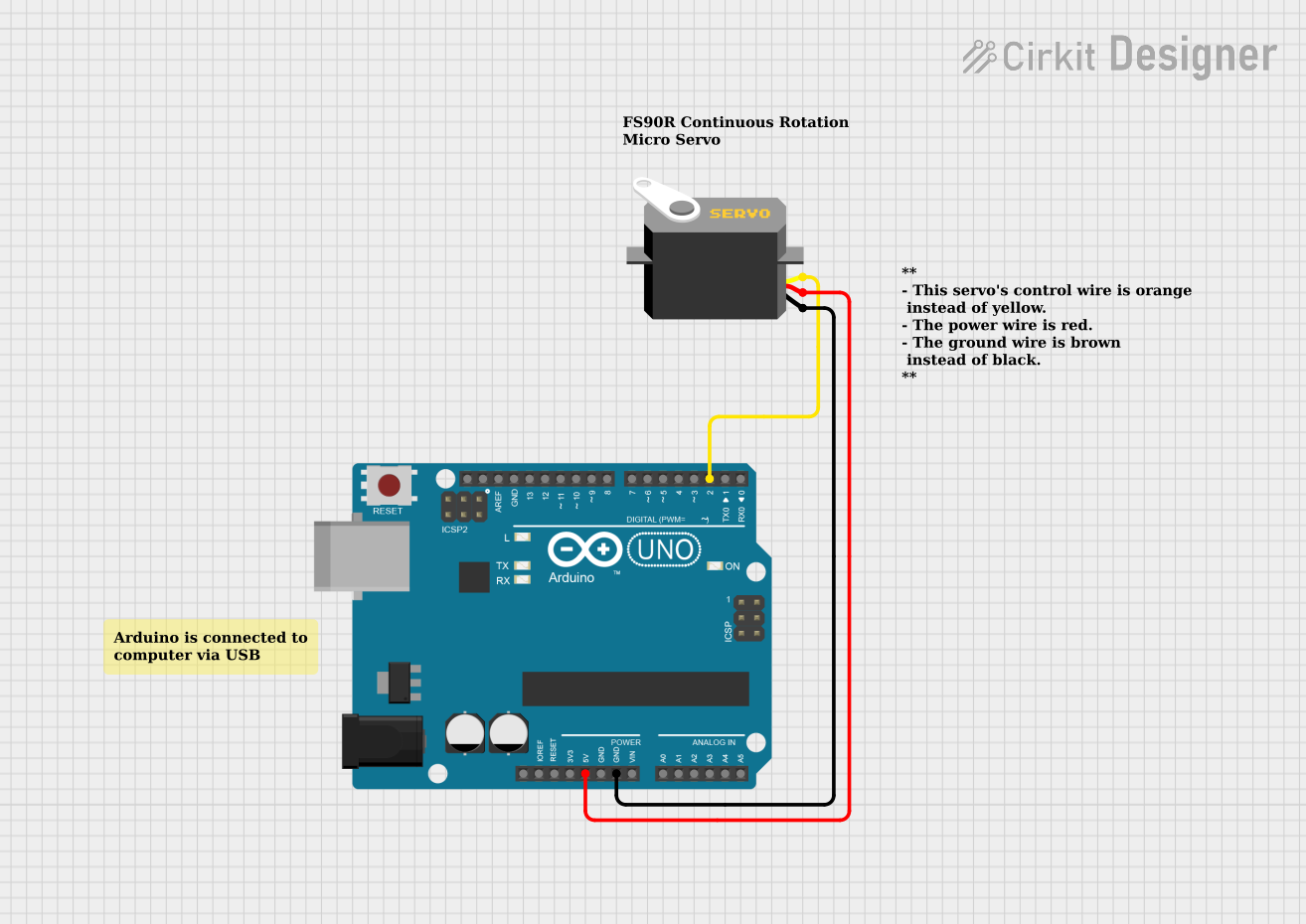
This circuit consists of an Arduino UNO microcontroller board and a servo motor. The Arduino UNO is programmed to control the servo motor, making it spin in both directions and stop at neutral positions. The servo is powered directly from the Arduino's 5V output and is controlled via one of the digital pins on the Arduino.
Component List
Arduino UNO
- Description: A microcontroller board based on the ATmega328P.
- Pins: UNUSED, IOREF, Reset, 3.3V, 5V, GND, Vin, A0-A5, SCL, SDA, AREF, D0-D13.
- Purpose: Acts as the central controller for the circuit, providing logic and power to the servo motor.
Servo
- Description: A rotary actuator or linear actuator that allows for precise control of angular or linear position.
- Pins: gnd, vcc, pulse.
- Purpose: Receives signals from the Arduino to perform movements at directed speeds and directions.
Comments
- Description: Textual annotations within the circuit design to provide additional information or instructions.
Wiring Details
Arduino UNO
- 5V connected to Servo's vcc pin for power.
- GND connected to Servo's gnd pin for a common ground reference.
- D2 connected to Servo's pulse pin for control signal.
Servo
- gnd connected to Arduino UNO's GND pin.
- vcc connected to Arduino UNO's 5V pin.
- pulse connected to Arduino UNO's D2 pin.
Documented Code
/**
 * This example demonstrates how to control a continuous rotation servo motor.
 * In this example, the servo spins forward for 1 second, pauses for 1 second,
 * spins backwards for 1 second, and pauses for 1 second in a loop.
 *
 * If the servo is still spinning when set to neutral (speed = 90), you will need
 * to tune the servo, which can be accomplished by turning the knob underneath
 * the servo (using a screw driver) until the servo is stationary.
 *
 * This example was written by Cirkit Design LLC.
 */

#include <Servo.h>

int SERVO_PIN = 2;

// Speed values in the range [0, 180]. 0 is full speed in reverse,
// 90 is neutral, and 180 is full speed forward.
int FORWARD = 180;
int NEUTRAL = 90;
int REVERSE = 0;

Servo myservo;

void setup() {
  // The servo control wire is connected to Arduino D2 pin.
  myservo.attach(2);
  // Servo is stationary.
  myservo.write(NEUTRAL);
}

void loop() {
  // Servo spins forward at full speed for 1 second.
  myservo.write(FORWARD);
  delay(1000);
  // Servo is stationary for 1 second.
  myservo.write(NEUTRAL);
  delay(1000);
  // Servo spins in reverse at full speed for 1 second.
  myservo.write(REVERSE);
  delay(1000);
  // Servo is stationary for 1 second.
  myservo.write(NEUTRAL);
  delay(1000);
}
Filename: sketch.ino
This code is designed to be uploaded to the Arduino UNO microcontroller. It initializes a Servo object and attaches it to pin D2. The servo is set to neutral at startup. In the main loop, the servo is commanded to rotate in one direction, stop, rotate in the opposite direction, and then stop again, each for a duration of one second.