
Arduino UNO PS2 Controlled Battery-Powered Robotic Car with L298N Motor Drivers
View and Edit Project In Cirkit Designer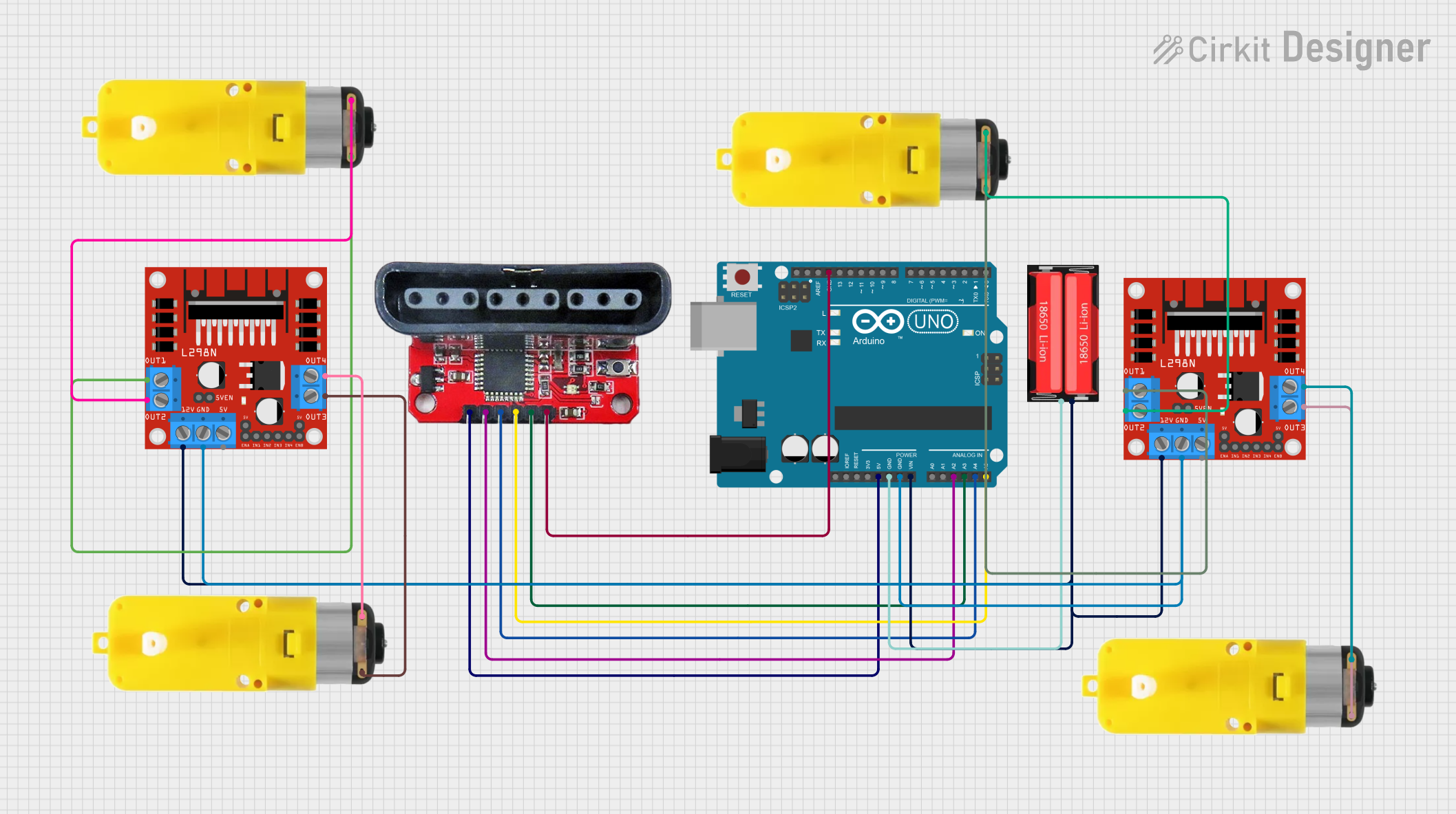
Circuit Documentation
Summary
This circuit is designed to control a four-wheel robot using an Arduino UNO microcontroller and a PS2 controller. The robot's movement is managed by two L298N DC motor drivers, each controlling two motors with reducers. The power is supplied by a 18650 Li-Ion battery. The PS2 controller adapter board is used to interface the PS2 controller with the Arduino UNO.
Component List
Arduino UNO
- Description: Microcontroller board based on the ATmega328P.
- Pins: UNUSED, IOREF, Reset, 3.3V, 5V, GND, Vin, A0, A1, A2, A3, A4, A5, SCL, SDA, AREF, D13, D12, D11, D10, D9, D8, D7, D6, D5, D4, D3, D2, D1, D0
L298N DC Motor Driver (2 units)
- Description: Dual H-Bridge motor driver.
- Pins: OUT1, OUT2, 12V, GND, 5V, OUT3, OUT4, 5V-ENA-JMP-I, 5V-ENA-JMP-O, +5V-J1, +5V-J2, ENA, IN1, IN2, IN3, IN4, ENB
Motor with Reducer (4 units)
- Description: DC motor with a gear reducer.
- Pins: 3 - 6 VCC, GND
PS2 Controller Adapter Board
- Description: Adapter board for interfacing a PS2 controller.
- Pins: 5v, data, CMD, CLK, ATT, GND
18650 Li-Ion Battery
- Description: Rechargeable lithium-ion battery.
- Pins: Positive, Negative
Wiring Details
Arduino UNO
- 5V connected to 5v of PS2 controller adapter board.
- GND connected to:
- Negative of 18650 Li-Ion battery.
- GND of both L298N DC motor drivers.
- GND of PS2 controller adapter board.
- Vin connected to Positive of 18650 Li-Ion battery.
- A2 connected to data of PS2 controller adapter board.
- A3 connected to ATT of PS2 controller adapter board.
- A4 connected to CMD of PS2 controller adapter board.
- A5 connected to CLK of PS2 controller adapter board.
L298N DC Motor Driver (1st Unit)
- 12V connected to Positive of 18650 Li-Ion battery.
- GND connected to GND of Arduino UNO.
- OUT1 connected to GND of Motor with reducer (1st unit).
- OUT2 connected to 3 - 6 VCC of Motor with reducer (1st unit).
- OUT3 connected to GND of Motor with reducer (2nd unit).
- OUT4 connected to 3 - 6 VCC of Motor with reducer (2nd unit).
L298N DC Motor Driver (2nd Unit)
- 12V connected to Positive of 18650 Li-Ion battery.
- GND connected to GND of Arduino UNO.
- OUT1 connected to GND of Motor with reducer (3rd unit).
- OUT2 connected to 3 - 6 VCC of Motor with reducer (3rd unit).
- OUT3 connected to GND of Motor with reducer (4th unit).
- OUT4 connected to 3 - 6 VCC of Motor with reducer (4th unit).
Motor with Reducer (1st Unit)
- GND connected to OUT1 of 1st L298N DC motor driver.
- 3 - 6 VCC connected to OUT2 of 1st L298N DC motor driver.
Motor with Reducer (2nd Unit)
- GND connected to OUT3 of 1st L298N DC motor driver.
- 3 - 6 VCC connected to OUT4 of 1st L298N DC motor driver.
Motor with Reducer (3rd Unit)
- GND connected to OUT1 of 2nd L298N DC motor driver.
- 3 - 6 VCC connected to OUT2 of 2nd L298N DC motor driver.
Motor with Reducer (4th Unit)
- GND connected to OUT3 of 2nd L298N DC motor driver.
- 3 - 6 VCC connected to OUT4 of 2nd L298N DC motor driver.
PS2 Controller Adapter Board
- 5v connected to 5V of Arduino UNO.
- data connected to A2 of Arduino UNO.
- CMD connected to A4 of Arduino UNO.
- CLK connected to A5 of Arduino UNO.
- ATT connected to A3 of Arduino UNO.
- GND connected to GND of Arduino UNO.
18650 Li-Ion Battery
- Positive connected to:
- 12V of both L298N DC motor drivers.
- Vin of Arduino UNO.
- Negative connected to GND of Arduino UNO.
Code Documentation
#include <PS2X_lib.h>

PS2X ps2x;

int error = 0;
byte type = 0;
byte vibrate = 0;
bool joystickEnabled = false;
int speed = 255;

const int ledPin = 13;

// Motor Driver 1 (Front Wheels) pins
const int motor1pin1 = 2;  // Front-left IN1 red-OUT1
const int motor1pin2 = 3;  // Front-left IN2 black-OUT2
const int motor2pin1 = 4;  // Front-right IN3 red-OUT3
const int motor2pin2 = 5;  // Front-right IN4 black-OUT4
const int ENA = 6;         // Front enable pin
const int ENB = 7;         // Front enable pin

// Motor Driver 2 (Rear Wheels) pins
const int motor3pin1 = 8;  // Rear-left IN1  red-OUT1
const int motor3pin2 = 9;  // Rear-left IN2  black-OUT2
const int motor4pin1 = 10; // Rear-right IN3 red-OUT3
const int motor4pin2 = 11; // Rear-right IN4 black-OUT4
const int ENA2 = 12;       // Rear enable pin
const int ENB2 = 13;       // Rear enable pin

void setup() {
    Serial.begin(57600);

    // Configure all motor pins
    pinMode(motor1pin1, OUTPUT);
    pinMode(motor1pin2, OUTPUT);
    pinMode(motor2pin1, OUTPUT);
    pinMode(motor2pin2, OUTPUT);
    pinMode(ENA, OUTPUT);
    pinMode(ENB, OUTPUT);

    pinMode(motor3pin1, OUTPUT);
    pinMode(motor3pin2, OUTPUT);
    pinMode(motor4pin1, OUTPUT);
    pinMode(motor4pin2, OUTPUT);
    pinMode(ENA2, OUTPUT);
    pinMode(ENB2, OUTPUT);

    // Initialize motor states
    stop();

    // Configure PS2 controller
    error = ps2x.config_gamepad(A5, A4, A3, A2, true, true);

    pinMode(ledPin, OUTPUT);
    digitalWrite(ledPin, LOW);

    if (error == 0) {
        Serial.println("Controller configured successfully");
    } else {
        Serial.print("Error configuring controller: ");
        Serial.println(error);
    }

    type = ps2x.readType();
    switch (type) {
        case 0: Serial.println("Unknown Controller type"); break;
        case 1: Serial.println("DualShock Controller Found"); break;
        case 2: Serial.println("GuitarHero Controller Found"); break;
    }
}

// Unified movement functions for 4 wheels
void forward(int speed) {
    // Front wheels
    digitalWrite(motor1pin1, HIGH);
    digitalWrite(motor1pin2, LOW);
    digitalWrite(motor2pin1, HIGH);
    digitalWrite(motor2pin2, LOW);

    // Rear wheels
    digitalWrite(motor3pin1, HIGH);
    digitalWrite(motor3pin2, LOW);
    digitalWrite(motor4pin1, LOW);
    digitalWrite(motor4pin2, HIGH);

    analogWrite(ENA, speed);
    analogWrite(ENB, speed);
    analogWrite(ENA2, speed);
    analogWrite(ENB2, speed);
}

void back(int speed) {
    // Front wheels
    digitalWrite(motor1pin1, LOW);