
ESP32-Based Wi-Fi Temperature and Humidity Monitor with LCD Display and Buzzer
View and Edit Project In Cirkit Designer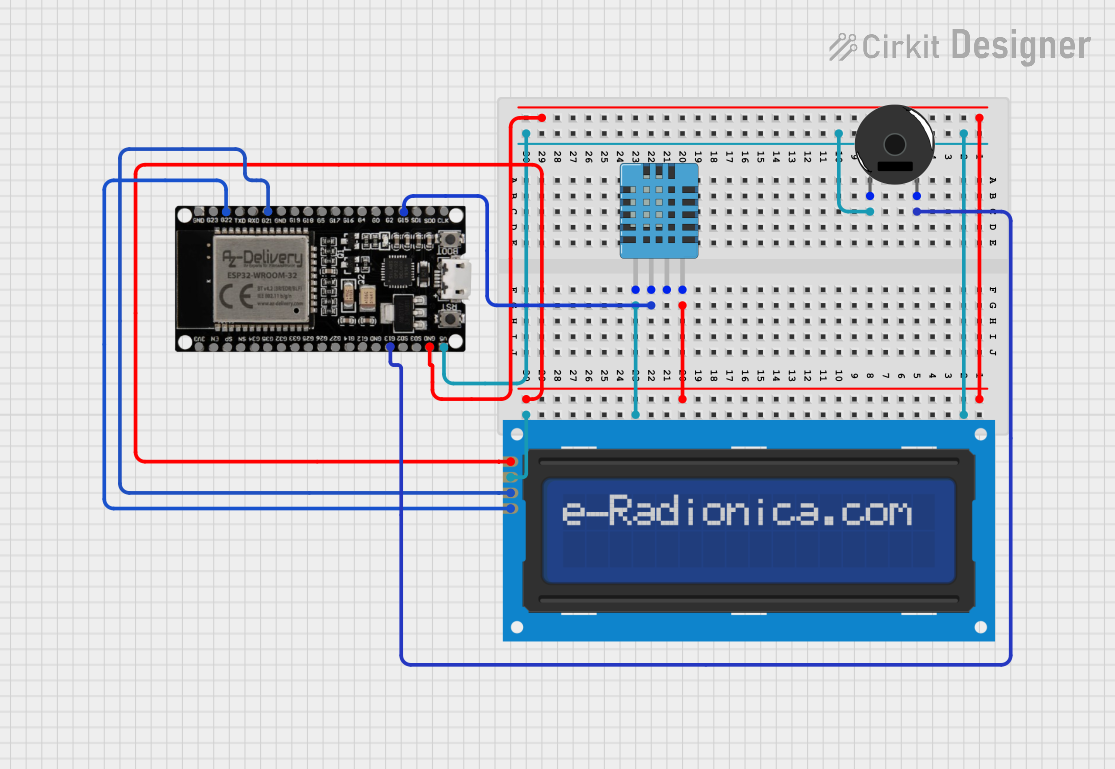
Circuit Documentation
Summary
This circuit is designed to measure temperature and humidity using a DHT11 sensor and display the readings on a 16x2 I2C LCD screen. Additionally, it includes a piezo buzzer for audio alerts. The entire system is controlled by an ESP32 microcontroller.
Component List
LCD Screen 16x2 I2C
- Description: A 16x2 character LCD display with I2C interface.
- Pins: SCL, SDA, VCC, GND
Piezo Buzzer
- Description: A simple piezoelectric buzzer for generating sound.
- Pins: pin 1, pin 2
DHT11 Humidity and Temperature Sensor
- Description: A sensor for measuring temperature and humidity.
- Pins: VDD, DATA, NULL, GND
ESP32 38 PINS
- Description: A powerful microcontroller with Wi-Fi and Bluetooth capabilities.
- Pins: GND, G23, G22, TXD, RXD, G21, G19, G18, G5, G17, G16, G4, G0, G2, G15, SDI, SD0, CLK, 3V3, EN, SP, SN, G34, G35, G32, 33, G25, G26, G27, G14, G12, G13, SD2, SD3, 5V
Wiring Details
LCD Screen 16x2 I2C
- SCL connected to G22 of ESP32
- SDA connected to G21 of ESP32
- VCC connected to 5V of ESP32
- GND connected to GND of ESP32
Piezo Buzzer
- pin 1 connected to 5V of ESP32
- pin 2 connected to G13 of ESP32
DHT11 Humidity and Temperature Sensor
- VDD connected to 5V of ESP32
- DATA connected to G15 of ESP32
- GND connected to GND of ESP32
ESP32 38 PINS
- GND connected to GND of DHT11 and LCD screen
- 5V connected to VDD of DHT11, VCC of LCD screen, and pin 1 of Piezo Buzzer
- G13 connected to pin 2 of Piezo Buzzer
- G15 connected to DATA of DHT11
- G22 connected to SCL of LCD screen
- G21 connected to SDA of LCD screen
Code Documentation
Code for ESP32
#include <Wire.h>
#include <LiquidCrystal_I2C.h>
#include <DHT.h>

// إعداد LCD
LiquidCrystal_I2C lcd(0x27, 16, 2); // I2C address 0x27

// إعداد حساس DHT
#define DHTPIN 15      // توصيل الحساس بالمنفذ D15
#define DHTTYPE DHT11  // نوع الحساس
DHT dht(DHTPIN, DHTTYPE);

// الوقت
unsigned long previousMillis = 0;
int seconds = 0;
int minutes = 0;
int hours = 12; // وقت ابتدائي
bool isPM = false; // AM/PM

void setup() {
  // إعداد الاتصال التسلسلي
  Serial.begin(115200);

  // إعداد الشاشة
  lcd.init();
  lcd.backlight();
  lcd.setCursor(0, 0);
  lcd.print("Initializing...");
  delay(2000);
  lcd.clear();

  // إعداد الحساس
  dht.begin();
}

void loop() {
  // تحديث الوقت كل ثانية
  if (millis() - previousMillis >= 1000) {
    previousMillis = millis();
    updateTime();
  }

  // قراءة درجة الحرارة
  float temperature = dht.readTemperature();
  if (isnan(temperature)) {
    Serial.println("Failed to read temperature!");
    temperature = 0.0; // في حال الخطأ
  }

  // عرض الوقت ودرجة الحرارة
  displayTimeAndTemperature(temperature);

  delay(100); // تأخير بسيط للاستقرار
}

void updateTime() {
  seconds++;
  if (seconds >= 60) {
    seconds = 0;
    minutes++;
    if (minutes >= 60) {
      minutes = 0;
      hours++;
      if (hours == 12) {
        isPM = !isPM; // تبديل AM/PM عند الساعة 12
      }
      if (hours > 12) {
        hours = 1; // إعادة الساعات بعد 12
      }
    }
  }
}

void displayTimeAndTemperature(float temperature) {
  // عرض الوقت
  lcd.setCursor(0, 0);
  lcd.print("Time: ");
  if (hours < 10) lcd.print("0");
  lcd.print(hours);
  lcd.print(":");
  if (minutes < 10) lcd.print("0");
  lcd.print(minutes);
  lcd.print(":");
  if (seconds < 10) lcd.print("0");
  lcd.print(seconds);
  lcd.print(isPM ? " PM" : " AM");

  // عرض درجة الحرارة
  lcd.setCursor(0, 1);
  lcd.print("Temp: ");
  lcd.print(temperature, 1);
  lcd.print(" C");
}
This code initializes the LCD screen and the DHT11 sensor, reads the temperature from the sensor, and displays the time and temperature on the LCD screen. The time is updated every second, and the temperature is read and displayed continuously.