
Arduino UNO-Based Environmental Monitoring System with DHT11 and MQ135 Sensors
View and Edit Project In Cirkit Designer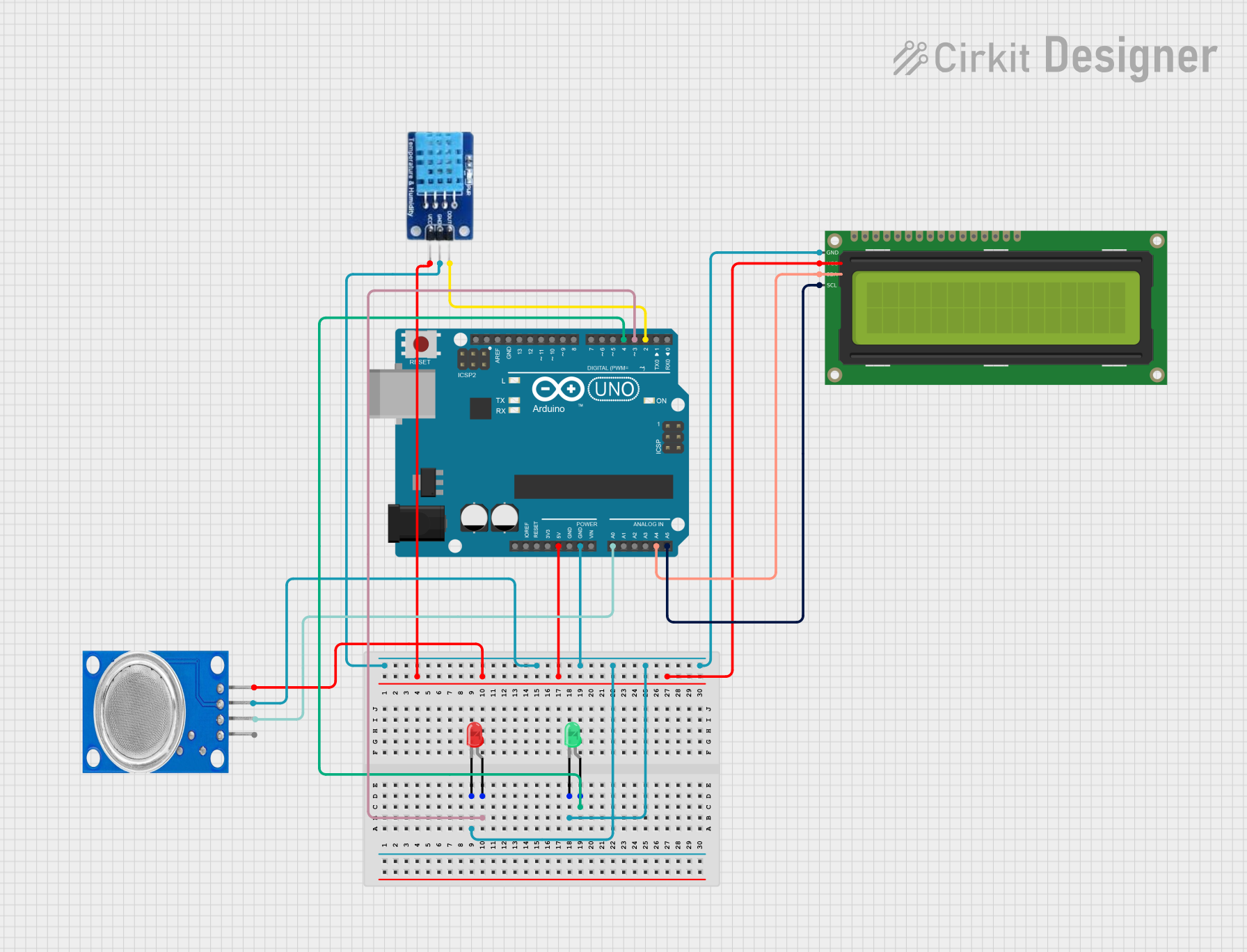
Circuit Documentation
Summary
This circuit involves an Arduino UNO microcontroller interfacing with a DHT11 temperature and humidity sensor, an MQ135 gas sensor, a 16x2 I2C LCD display, and two LEDs (red and green). The Arduino UNO reads data from the sensors and displays the information on the LCD. The LEDs are used as indicators.
Component List
Arduino UNO
- Description: A microcontroller board based on the ATmega328P.
- Pins: UNUSED, IOREF, Reset, 3.3V, 5V, GND, Vin, A0, A1, A2, A3, A4, A5, SCL, SDA, AREF, D13, D12, D11, D10, D9, D8, D7, D6, D5, D4, D3, D2, D1, D0
DHT11
- Description: A digital temperature and humidity sensor.
- Pins: DATA, GND, VCC
16x2 I2C LCD
- Description: A 16x2 character LCD display with I2C interface.
- Pins: GND, VCC, SDA, SCL
MQ135
- Description: A gas sensor for detecting air quality.
- Pins: VCC, GND, A0, D0
LED: Two Pin (red)
- Description: A red LED with two pins.
- Pins: cathode, anode
LED: Two Pin (green)
- Description: A green LED with two pins.
- Pins: cathode, anode
Wiring Details
Arduino UNO
- GND: Connected to GND of DHT11, MQ135, 16x2 I2C LCD, red LED, and green LED.
- 5V: Connected to VCC of DHT11, MQ135, and 16x2 I2C LCD.
- D2: Connected to DATA of DHT11.
- D3: Connected to anode of red LED.
- D4: Connected to anode of green LED.
- A0: Connected to A0 of MQ135.
- A4: Connected to SDA of 16x2 I2C LCD.
- A5: Connected to SCL of 16x2 I2C LCD.
DHT11
- DATA: Connected to D2 of Arduino UNO.
- GND: Connected to GND of Arduino UNO.
- VCC: Connected to 5V of Arduino UNO.
16x2 I2C LCD
- GND: Connected to GND of Arduino UNO.
- VCC: Connected to 5V of Arduino UNO.
- SDA: Connected to A4 of Arduino UNO.
- SCL: Connected to A5 of Arduino UNO.
MQ135
- VCC: Connected to 5V of Arduino UNO.
- GND: Connected to GND of Arduino UNO.
- A0: Connected to A0 of Arduino UNO.
LED: Two Pin (red)
- cathode: Connected to GND of Arduino UNO.
- anode: Connected to D3 of Arduino UNO.
LED: Two Pin (green)
- cathode: Connected to GND of Arduino UNO.
- anode: Connected to D4 of Arduino UNO.
Code Documentation
#include <Adafruit_Sensor.h>
#include <DHT.h>
#include <DHT_U.h>

#define DHTPIN 2     // Digital pin connected to the DHT sensor
// Feather HUZZAH ESP8266 note: use pins 3, 4, 5, 12, 13 or 14 --
// Pin 15 can work but DHT must be disconnected during program upload.

// Uncomment the type of sensor in use:
#define DHTTYPE    DHT11     // DHT 11
//#define DHTTYPE    DHT22     // DHT 22 (AM2302)
//#define DHTTYPE    DHT21     // DHT 21 (AM2301)

// See guide for details on sensor wiring and usage:
//   https://learn.adafruit.com/dht/overview

DHT_Unified dht(DHTPIN, DHTTYPE);

uint32_t delayMS;

void setup() {
  Serial.begin(9600);
  // Initialize device.
  dht.begin();
  Serial.println(F("DHTxx Unified Sensor Example"));
  // Print temperature sensor details.
  sensor_t sensor;
  dht.temperature().getSensor(&sensor);
  Serial.println(F("------------------------------------"));
  Serial.println(F("Temperature Sensor"));
  Serial.print  (F("Sensor Type: ")); Serial.println(sensor.name);
  Serial.print  (F("Driver Ver:  ")); Serial.println(sensor.version);
  Serial.print  (F("Unique ID:   ")); Serial.println(sensor.sensor_id);
  Serial.print  (F("Max Value:   ")); Serial.print(sensor.max_value); Serial.println(F("°C"));
  Serial.print  (F("Min Value:   ")); Serial.print(sensor.min_value); Serial.println(F("°C"));
  Serial.print  (F("Resolution:  ")); Serial.print(sensor.resolution); Serial.println(F("°C"));
  Serial.println(F("------------------------------------"));
  // Print humidity sensor details.
  dht.humidity().getSensor(&sensor);
  Serial.println(F("Humidity Sensor"));
  Serial.print  (F("Sensor Type: ")); Serial.println(sensor.name);
  Serial.print  (F("Driver Ver:  ")); Serial.println(sensor.version);
  Serial.print  (F("Unique ID:   ")); Serial.println(sensor.sensor_id);
  Serial.print  (F("Max Value:   ")); Serial.print(sensor.max_value); Serial.println(F("%"));
  Serial.print  (F("Min Value:   ")); Serial.print(sensor.min_value); Serial.println(F("%"));
  Serial.print  (F("Resolution:  ")); Serial.print(sensor.resolution); Serial.println(F("%"));
  Serial.println(F("------------------------------------"));
  // Set delay between sensor readings based on sensor details.
  delayMS = sensor.min_delay / 1000;
}

void loop() {
  // Delay between measurements.
  delay(delayMS);
  // Get temperature event and print its value.
  sensors_event_t event;
  dht.temperature().getEvent(&event);
  if (isnan(event.temperature)) {
    Serial.println(F("Error reading temperature!"));
  }
  else {
    Serial.print(F("Temperature: "));
    Serial.print(event.temperature);
    Serial.println(F("°C"));
  }
  // Get humidity event and print its value.
  dht.humidity().getEvent(&event);
  if (isnan(event.relative_humidity)) {
    Serial.println(F("Error reading humidity!"));
  }
  else {
    Serial.print(F("Humidity: "));
    Serial.print(event.relative_humidity);
    Serial.println(F("%"));
  }
}
This code initializes the DHT11 sensor and reads temperature and humidity data, which is then printed to the serial monitor. The code is designed to run on the Arduino UNO.