
Arduino Nano-Based Tachometer with LCD Display and Hall Sensor
View and Edit Project In Cirkit Designer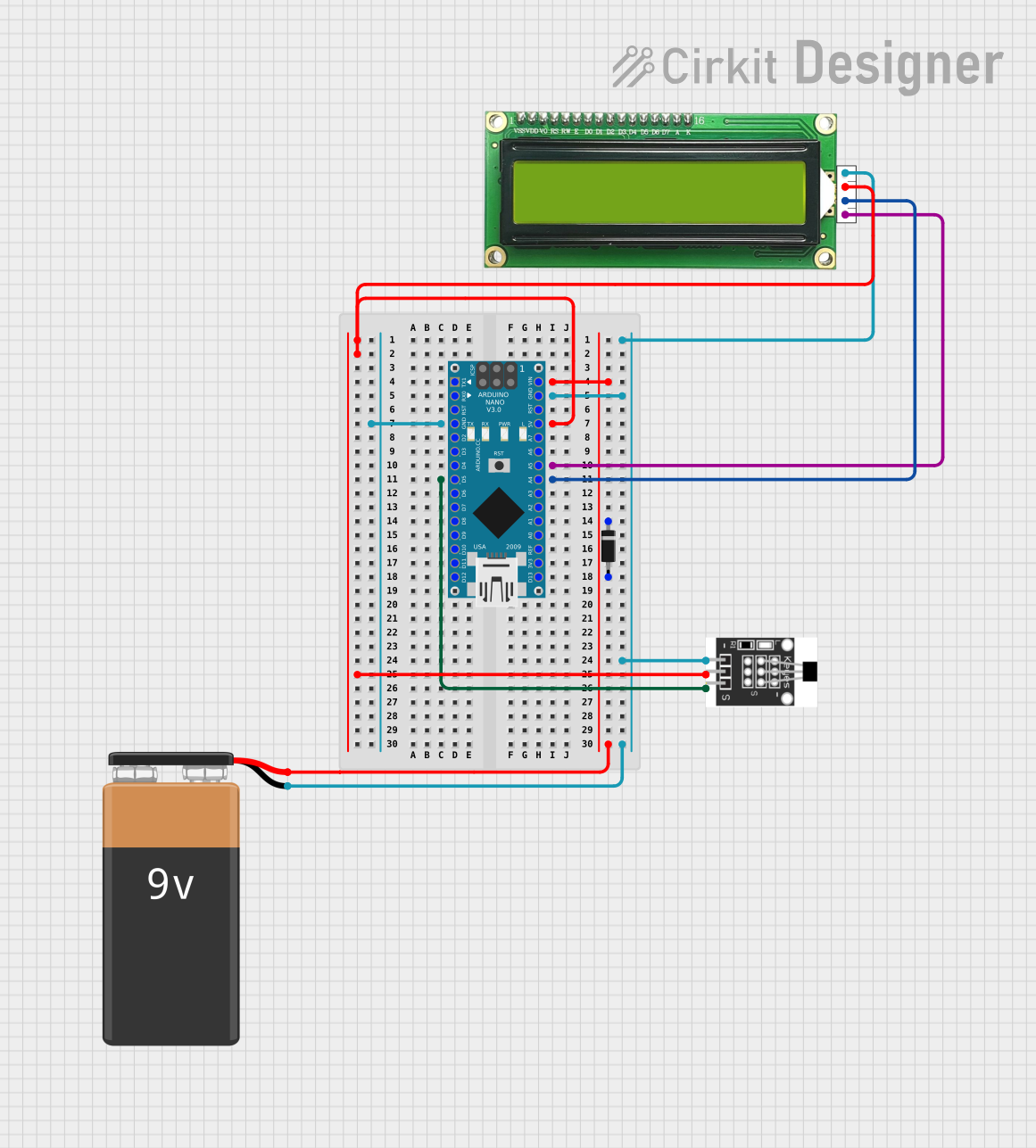
Circuit Documentation
Summary
This circuit is designed to function as a tachometer using an Arduino Nano as the central processing unit. It reads the rotational speed of an object via a Hall sensor and displays the measured RPM (Revolutions Per Minute) on an MKE-M07 LCD1602 I2C display. The circuit is powered by a 9V battery, and a diode is used to protect the Arduino from potential reverse voltage damage. The Hall sensor's output is connected to one of the digital pins of the Arduino, which counts the number of pulses per second to calculate the RPM. The LCD display communicates with the Arduino via the I2C protocol.
Component List
Arduino Nano
- Microcontroller board based on the ATmega328P
- Provides digital and analog I/O pins
- Features serial communication capabilities
MKE-M07 LCD1602 I2C
- Alphanumeric LCD display module with 16 characters and 2 lines
- Equipped with an I2C interface for communication
9V Battery
- Standard 9V battery used to power the circuit
Hall Sensor
- Magnetic field sensor that outputs a digital signal in response to a magnetic field
- Used to detect the presence of a magnet and thus the rotation of an object
Diode
- Semiconductor device that allows current to flow in one direction only
- Used to prevent reverse current flow that could damage the circuit
Wiring Details
Arduino Nano
5Vpin connected to the5Vpower railGNDpin connected to the ground railVINpin connected to the anode of the diodeA4pin connected to theSDApin of the LCD displayA5pin connected to theSCLpin of the LCD displayD5pin connected to theSpin of the Hall sensor
MKE-M07 LCD1602 I2C
GNDpin connected to the ground rail5Vpin connected to the5Vpower railSDApin connected to theA4pin of the Arduino NanoSCLpin connected to theA5pin of the Arduino Nano
9V Battery
+pin connected to the cathode of the diode-pin connected to the ground rail
Hall Sensor
+pin connected to the5Vpower rail-pin connected to the ground railSpin connected to theD5pin of the Arduino Nano
Diode
anodeconnected to the+pin of the 9V batterycathodeconnected to theVINpin of the Arduino Nano
Documented Code
/*
 * Arduino Tachometer Project
 * This code reads the speed from a Hall sensor and displays it on an LCD.
 * Connections:
 * - Hall Sensor S pin to Arduino D5
 * - LCD SDA to Arduino A4
 * - LCD SCL to Arduino A5
 * - Power and ground connections as per the net list
 */

#include <Wire.h>
#include <LiquidCrystal_I2C.h>

// Initialize the LCD, address 0x27, 16 chars, 2 lines
LiquidCrystal_I2C lcd(0x27, 16, 2);

const int hallSensorPin = 5; // Hall sensor connected to D5
volatile int rpmCount = 0;
unsigned long lastTime = 0;

void setup() {
  pinMode(hallSensorPin, INPUT);
  attachInterrupt(digitalPinToInterrupt(hallSensorPin), rpmCounter, RISING);
  lcd.begin();
  lcd.backlight();
  lcd.setCursor(0, 0);
  lcd.print("Tachometer");
}

void loop() {
  unsigned long currentTime = millis();
  if (currentTime - lastTime >= 1000) { // Update every second
    detachInterrupt(digitalPinToInterrupt(hallSensorPin));
    int rpm = (rpmCount * 60); // Calculate RPM
    rpmCount = 0;
    lastTime = currentTime;
    lcd.setCursor(0, 1);
    lcd.print("RPM: ");
    lcd.print(rpm);
    attachInterrupt(digitalPinToInterrupt(hallSensorPin), rpmCounter, RISING);
  }
}

void rpmCounter() {
  rpmCount++;
}
This code is responsible for reading the number of pulses from the Hall sensor, which is indicative of the rotational speed. It then calculates the RPM and displays the value on the LCD. The rpmCounter function is an interrupt service routine that increments the rpmCount variable each time a pulse is detected from the Hall sensor. The main loop updates the display every second with the latest RPM value.