
ESP32-Based Smart Environment Monitoring System with Blynk Integration
View and Edit Project In Cirkit Designer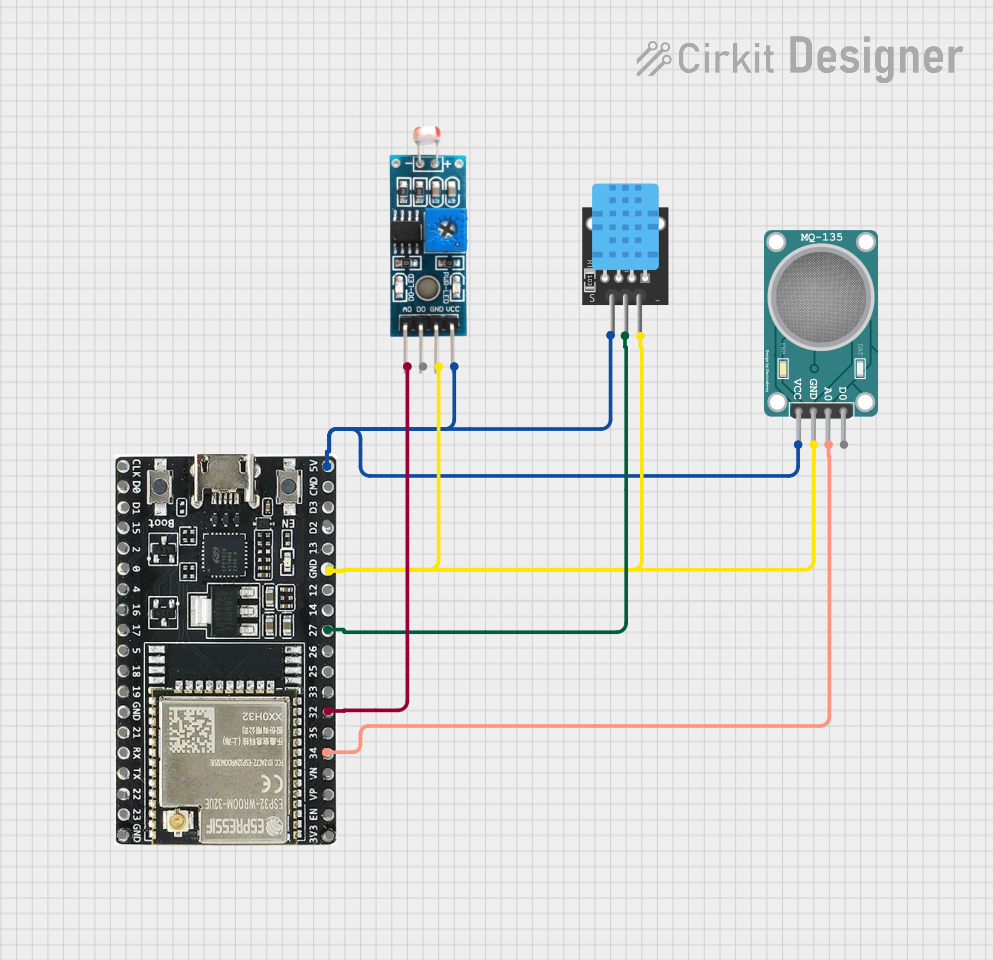
Smart Environment Monitoring System Documentation
Summary
The Smart Environment Monitoring System is designed to measure environmental parameters such as air quality, light intensity, temperature, and humidity. The system is based on the ESP32-WROOM-32UE microcontroller, which is connected to various sensors including the MQ-135 air quality sensor, an LDR module for light intensity, and a DHT11 sensor for temperature and humidity. The ESP32 microcontroller is programmed to read the sensor data and send it to the Blynk IoT platform for remote monitoring.
Component List
ESP32-WROOM-32UE
- Description: A powerful microcontroller with Wi-Fi and Bluetooth capabilities, suitable for a wide range of IoT applications.
- Pins: 3v3, EN, VP, VN, 34, 35, 32, 33, 25, 26, 27, 14, 12, GND, 13, D2, D3, 5V, 23, 22, TX, RX, 21, 19, 18, 5, 17, 16, 4, 0, 2, 15, D1, D0, CKL
Module LDR
- Description: A light-dependent resistor module used to measure the intensity of light.
- Pins: VCC, GND, DO, AO
MQ-135 SENSOR AIR QUALITY
- Description: A sensor for detecting a wide range of gases, including NH3, NOx, alcohol, benzene, smoke, and CO2.
- Pins: VCC, GND, A0, D0
KY-015 DHT11
- Description: A basic, ultra-low-cost digital temperature and humidity sensor.
- Pins: 5V, S, GND
Wiring Details
ESP32-WROOM-32UE
- 5V connected to VCC of Module LDR, MQ-135 SENSOR AIR QUALITY, and KY-015 DHT11
- GND connected to GND of Module LDR, MQ-135 SENSOR AIR QUALITY, and KY-015 DHT11
- Pin 34 (MQ135_PIN) connected to A0 of MQ-135 SENSOR AIR QUALITY
- Pin 32 (LDR_PIN) connected to AO of Module LDR
- Pin 27 (DHTPIN) connected to S of KY-015 DHT11
Module LDR
- VCC connected to 5V of ESP32-WROOM-32UE
- GND connected to GND of ESP32-WROOM-32UE
- AO connected to Pin 32 (LDR_PIN) of ESP32-WROOM-32UE
MQ-135 SENSOR AIR QUALITY
- VCC connected to 5V of ESP32-WROOM-32UE
- GND connected to GND of ESP32-WROOM-32UE
- A0 connected to Pin 34 (MQ135_PIN) of ESP32-WROOM-32UE
KY-015 DHT11
- 5V connected to 5V of ESP32-WROOM-32UE
- S connected to Pin 27 (DHTPIN) of ESP32-WROOM-32UE
- GND connected to GND of ESP32-WROOM-32UE
Documented Code
#define BLYNK_TEMPLATE_ID "TMPL6Gg7e2pVQ"
#define BLYNK_TEMPLATE_NAME "Smart Environment Monitoring System"
#define BLYNK_AUTH_TOKEN "sDAyP5tfJN5vol0a2ens8SbvtNxtG-ks"

#include <DHT.h>
#include <BlynkSimpleEsp32.h>

#define DHTPIN 27     // Pin connected to the DHT11 sensor
#define DHTTYPE DHT11 // DHT11 sensor type
#define MQ135_PIN 34  // Pin connected to the MQ-135 air quality sensor
#define LDR_PIN 32    // Pin connected to the LDR module

DHT dht(DHTPIN, DHTTYPE);

char ssid[] = "Harnantee-Maxis_Fibre"; // Replace with your Wi-Fi SSID
char pass[] = "hanahome7919";          // Replace with your Wi-Fi password

void setup() {
  Serial.begin(115200);
  dht.begin();
  analogSetPinAttenuation(LDR_PIN, ADC_11db);

  Blynk.begin(BLYNK_AUTH_TOKEN, ssid, pass);
}

void loop() {
  Blynk.run();

  float h = dht.readHumidity();
  float t = dht.readTemperature();

  int mq135Value = analogRead(MQ135_PIN);

  int ldrValue = analogRead(LDR_PIN);

  Blynk.virtualWrite(V0, t);       // Send temperature data to Blynk
  Blynk.virtualWrite(V1, h);       // Send humidity data to Blynk
  Blynk.virtualWrite(V2, mq135Value); // Send air quality data to Blynk
  Blynk.virtualWrite(V3, ldrValue);   // Send light intensity data to Blynk

  Serial.print("Temperature: ");
  Serial.print(t);
  Serial.println(" °C");

  Serial.print("Humidity: ");
  Serial.print(h);
  Serial.println(" %");

  Serial.print("Air Quality (MQ-135): ");
  Serial.println(mq135Value);

  Serial.print("Light Intensity (LDR): ");
  Serial.println(ldrValue);
  delay(2000);  // Delay between readings
}
Note: The Blynk template ID, Blynk template name, and Blynk authorization token are placeholders and should be replaced with actual values for deployment. Additionally, the Wi-Fi SSID and password are included in the code for the purpose of connecting to the Blynk platform and should be replaced with secure credentials before deploying the system.