
Arduino UNO-Based Automated Waste Sorting System with Capacitive Proximity Sensor and Servo Motor
View and Edit Project In Cirkit Designer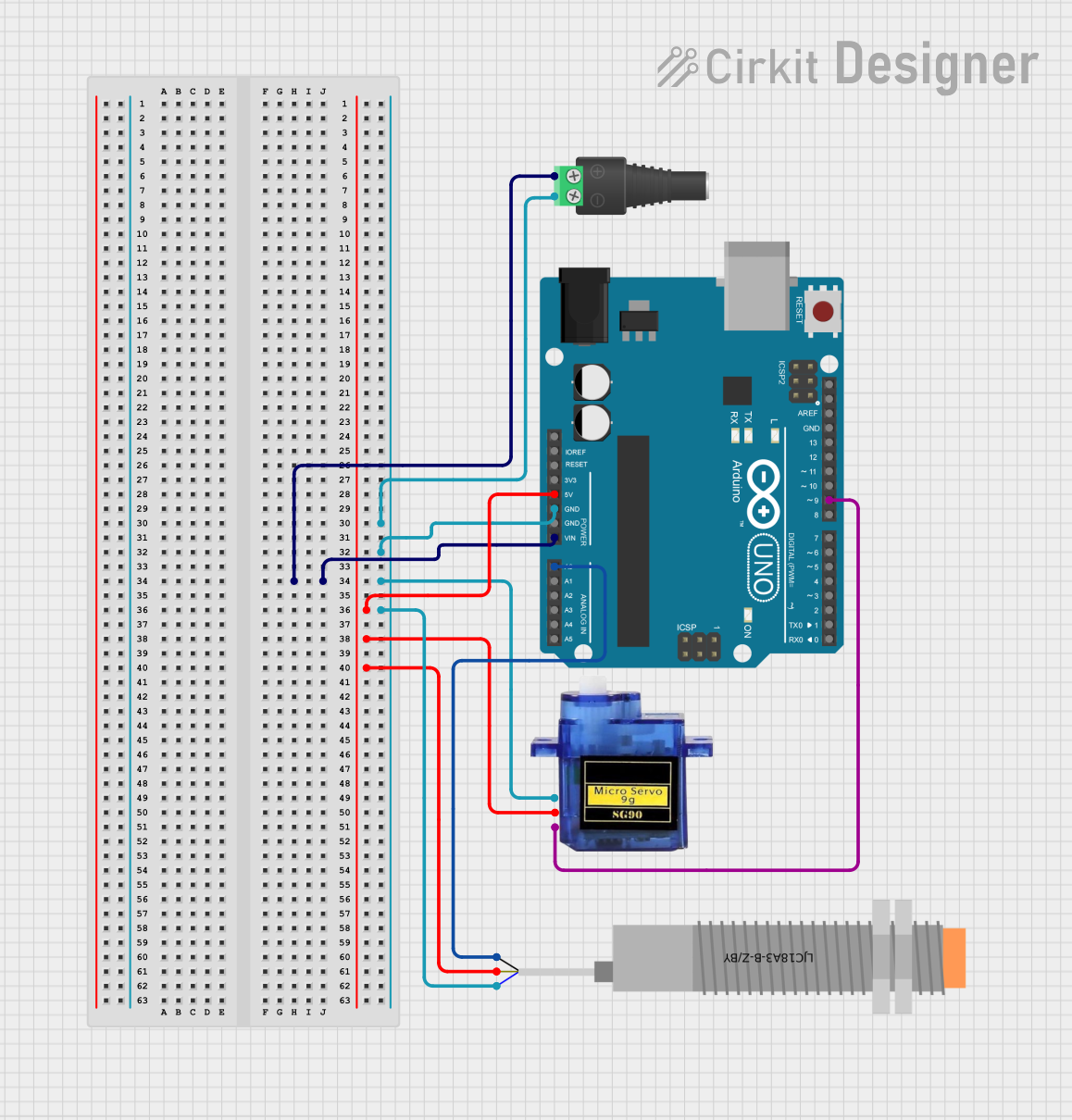
Circuit Documentation
Summary
This circuit is a Waste Management System designed to sort objects based on their material (paper or plastic). It uses a capacitive proximity sensor to detect the type of material and a servo motor to sort the object accordingly. The system is controlled by an Arduino UNO microcontroller.
Component List
Arduino UNO
- Description: A microcontroller board based on the ATmega328P.
- Pins: UNUSED, IOREF, Reset, 3.3V, 5V, GND, Vin, A0, A1, A2, A3, A4, A5, SCL, SDA, AREF, D13, D12, D11, D10, D9, D8, D7, D6, D5, D4, D3, D2, D1, D0
Micro servo 9G
- Description: A small servo motor used for precise control of angular position.
- Pins: GND, +5V, PWM
2.1mm Barrel Jack with Terminal Block
- Description: A power connector for supplying external power to the circuit.
- Pins: POS, NEG
LJC18A3-B-Z/BY Capacitive Proximity Sensor
- Description: A sensor used to detect the presence of objects without physical contact.
- Pins: VO (BLU), VI (BRN), SIG (BLK)
Wiring Details
Arduino UNO
- GND: Connected to NEG of the 2.1mm Barrel Jack with Terminal Block, GND of the Micro servo 9G, and VO (BLU) of the LJC18A3-B-Z/BY Capacitive Proximity Sensor.
- Vin: Connected to POS of the 2.1mm Barrel Jack with Terminal Block.
- 5V: Connected to +5V of the Micro servo 9G and VI (BRN) of the LJC18A3-B-Z/BY Capacitive Proximity Sensor.
- A0: Connected to SIG (BLK) of the LJC18A3-B-Z/BY Capacitive Proximity Sensor.
- D9: Connected to PWM of the Micro servo 9G.
Micro servo 9G
- GND: Connected to GND of the Arduino UNO and NEG of the 2.1mm Barrel Jack with Terminal Block.
- +5V: Connected to 5V of the Arduino UNO.
- PWM: Connected to D9 of the Arduino UNO.
2.1mm Barrel Jack with Terminal Block
- NEG: Connected to GND of the Arduino UNO, GND of the Micro servo 9G, and VO (BLU) of the LJC18A3-B-Z/BY Capacitive Proximity Sensor.
- POS: Connected to Vin of the Arduino UNO.
LJC18A3-B-Z/BY Capacitive Proximity Sensor
- VO (BLU): Connected to GND of the Arduino UNO and NEG of the 2.1mm Barrel Jack with Terminal Block.
- VI (BRN): Connected to 5V of the Arduino UNO.
- SIG (BLK): Connected to A0 of the Arduino UNO.
Code Documentation
/*
 * Waste Management System
 * This code reads input from a capacitive proximity sensor to detect if an object
 * is paper or plastic. Based on the detection, it controls a servo motor to
 * sort the object. If paper is detected, the servo turns to 25 degrees. If
 * plastic is detected, the servo turns to 35 degrees.
 */

#include <Servo.h>

// Pin definitions
const int sensorPin = A0; // Capacitive Proximity Sensor signal pin
const int servoPin = 9;   // Servo motor control pin

Servo myServo;

void setup() {
  // Initialize serial communication
  Serial.begin(9600);
  // Attach the servo to the control pin
  myServo.attach(servoPin);
  // Set initial position of the servo
  myServo.write(0);
}

void loop() {
  // Read the sensor value
  int sensorValue = analogRead(sensorPin);
  // Print the sensor value to the serial monitor
  Serial.println(sensorValue);

  // Determine if the object is paper or plastic
  if (sensorValue < 500) { // Assuming paper gives a lower value
    myServo.write(25); // Turn servo to 25 degrees for paper
  } else { // Assuming plastic gives a higher value
    myServo.write(35); // Turn servo to 35 degrees for plastic
  }

  // Small delay to allow the servo to move
  delay(1000);
}
This code initializes the servo motor and reads the sensor value from the capacitive proximity sensor. Based on the sensor value, it determines whether the object is paper or plastic and moves the servo motor to the corresponding position.