
Circuit Documentation
Summary
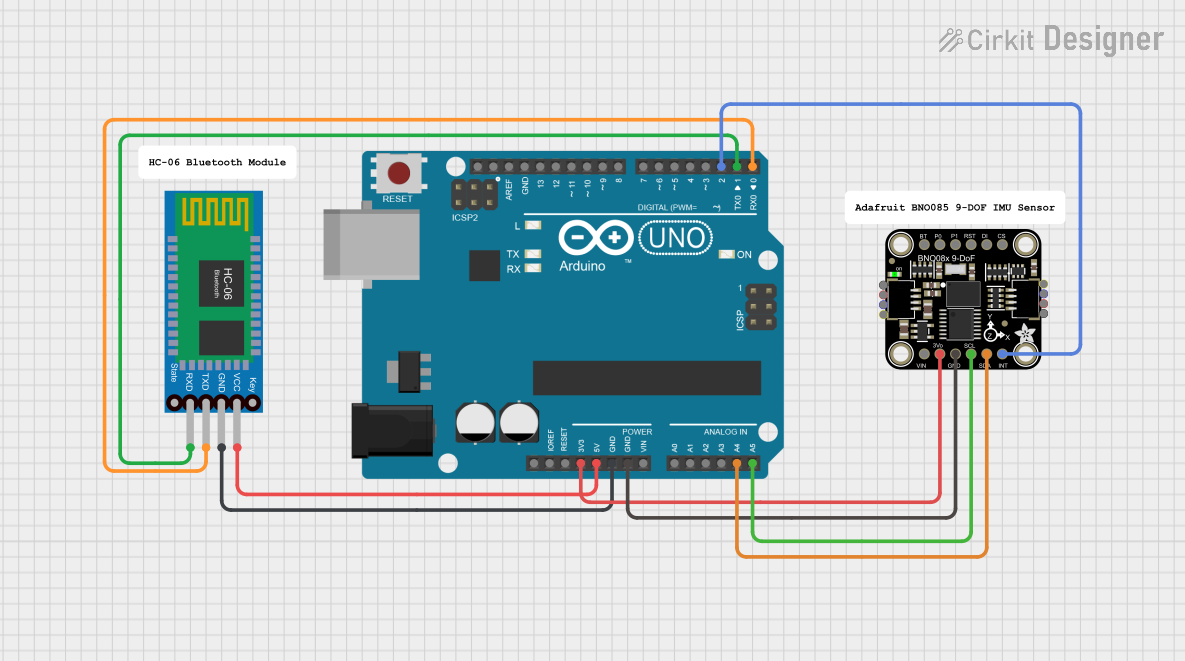
This document provides a detailed overview of a circuit that includes an Arduino UNO microcontroller, a Bluetooth HC-06 module, and an Adafruit BNO085 9-DOF Orientation IMU Fusion sensor. The circuit is designed to interface the Arduino with the Bluetooth module for wireless communication and the IMU sensor for orientation data.
Component List
Arduino UNO
- Description: A microcontroller board based on the ATmega328P.
- Pins: UNUSED, IOREF, Reset, 3.3V, 5V, GND, Vin, A0, A1, A2, A3, A4, A5, SCL, SDA, AREF, D13, D12, D11, D10, D9, D8, D7, D6, D5, D4, D3, D2, D1, D0
Bluetooth HC-06
- Description: A Bluetooth module used for wireless communication.
- Pins: VCC, GND, TXD, RXD
Adafruit BNO085 9-DOF Orientation IMU Fusion
- Description: A sensor module that provides 9 degrees of freedom orientation data.
- Pins: VCC, 3.3V, GND, SCL/SCK/RX, SDA/MISO/TX, INT, BOOT, PS0, PS1, RST, MOSI, CS
Comment
- Description: Placeholder for comments in the circuit.
- Pins: None
Wiring Details
Arduino UNO
- 3.3V: Connected to Adafruit BNO085 9-DOF Orientation IMU Fusion (3.3V)
- 5V: Connected to Bluetooth HC-06 (VCC)
- GND: Connected to Bluetooth HC-06 (GND) and Adafruit BNO085 9-DOF Orientation IMU Fusion (GND)
- A4: Connected to Adafruit BNO085 9-DOF Orientation IMU Fusion (SDA/MISO/TX)
- A5: Connected to Adafruit BNO085 9-DOF Orientation IMU Fusion (SCL/SCK/RX)
- D2: Connected to Adafruit BNO085 9-DOF Orientation IMU Fusion (INT)
- D1: Connected to Bluetooth HC-06 (RXD)
- D0: Connected to Bluetooth HC-06 (TXD)
Bluetooth HC-06
- VCC: Connected to Arduino UNO (5V)
- GND: Connected to Arduino UNO (GND)
- TXD: Connected to Arduino UNO (D0)
- RXD: Connected to Arduino UNO (D1)
Adafruit BNO085 9-DOF Orientation IMU Fusion
- 3.3V: Connected to Arduino UNO (3.3V)
- GND: Connected to Arduino UNO (GND)
- SDA/MISO/TX: Connected to Arduino UNO (A4)
- SCL/SCK/RX: Connected to Arduino UNO (A5)
- INT: Connected to Arduino UNO (D2)
Documented Code
Arduino UNO Code
void setup() {
  // put your setup code here, to run once:

}

void loop() {
  // put your main code here, to run repeatedly:

}
This code is a basic template for the Arduino UNO. The setup function is where you initialize your components and settings, and the loop function is where the main logic of your program runs repeatedly.