
Circuit Documentation
Summary of the Circuit
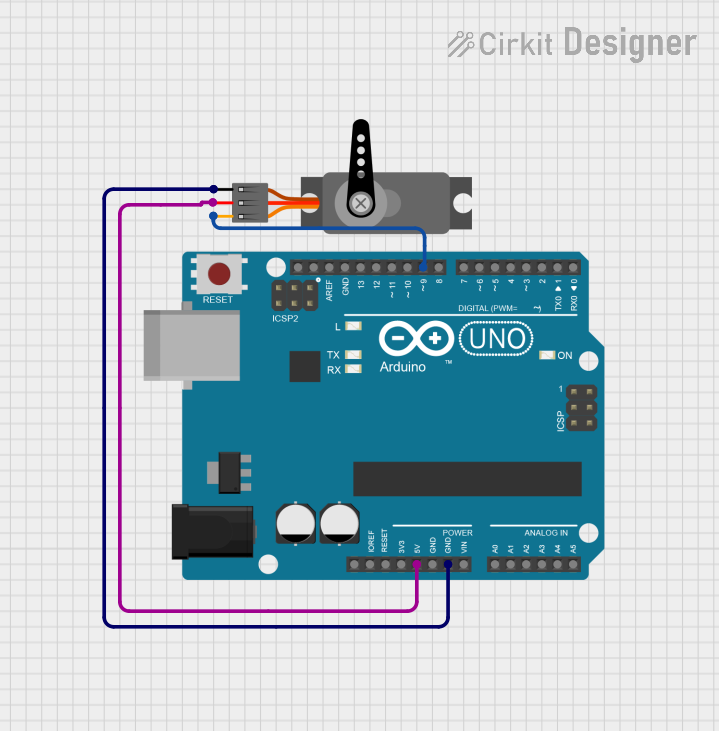
This circuit consists of an Arduino UNO microcontroller board and a servo motor. The Arduino UNO is used to control the position of the servo motor through one of its digital pins using Pulse Width Modulation (PWM). The servo motor is powered directly from the Arduino's 5V output, and the ground is shared between the two components. The code running on the Arduino UNO sweeps the servo motor from 0 to 180 degrees and back, demonstrating basic servo motor control.
Component List
Arduino UNO
- Description: A microcontroller board based on the ATmega328P.
- Pins: UNUSED, IOREF, Reset, 3.3V, 5V, GND, Vin, A0-A5, SCL, SDA, AREF, D0-D13
- Purpose: Acts as the main controller for the circuit, generating PWM signals to control the servo motor.
Servo
- Description: A rotary actuator or linear actuator that allows for precise control of angular or linear position.
- Pins: GND, VCC, PWM
- Purpose: Receives PWM signals from the Arduino UNO to set its position.
Wiring Details
Arduino UNO
- 5V connected to Servo VCC
- GND connected to Servo GND
- D9 connected to Servo PWM
Servo
- VCC connected to Arduino UNO 5V
- GND connected to Arduino UNO GND
- PWM connected to Arduino UNO D9
Documented Code
Arduino UNO Code
#include <Servo.h>

Servo myServo;  // create servo object to control a servo

void setup() {
  // Attach the servo on pin D9 to the servo object
  myServo.attach(9);
  // Set the servo to the initial position (0 degrees)
  myServo.write(0);
}

void loop() {
  // Example: Sweep the servo from 0 to 180 degrees and back
  for (int pos = 0; pos <= 180; pos += 1) { // goes from 0 to 180 degrees
    myServo.write(pos);              // tell servo to go to position in variable 'pos'
    delay(15);                       // waits 15ms for the servo to reach the position
  }
  for (int pos = 180; pos >= 0; pos -= 1) { // goes from 180 to 0 degrees
    myServo.write(pos);              // tell servo to go to position in variable 'pos'
    delay(15);                       // waits 15ms for the servo to reach the position
  }
}
File Name: sketch.ino
Servo Code
The servo does not have separate code as it is controlled directly by the Arduino UNO through PWM signals.
(Note: The second code entry for the servo with instance ID 752a0a3b-cc40-46d8-bbf8-3c2cd5dad2c3 is empty and seems to be a placeholder. It is not included in the documentation as it does not contain any functional code.)