
Wi-Fi Controlled ESP32-CAM Robotic Car with L298N Motor Driver
View and Edit Project In Cirkit Designer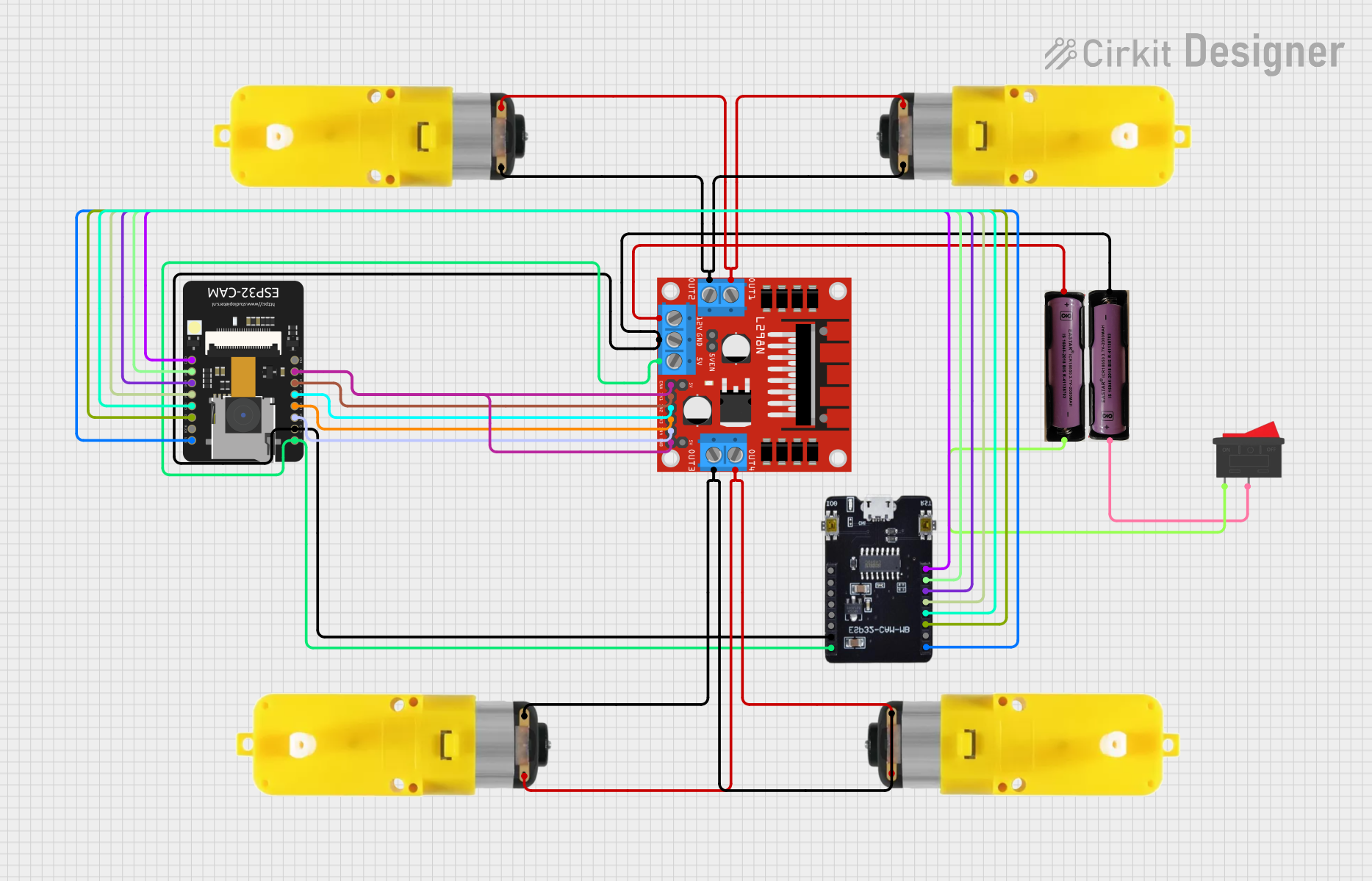
Circuit Documentation
Summary
This circuit is designed to control a car with motors using an ESP32-CAM microcontroller. The ESP32-CAM is connected to a motor driver (L298N) which controls four motors with reducers. The circuit also includes a rocker switch and two 3.7V batteries to power the components. The ESP32-CAM is programmed to provide a web interface for controlling the car's movement and capturing images.
Component List
L298N DC Motor Driver
- Description: Motor driver used to control the speed and direction of DC motors.
- Pins: OUT1, OUT2, 12V, GND, 5V, OUT3, OUT4, 5V-ENA-JMP-I, 5V-ENA-JMP-O, +5V-J1, +5V-J2, ENA, IN1, IN2, IN3, IN4, ENB
ESP32-CAM
- Description: Microcontroller with camera module, used for controlling the car and capturing images.
- Pins: 5V, GND, IO12, IO13, IO15, IO14, IO2, IO4, VOT, VOR, VCC, IO0, IO16, 3V3
Motor with Reducer
- Description: DC motor with a gear reducer.
- Pins: 3 - 6 VCC, GND
3.7V Battery
- Description: Power source for the circuit.
- Pins: +, -
Rocker Switch
- Description: Switch used to control the power supply.
- Pins: 1, 2
ESP32-CAM MB FLIP
- Description: Development board for ESP32-CAM.
- Pins: 3.3V, IO16, IO0, GND, VCC, IO3RX, IO1TX, 5V, IO12, IO13, IO15, IO14, IO2, IO4
Wiring Details
L298N DC Motor Driver
- OUT1 connected to 3 - 6 VCC of Motor with Reducer
- OUT2 connected to GND of Motor with Reducer
- OUT3 connected to 3 - 6 VCC of another Motor with Reducer
- OUT4 connected to GND of another Motor with Reducer
- 12V connected to + of 3.7V Battery
- GND connected to - of 3.7V Battery, GND of ESP32-CAM, and GND of ESP32-CAM MB FLIP
- 5V connected to 5V of ESP32-CAM and 5V of ESP32-CAM MB FLIP
- ENA connected to IO2 of ESP32-CAM
- ENB connected to IO2 of ESP32-CAM
- IN1 connected to IO14 of ESP32-CAM
- IN2 connected to IO15 of ESP32-CAM
- IN3 connected to IO13 of ESP32-CAM
- IN4 connected to IO12 of ESP32-CAM
ESP32-CAM
- GND connected to GND of L298N DC Motor Driver and GND of ESP32-CAM MB FLIP
- 5V connected to 5V of L298N DC Motor Driver and 5V of ESP32-CAM MB FLIP
- IO2 connected to ENA and ENB of L298N DC Motor Driver
- IO14 connected to IN1 of L298N DC Motor Driver
- IO15 connected to IN2 of L298N DC Motor Driver
- IO13 connected to IN3 of L298N DC Motor Driver
- IO12 connected to IN4 of L298N DC Motor Driver
- VOT connected to IO1TX of ESP32-CAM MB FLIP
- VOR connected to IO3RX of ESP32-CAM MB FLIP
- VCC connected to VCC of ESP32-CAM MB FLIP
- IO0 connected to IO0 of ESP32-CAM MB FLIP
- 3V3 connected to 3.3V of ESP32-CAM MB FLIP
Motor with Reducer
- 3 - 6 VCC connected to OUT1 of L298N DC Motor Driver
- GND connected to OUT2 of L298N DC Motor Driver
Another Motor with Reducer
- 3 - 6 VCC connected to OUT3 of L298N DC Motor Driver
- GND connected to OUT4 of L298N DC Motor Driver
3.7V Battery
- + connected to 12V of L298N DC Motor Driver
- - connected to GND of L298N DC Motor Driver
Another 3.7V Battery
- + connected to 2 of Rocker Switch
- - connected to 1 of Rocker Switch
Rocker Switch
- 2 connected to + of 3.7V Battery
- 1 connected to - of another 3.7V Battery
ESP32-CAM MB FLIP
- GND connected to GND of L298N DC Motor Driver and GND of ESP32-CAM
- 5V connected to 5V of L298N DC Motor Driver and 5V of ESP32-CAM
- IO1TX connected to VOT of ESP32-CAM
- IO3RX connected to VOR of ESP32-CAM
- VCC connected to VCC of ESP32-CAM
- IO0 connected to IO0 of ESP32-CAM
- 3.3V connected to 3V3 of ESP32-CAM
Code Documentation
sketch.ino
#include "esp_camera.h"
#include <Arduino.h>
#include <WiFi.h>
#include <AsyncTCP.h>
#include <ESPAsyncWebServer.h>
#include <iostream>
#include <sstream>

struct MOTOR_PINS
{
  int pinEn;
  int pinIN1;
  int pinIN2;
};

std::vector<MOTOR_PINS> motorPins =
{
  {12, 13, 15},  //RIGHT_MOTOR Pins (EnA, IN1, IN2)
  {12, 14, 2},  //LEFT_MOTOR  Pins (EnB, IN3, IN4)
};
#define LIGHT_PIN 4

#define UP 1
#define DOWN 2
#define LEFT 3
#define RIGHT 4
#define STOP 0

#define RIGHT_MOTOR 0
#define LEFT_MOTOR 1

#define FORWARD 1
#define BACKWARD -1

const int PWMFreq = 1000; /* 1 KHz */
const int PWMResolution = 8;
const int PWMSpeedChannel = 2;
const int PWMLightChannel = 3;

//Camera related constants
#define PWDN_GPIO_NUM     32
#define RESET_GPIO_NUM    -1
#define XCLK_GPIO_NUM      0
#define SIOD_GPIO_NUM     26
#define SIOC_GPIO_NUM     27
#define Y9_GPIO_NUM       35
#define Y8_GPIO_NUM       34
#define Y7_GPIO_NUM       39
#define Y6_GPIO_NUM       36
#define Y5_GPIO_NUM       21
#define Y4_GPIO_NUM       19
#define Y3_GPIO_NUM       18
#define Y2_GPIO_NUM        5
#define VSYNC_GPIO_NUM    25
#define HREF_GPIO_NUM     23
#define PCLK_GPIO_NUM     22

const char* ssid     = "MyWiFiCar";
const char* password = "12345678";

AsyncWebServer server(80);
AsyncWebSocket wsCamera("/Camera");
AsyncWebSocket wsCarInput("/CarInput");
uint32_t cameraClientId = 0;

const char* htmlHomePage PROGMEM = R"HTMLHOMEPAGE(
<!DOCTYPE html>
<html>
  <head>
  <meta name="viewport" content="width=device-width, initial-scale=1, maximum-scale=1, user-scalable=no">
    <style>
    .arrows {
      font-size:40px;
      color:red;
    }
    td.button {
      background-color:black;
      border-radius:25%;
      box-shadow: 5px 5px #888888;
    }
    td.button:active {
      transform: translate(5px,5px);
      box-shadow: none;
    }

    .noselect {
      -webkit-touch-callout: none; /* iOS Safari */
        -webkit-user-select: none; /* Safari */
         -khtml-user-select