
Arduino UNO-Based Automatic Umbrella Control System with Rain and Temperature Sensors
View and Edit Project In Cirkit Designer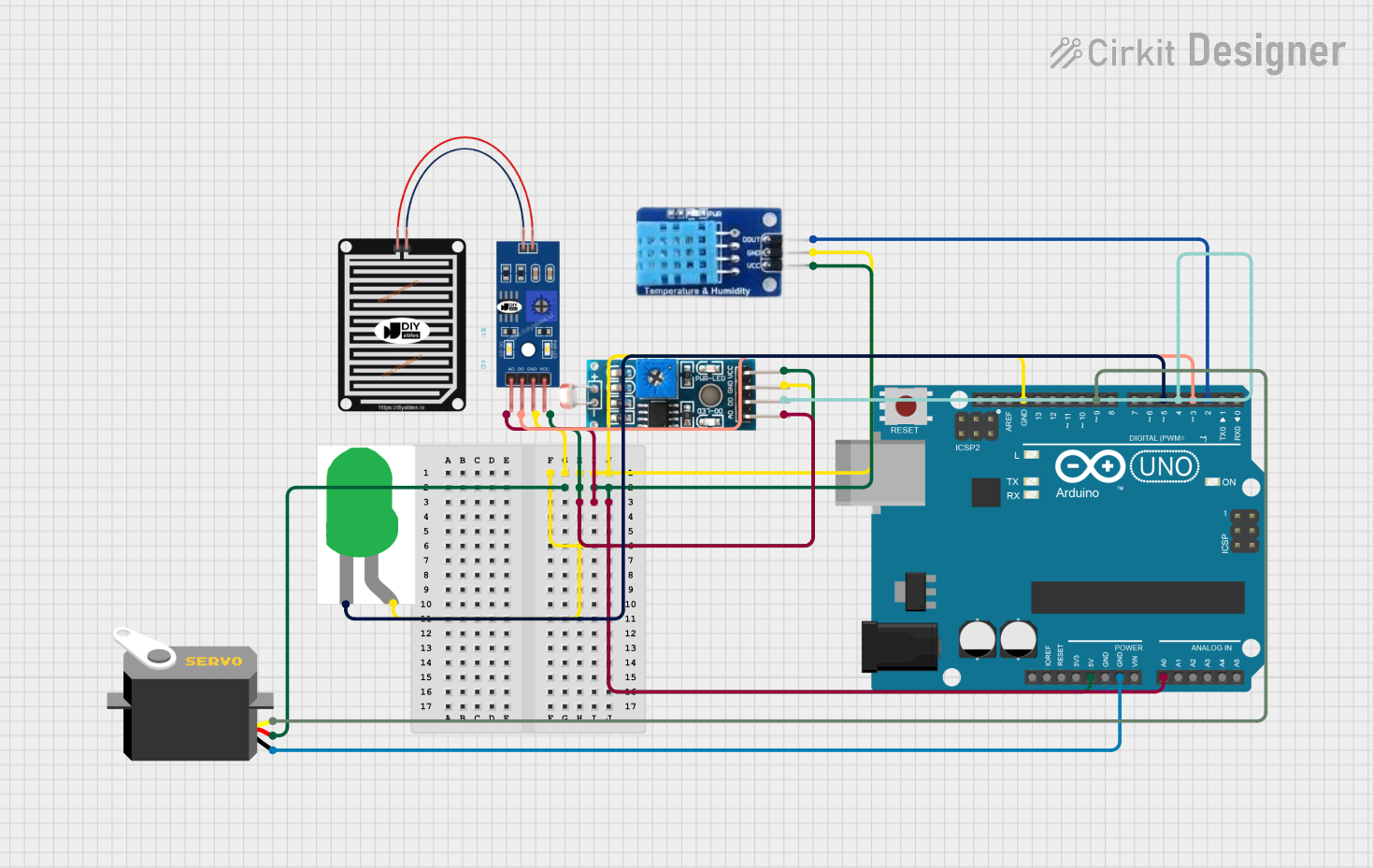
Automatic Umbrella Control System Documentation
Summary
This document provides a detailed overview of the Automatic Umbrella Control System. The system uses an Arduino UNO microcontroller to control an umbrella mechanism based on environmental conditions. It utilizes a rain sensor, a DHT11 temperature sensor, an LDR module, and a servo motor. The umbrella opens when it detects rain or when the temperature exceeds 30°C. Additionally, an LED lights up during the night.
Component List
Arduino UNO
- Description: Microcontroller board based on the ATmega328P.
- Pins: UNUSED, IOREF, Reset, 3.3V, 5V, GND, Vin, A0, A1, A2, A3, A4, A5, SCL, SDA, AREF, D13, D12, D11, D10, D9, D8, D7, D6, D5, D4, D3, D2, D1, D0
DHT11
- Description: Temperature and humidity sensor.
- Pins: DATA, GND, VCC
RAIN SENSOR
- Description: Sensor to detect rain.
- Pins: AO, DO, GRD, VCC
Module LDR
- Description: Light-dependent resistor module.
- Pins: VCC, GND, DO, AO
LED: Two Pin (green)
- Description: Green LED.
- Pins: cathode, anode
Servo
- Description: Servo motor for controlling the umbrella.
- Pins: gnd, vcc, pulse
Wiring Details
Arduino UNO
GND
- Connected to:
- LED: Two Pin (green) - anode
- RAIN SENSOR - GRD
- Module LDR - GND
- DHT11 - GND
- Servo - gnd
- Connected to:
5V
- Connected to:
- Servo - vcc
- RAIN SENSOR - VCC
- Module LDR - VCC
- DHT11 - VCC
- Connected to:
A0
- Connected to:
- RAIN SENSOR - AO
- Module LDR - AO
- Connected to:
D9
- Connected to:
- Servo - pulse
- Connected to:
D5
- Connected to:
- LED: Two Pin (green) - cathode
- Connected to:
D4
- Connected to:
- Module LDR - DO
- Connected to:
D3
- Connected to:
- RAIN SENSOR - DO
- Connected to:
D2
- Connected to:
- DHT11 - DATA
- Connected to:
DHT11
DATA
- Connected to:
- Arduino UNO - D2
- Connected to:
GND
- Connected to:
- Arduino UNO - GND
- Connected to:
VCC
- Connected to:
- Arduino UNO - 5V
- Connected to:
RAIN SENSOR
AO
- Connected to:
- Arduino UNO - A0
- Connected to:
DO
- Connected to:
- Arduino UNO - D3
- Connected to:
GRD
- Connected to:
- Arduino UNO - GND
- Connected to:
VCC
- Connected to:
- Arduino UNO - 5V
- Connected to:
Module LDR
VCC
- Connected to:
- Arduino UNO - 5V
- Connected to:
GND
- Connected to:
- Arduino UNO - GND
- Connected to:
DO
- Connected to:
- Arduino UNO - D4
- Connected to:
AO
- Connected to:
- Arduino UNO - A0
- Connected to:
LED: Two Pin (green)
cathode
- Connected to:
- Arduino UNO - D5
- Connected to:
anode
- Connected to:
- Arduino UNO - GND
- Connected to:
Servo
gnd
- Connected to:
- Arduino UNO - GND
- Connected to:
vcc
- Connected to:
- Arduino UNO - 5V
- Connected to:
pulse
- Connected to:
- Arduino UNO - D9
- Connected to:
Code Documentation
/*
 * Automatic Umbrella Control System
 * This Arduino sketch controls an automatic umbrella system using a rain sensor,
 * a DHT11 temperature sensor, an LDR module, and a servo motor. The umbrella opens
 * when it detects rain or when the temperature exceeds 30°C. Additionally, an LED
 * lights up during the night.
 */

#include <DHT.h>
#include <Servo.h>

#define DHTPIN 2
#define DHTTYPE DHT11
#define RAIN_SENSOR_PIN A0
#define RAIN_SENSOR_DIGITAL_PIN 3
#define LDR_PIN A0
#define LDR_DIGITAL_PIN 4
#define LED_PIN 5
#define SERVO_PIN 9

DHT dht(DHTPIN, DHTTYPE);
Servo umbrellaServo;

void setup() {
  Serial.begin(9600);
  dht.begin();
  pinMode(RAIN_SENSOR_DIGITAL_PIN, INPUT);
  pinMode(LDR_DIGITAL_PIN, INPUT);
  pinMode(LED_PIN, OUTPUT);
  umbrellaServo.attach(SERVO_PIN);
  umbrellaServo.write(0); // Initial position: closed
}

void loop() {
  float temperature = dht.readTemperature();
  int rainAnalog = analogRead(RAIN_SENSOR_PIN);
  int rainDigital = digitalRead(RAIN_SENSOR_DIGITAL_PIN);
  int ldrAnalog = analogRead(LDR_PIN);
  int ldrDigital = digitalRead(LDR_DIGITAL_PIN);

  if (isnan(temperature)) {
    Serial.println("Failed to read from DHT sensor!");
    return;
  }

  Serial.print("Temperature: ");
  Serial.print(temperature);
  Serial.println(" *C");
  Serial.print("Rain Analog: ");
  Serial.println(rainAnalog);
  Serial.print("Rain Digital: ");
  Serial.println(rainDigital);
  Serial.print("LDR Analog: ");
  Serial.println(ldrAnalog);
  Serial.print("LDR Digital: ");
  Serial.println(ldrDigital);

  if (rainDigital == LOW || temperature > 30) {
    openUmbrella();
  } else {
    closeUmbrella();
  }

  if (ldrDigital == LOW) {
    digitalWrite(LED_PIN, HIGH);
  } else {
    digitalWrite(LED_PIN, LOW);
  }

  delay(2000);
}

void openUmbrella() {
  Serial.println("Umbrella Opened");
  umbrellaServo.write(90); // Open position
}

void closeUmbrella() {
  Serial.println("Umbrella Closed");
  umbrellaServo.write(0); // Closed position
}
This code initializes the sensors and servo motor, reads the sensor values, and controls the umbrella and LED based on the sensor readings. The umbrella opens if it detects rain or if the temperature exceeds 30°C, and the LED lights up during the night.