
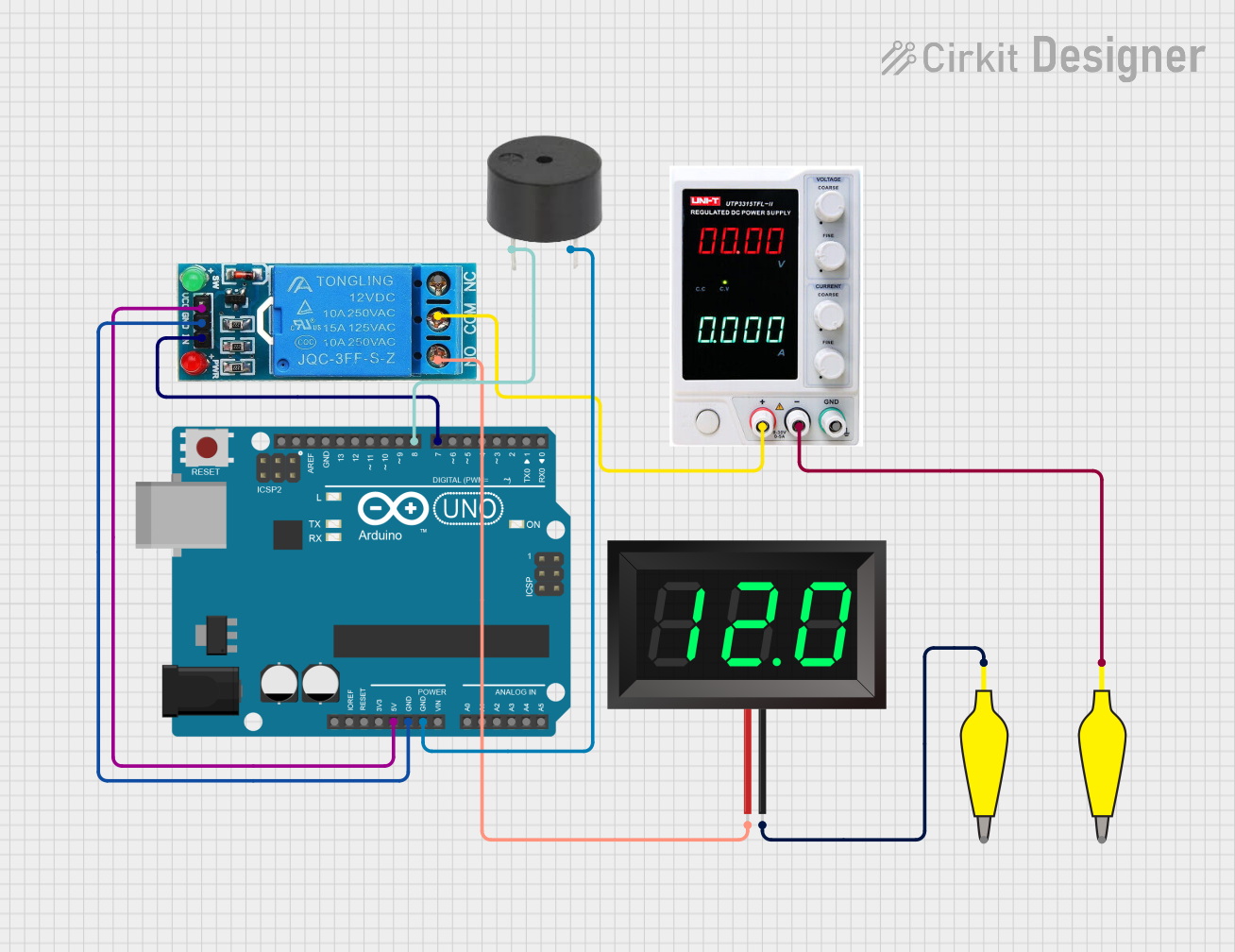
Circuit Documentation
Summary
This circuit involves an Arduino UNO microcontroller, a 12V single-channel relay, a buzzer, a 7-segment panel voltmeter, and a power supply. The Arduino UNO controls the relay and the buzzer, while the relay switches the power to the voltmeter. The power supply provides the necessary voltage for the relay and the voltmeter.
Component List
Arduino UNO
- Description: A microcontroller board based on the ATmega328P.
- Pins: UNUSED, IOREF, Reset, 3.3V, 5V, GND, Vin, A0, A1, A2, A3, A4, A5, SCL, SDA, AREF, D13, D12, D11, D10, D9, D8, D7, D6, D5, D4, D3, D2, D1, D0
12V Single Channel Relay
- Description: A relay module that allows a microcontroller to control high voltage devices.
- Pins: NC, COM, NO, IN, GND, VCC
Power Supply
- Description: Provides power to the circuit.
- Pins: +, -, GND
12978 Alligator Clip Cable Half-Yellow
- Description: Used for making temporary connections.
- Pins: Pin, Alligator
7-Segment Panel Voltmeter
- Description: Displays voltage readings.
- Pins: V+, V-
Buzzer
- Description: Emits sound when activated.
- Pins: PIN, GND
Wiring Details
Arduino UNO
- 5V connected to VCC of the 12V Single Channel Relay
- GND connected to GND of the 12V Single Channel Relay
- GND connected to GND of the Buzzer
- D8 connected to PIN of the Buzzer
- D7 connected to IN of the 12V Single Channel Relay
12V Single Channel Relay
- VCC connected to 5V of the Arduino UNO
- GND connected to GND of the Arduino UNO
- IN connected to D7 of the Arduino UNO
- COM connected to + of the Power Supply
- NO connected to V+ of the 7-Segment Panel Voltmeter
Power Supply
- + connected to COM of the 12V Single Channel Relay
- - connected to Pin of the 12978 Alligator Clip Cable Half-Yellow
12978 Alligator Clip Cable Half-Yellow
- Pin connected to - of the Power Supply
- Pin connected to V- of the 7-Segment Panel Voltmeter
7-Segment Panel Voltmeter
- V+ connected to NO of the 12V Single Channel Relay
- V- connected to Pin of the 12978 Alligator Clip Cable Half-Yellow
Buzzer
- GND connected to GND of the Arduino UNO
- PIN connected to D8 of the Arduino UNO
Code Documentation
Arduino UNO Code
sketch.ino
void setup() {
  // put your setup code here, to run once:

}

void loop() {
  // put your main code here, to run repeatedly:

}
documentation.txt