
Arduino Nano Controlled DC Motor with Pushbutton and BT139 Triac
View and Edit Project In Cirkit Designer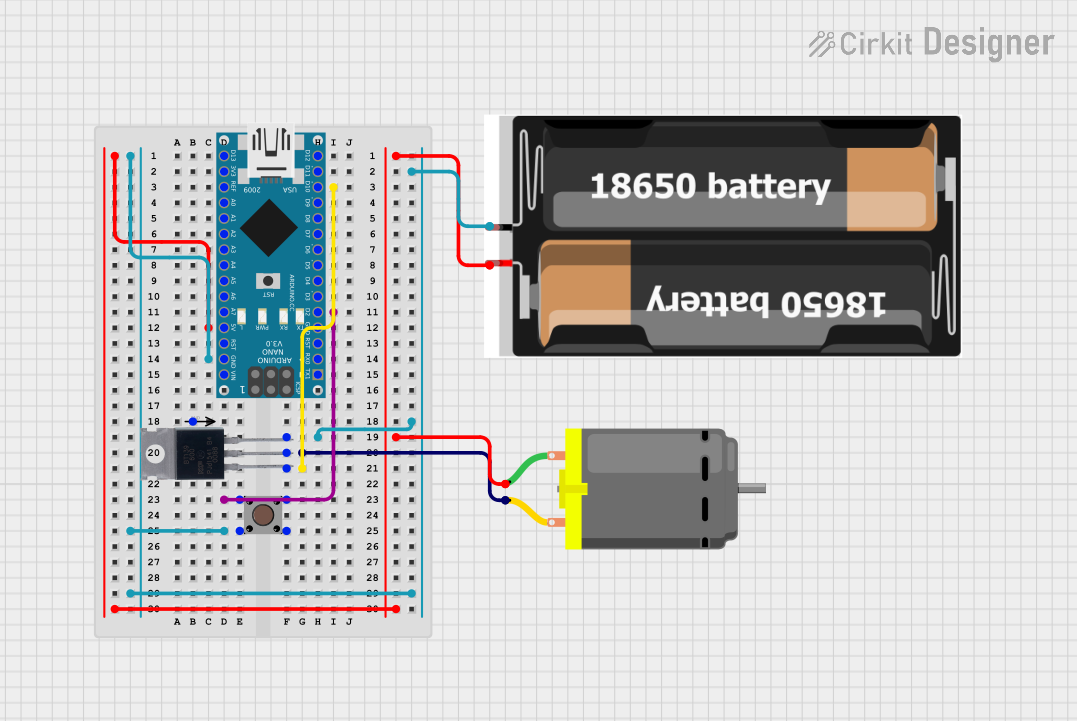
Circuit Documentation
Summary
This document provides a detailed overview of a circuit that includes an Arduino Nano microcontroller, a pushbutton, a DC motor, a BT139 600 TRIAC, a 2x 18650 battery pack, and Qwiic cables. The circuit is designed to control a DC motor using a pushbutton and a TRIAC, with power supplied by a 2x 18650 battery pack.
Component List
Pushbutton
- Description: A simple pushbutton switch.
- Pins: Pin 1 (in), Pin 2 (in), Pin 3 (out), Pin 4 (out)
DC Motor
- Description: A DC motor for mechanical movement.
- Pins: pin 1, pin 2
Qwiic Cable - Breadboard Jumper (4-pin)
- Description: A 4-pin Qwiic cable for I2C communication.
- Pins: GND, 3.3V, SDA, SCL
Arduino Nano
- Description: A small, complete, and breadboard-friendly microcontroller board based on the ATmega328P.
- Pins: D1/TX, D0/RX, RESET, GND, D2, D3, D4, D5, D6, D7, D8, D9, D10, D11/MOSI, D12/MISO, VIN, 5V, A7, A6, A5, A4, A3, A2, A1, A0, AREF, 3V3, D13/SCK
BT139 600
- Description: A TRIAC for controlling AC loads.
- Pins: MT1, MT2, GATE
2x 18650
- Description: A battery pack containing two 18650 batteries.
- Pins: vcc, gnd
Wiring Details
Pushbutton
- Pin 3 (out) is connected to Arduino Nano D2.
- Pin 1 (in) is connected to Arduino Nano GND.
DC Motor
- pin 1 is connected to Arduino Nano 5V.
- pin 2 is connected to BT139 600 MT2.
Qwiic Cable - Breadboard Jumper (4-pin)
- GND is not connected in this circuit.
- 3.3V is not connected in this circuit.
- SDA is not connected in this circuit.
- SCL is not connected in this circuit.
Arduino Nano
- D10 is connected to BT139 600 MT1.
- D2 is connected to Pushbutton Pin 3 (out).
- 5V is connected to 2x 18650 vcc and DC Motor pin 1.
- GND is connected to Pushbutton Pin 1 (in), BT139 600 GATE, and 2x 18650 gnd.
BT139 600
- MT1 is connected to Arduino Nano D10.
- MT2 is connected to DC Motor pin 2.
- GATE is connected to Arduino Nano GND.
2x 18650
- vcc is connected to Arduino Nano 5V and DC Motor pin 1.
- gnd is connected to Arduino Nano GND.
Documented Code
Arduino Nano Code
void setup() {
  // put your setup code here, to run once:

}

void loop() {
  // put your main code here, to run repeatedly:

}
This code is a basic template for the Arduino Nano. The setup function is used to initialize any settings, and the loop function contains the main code that runs repeatedly. Currently, the code does not perform any specific actions and serves as a starting point for further development.