
Arduino Nano Rain-Sensing Stepper Motor System with A4988 Driver
View and Edit Project In Cirkit Designer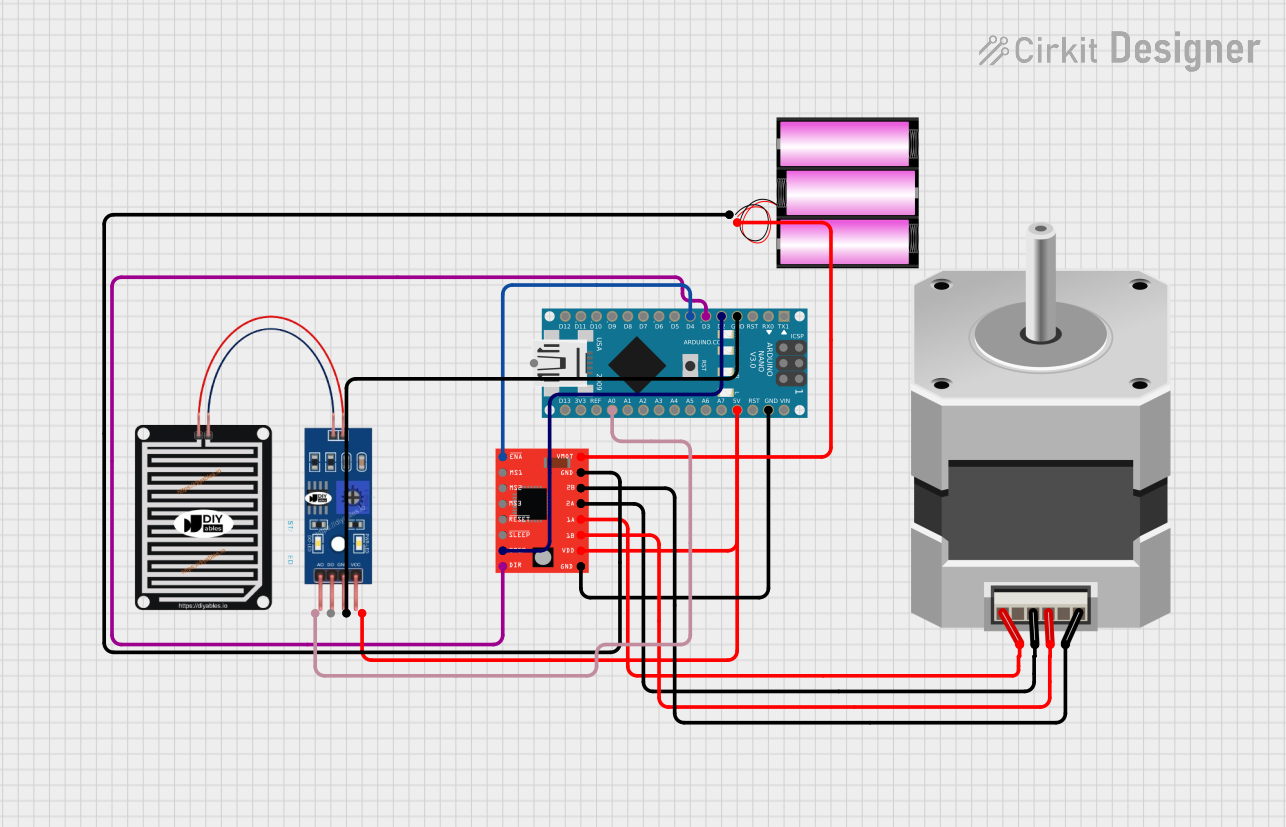
Circuit Documentation
Summary
This circuit is designed to detect rain using a rain sensor and control a stepper motor to move a rack to a sheltered area when rain is detected. The system is built around an Arduino Nano microcontroller, which reads the rain sensor data and controls the stepper motor via an A4988 stepper motor driver. The circuit is powered by a 12V battery.
Component List
Arduino Nano
- Description: A small, complete, and breadboard-friendly board based on the ATmega328P.
- Pins: D1/TX, D0/RX, RESET, GND, D2, D3, D4, D5, D6, D7, D8, D9, D10, D11/MOSI, D12/MISO, VIN, 5V, A7, A6, A5, A4, A3, A2, A1, A0, AREF, 3V3, D13/SCK
RAIN SENSOR
- Description: A sensor module used to detect rain.
- Pins: AO, DO, GRD, VCC
Stepper Motor (Bipolar)
- Description: A bipolar stepper motor used for precise control of rotational position.
- Pins: D, B, C, A
A4988 Stepper Motor Driver (Red)
- Description: A microstepping driver for controlling bipolar stepper motors.
- Pins: ENABLE, MS1, MS2, MS3, RESET, SLEEP, STEP, DIR, VMOT, GND, 2B, 2A, 1A, 1B, VDD
Battery 12V
- Description: A 12V battery used to power the stepper motor driver and motor.
- Pins: +, -
Wiring Details
Arduino Nano
- GND connected to RAIN SENSOR GRD
- D2 connected to A4988 Stepper Motor Driver (Red) STEP
- D3 connected to A4988 Stepper Motor Driver (Red) DIR
- D4 connected to A4988 Stepper Motor Driver (Red) ENABLE
- GND connected to A4988 Stepper Motor Driver (Red) GND
- 5V connected to A4988 Stepper Motor Driver (Red) VDD and RAIN SENSOR VCC
- A0 connected to RAIN SENSOR AO
RAIN SENSOR
- GRD connected to Arduino Nano GND
- VCC connected to Arduino Nano 5V
- AO connected to Arduino Nano A0
Stepper Motor (Bipolar)
- D connected to A4988 Stepper Motor Driver (Red) 2B
- B connected to A4988 Stepper Motor Driver (Red) 1B
- C connected to A4988 Stepper Motor Driver (Red) 2A
- A connected to A4988 Stepper Motor Driver (Red) 1A
A4988 Stepper Motor Driver (Red)
- STEP connected to Arduino Nano D2
- DIR connected to Arduino Nano D3
- ENABLE connected to Arduino Nano D4
- GND connected to Arduino Nano GND and Battery 12V -
- VDD connected to Arduino Nano 5V
- 2B connected to Stepper Motor (Bipolar) D
- 1B connected to Stepper Motor (Bipolar) B
- 2A connected to Stepper Motor (Bipolar) C
- 1A connected to Stepper Motor (Bipolar) A
- VMOT connected to Battery 12V +
Battery 12V
- + connected to A4988 Stepper Motor Driver (Red) VMOT
- - connected to A4988 Stepper Motor Driver (Red) GND
Code Documentation
Arduino Nano Code
#include <AccelStepper.h>

const int rainSensorPin = A0; // Pin connected to the rain sensor
const int threshold = 500;    // Rain detection threshold value
const int stepsPerRevolution = 200; // Steps per revolution of the stepper motor
const int stepsFor5Meter = 10000;   // Adjust this based on your motor and mechanism

AccelStepper stepper(AccelStepper::DRIVER, 2, 3); // Pins connected to step and direction

void setup() {
  pinMode(rainSensorPin, INPUT);

  stepper.setMaxSpeed(1000);  // Set maximum speed of the motor
  stepper.setAcceleration(500); // Set acceleration for smooth motion
}

void loop() {
  int sensorValue = analogRead(rainSensorPin); // Read the rain sensor

  if (sensorValue > threshold) {
    // If rain is detected, move the rack to the sheltered area
    if (stepper.currentPosition() != stepsFor5Meter) {
      stepper.moveTo(stepsFor5Meter); // Move forward to the sheltered area
    }
  } else {
    // If no rain, retract the rack
    if (stepper.currentPosition() != 0) {
      stepper.moveTo(0); // Move back to the original position
    }
  }

  stepper.run();  // Moves the motor to the target position
  delay(1000);    // Delay to reduce noise and avoid false triggering
}
This code initializes the rain sensor and stepper motor driver, reads the rain sensor value, and moves the stepper motor to a sheltered area if rain is detected. If no rain is detected, the stepper motor retracts the rack to its original position.