
ESP32-Based Smart Parking System with IR Sensors and LCD Display
View and Edit Project In Cirkit Designer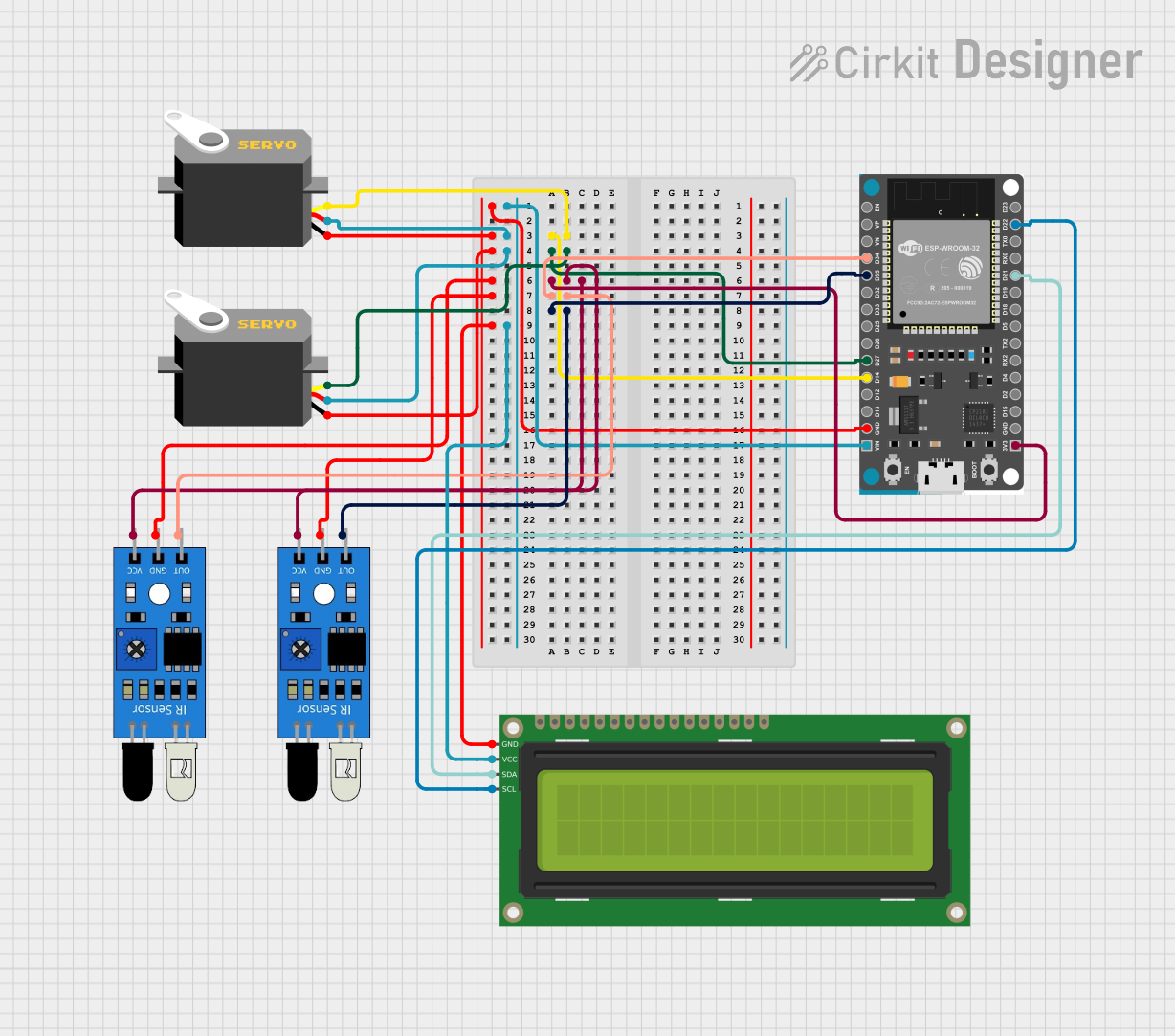
Circuit Documentation
Summary
This circuit is designed to manage a parking system using an ESP32 microcontroller. It includes two IR sensors to detect vehicle entry and exit, two servos to control entry and exit gates, and a 16x2 I2C LCD to display the parking status. The system counts the number of vehicles in the parking lot and updates the display accordingly. When the parking lot is full, it prevents additional vehicles from entering.
Component List
ESP32 Devkit V1
- Description: Microcontroller used to control the entire system.
- Pins: 3V3, GND, D15, D2, D4, RX2, TX2, D5, D18, D19, D21, RX0, TX0, D22, D23, EN, VP, VN, D34, D35, D32, D33, D25, D26, D27, D14, D12, D13, VIN
16x2 I2C LCD
- Description: Display module used to show the parking status.
- Pins: GND, VCC, SDA, SCL
IR Sensor (Entry)
- Description: Infrared sensor used to detect vehicle entry.
- Pins: out, gnd, vcc
IR Sensor (Exit)
- Description: Infrared sensor used to detect vehicle exit.
- Pins: out, gnd, vcc
Servo (Entry Gate)
- Description: Servo motor used to control the entry gate.
- Pins: gnd, vcc, pulse
Servo (Exit Gate)
- Description: Servo motor used to control the exit gate.
- Pins: gnd, vcc, pulse
Wiring Details
ESP32 Devkit V1
- 3V3: Connected to VCC of both IR sensors.
- GND: Connected to GND of both IR sensors, both servos, and the LCD.
- D14: Connected to the pulse pin of the entry gate servo.
- D27: Connected to the pulse pin of the exit gate servo.
- D34: Connected to the out pin of the entry IR sensor.
- D35: Connected to the out pin of the exit IR sensor.
- VIN: Connected to VCC of both servos and the LCD.
- D21: Connected to SDA of the LCD.
- D22: Connected to SCL of the LCD.
16x2 I2C LCD
- GND: Connected to GND of the ESP32.
- VCC: Connected to VIN of the ESP32.
- SDA: Connected to D21 of the ESP32.
- SCL: Connected to D22 of the ESP32.
IR Sensor (Entry)
- out: Connected to D34 of the ESP32.
- gnd: Connected to GND of the ESP32.
- vcc: Connected to 3V3 of the ESP32.
IR Sensor (Exit)
- out: Connected to D35 of the ESP32.
- gnd: Connected to GND of the ESP32.
- vcc: Connected to 3V3 of the ESP32.
Servo (Entry Gate)
- gnd: Connected to GND of the ESP32.
- vcc: Connected to VIN of the ESP32.
- pulse: Connected to D14 of the ESP32.
Servo (Exit Gate)
- gnd: Connected to GND of the ESP32.
- vcc: Connected to VIN of the ESP32.
- pulse: Connected to D27 of the ESP32.
Documented Code
#include <Arduino.h>
#include <ESP32Servo.h> // Pastikan Anda telah menginstal library ESP32Servo
#include <Wire.h>
#include <LiquidCrystal_I2C.h>

// --- Konfigurasi Pin ---
const int sensorMasukPin = 34;    // GPIO 34 untuk sensor masuk
const int sensorKeluarPin = 35;   // GPIO 35 untuk sensor keluar
const int servoMasukPin = 14;     // GPIO 14 untuk servo masuk
const int servoKeluarPin = 27;    // GPIO 27 untuk servo keluar

// --- Variabel Global ---
volatile int countKendaraan = 0;
volatile bool sensorMasukState = false;
volatile bool sensorKeluarState = false;

// --- Status Sensor ---
bool prevSensorMasuk = false;  // Status sebelumnya dari sensor masuk
bool prevSensorKeluar = false; // Status sebelumnya dari sensor keluar

// --- Objek Servo ---
Servo servoMasuk;
Servo servoKeluar;

// --- Objek LCD ---
LiquidCrystal_I2C lcd(0x27, 16, 2); // Pastikan alamat I2C sesuai dengan modul Anda

// --- Timing Servo ---
unsigned long servoMasukTimer = 0;
unsigned long servoKeluarTimer = 0;

const unsigned long servoOpenTime = 1000; // Waktu servo terbuka dalam ms

// --- State Machine untuk Servo ---
enum ServoState { IDLE, OPENING, OPEN, CLOSING };

ServoState servoMasukStateMachine = IDLE;
ServoState servoKeluarStateMachine = IDLE;

// --- Indikator LED (Opsional) ---
const int ledMasukPin = 12;  // GPIO 12 untuk LED masuk
const int ledKeluarPin = 13; // GPIO 13 untuk LED keluar

// --- Batas Maksimal Parkir ---
const int batasParkir = 10;

void IRAM_ATTR sensorMasukISR() {
  sensorMasukState = true;
}

void IRAM_ATTR sensorKeluarISR() {
  sensorKeluarState = true;
}

void setup() {
  // Inisialisasi Serial Monitor
  Serial.begin(115200);

  // Inisialisasi pin sensor
  pinMode(sensorMasukPin, INPUT_PULLUP);
  pinMode(sensorKeluarPin, INPUT_PULLUP);

  // Inisialisasi pin LED
  pinMode(ledMasukPin, OUTPUT);
  pinMode(ledKeluarPin, OUTPUT);
  digitalWrite(ledMasukPin, LOW);
  digitalWrite(ledKeluarPin, LOW);

  // Pasang ISR
  attachInterrupt(digitalPinToInterrupt(sensorMasukPin), sensorMasukISR, FALLING);
  attachInterrupt(digitalPinToInterrupt(sensorKeluarPin), sensorKeluarISR, FALLING);

  // Inisialisasi servo
  servoMasuk.attach(servoMasukPin);
  servoKeluar.attach(servoKeluarPin);

  // Inisialisasi LCD
  lcd.init();
  lcd.backlight();
  lcd.setCursor(0, 0);
  lcd.print("Parkir: ");
  lcd.setCursor(0, 1);
  lcd.print("Status: ");

  // Inisialisasi posisi servo
  servoMasuk.write(0);  // Posisi awal servo masuk
  servoKeluar.write(0); // Posisi awal servo keluar
}

void loop() {
  unsigned long currentMillis = millis();

  // --- Penanganan Sensor Masuk ---
  if (sensorMasukState) {
    sensorMasukState = false; // Reset flag

    // Membaca status sensor masuk
    bool currentSensorMasuk = (digitalRead(sensorMasukPin) == LOW);

    // Deteksi transisi dari HIGH ke LOW
    if (currentSensorMasuk && !prevSensorMasuk) {
      if (countKendaraan < batasParkir) { // Cek apakah parkir belum penuh
        countKendaraan++;
        Serial.print("Kendaraan masuk. Total: ");
        Serial.println(countKendaraan);

        // Update tampilan LCD
        lcd.setCursor(7, 0);
        lcd.print("       "); // Clear sebelumnya
        lcd.setCursor(7, 0);
        lcd.print(countKendaraan);

        // Update Status Parkir
        updateStatusParkir();

        // Mulai state machine servo masuk
        servoMasukStateMachine = OPENING;
        servoMasukTimer = currentMillis;

        // Nyalakan LED indikator masuk
        digitalWrite(ledMasukPin, HIGH);
      } else {
        // Parkir penuh, tampilkan pesan
        Serial.println("Parkir penuh! Tidak bisa menambah kendaraan.");
        lcd.setCursor(0, 1);
        lcd.print("Penuh!            ");
      }
    }

    prevSensorMasuk = currentSensorMasuk;
  }

  // --- Penanganan Sensor Keluar ---
  if (sensorKeluarState) {
    sensorKeluarState = false; // Reset flag

    // Membaca status sensor keluar
    bool currentSensorKeluar = (digitalRead(sensorKeluarPin) == LOW);

    // Deteksi transisi dari HIGH ke LOW
    if (currentSensorKeluar && !prevSensorKeluar) {
      if (countKendaraan > 0) {
        countKendaraan--;
        Serial.print("Kendaraan keluar. Total: ");
        Serial.println(countKendaraan);

        // Update tampilan LCD
        lcd.setCursor(7, 0);
        lcd.print("       "); // Clear sebelumnya
        lcd.setCursor