
Circuit Documentation
Summary
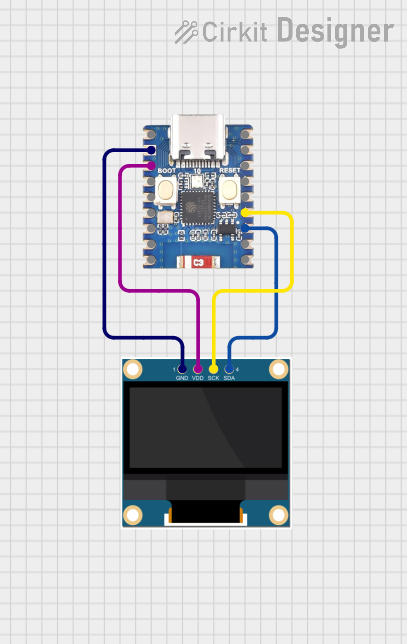
This circuit consists of an ESP32-C3 Mini microcontroller and a 0.96" OLED display. The ESP32-C3 Mini is used to read an analog signal and display a waveform on the OLED screen. The OLED display is connected to the ESP32-C3 Mini via I2C communication.
Component List
ESP32-C3 Mini
- Description: A low-power microcontroller with integrated Wi-Fi and Bluetooth capabilities.
- Pins: 5V, GND, 21, 20, 3V3, 0, 1, 2, 3, 4, 5, 19, 18, 10, 9, 8, 7, 6
0.96" OLED
- Description: A small OLED display module with a resolution of 128x64 pixels.
- Pins: GND, VDD, SCK, SDA
Wiring Details
ESP32-C3 Mini
- GND: Connected to GND of the 0.96" OLED
- 3V3: Connected to VDD of the 0.96" OLED
- Pin 9: Connected to SCK of the 0.96" OLED
- Pin 8: Connected to SDA of the 0.96" OLED
0.96" OLED
- GND: Connected to GND of the ESP32-C3 Mini
- VDD: Connected to 3V3 of the ESP32-C3 Mini
- SCK: Connected to Pin 9 of the ESP32-C3 Mini
- SDA: Connected to Pin 8 of the ESP32-C3 Mini
Code
#include <Wire.h>
#include <Adafruit_GFX.h>
#include <Adafruit_SSD1306.h>

#define SCREEN_WIDTH 128 // OLED display width, in pixels
#define SCREEN_HEIGHT 64 // OLED display height, in pixels
#define OLED_RESET    -1 // Reset pin # (or -1 if sharing Arduino reset pin)
Adafruit_SSD1306 display(SCREEN_WIDTH, SCREEN_HEIGHT, &Wire, OLED_RESET);

#define ANALOG_PIN 0 // Analog input pin (use correct GPIO number)

void setup() {
  // Initialize serial communication
  Serial.begin(115200);

  // Initialize the I2C bus
  Wire.begin();

  // Initialize the OLED display
  if(!display.begin(0x3C, OLED_RESET)) { // Use correct I2C address
    Serial.println(F("SSD1306 allocation failed"));
    for(;;);
  }
  display.display();
  delay(2000); // Pause for 2 seconds
  display.clearDisplay();
}

void loop() {
  // Read the analog signal from the defined analog pin
  int analogValue = analogRead(ANALOG_PIN);

  // Map the analog value to the display height
  int displayValue = map(analogValue, 0, 1023, 0, SCREEN_HEIGHT);

  // Clear the display
  display.clearDisplay();

  // Draw the waveform
  for (int x = 0; x < SCREEN_WIDTH; x++) {
    int y = map(analogRead(ANALOG_PIN), 0, 1023, 0, SCREEN_HEIGHT);
    display.drawPixel(x, SCREEN_HEIGHT - y, SSD1306_WHITE);
    delay(10); // Small delay to simulate waveform
  }

  // Display the waveform
  display.display();
}
This code initializes the ESP32-C3 Mini and the OLED display, reads an analog signal, and displays a waveform on the OLED screen. The waveform is updated continuously in the loop function.