
Circuit Documentation
Summary
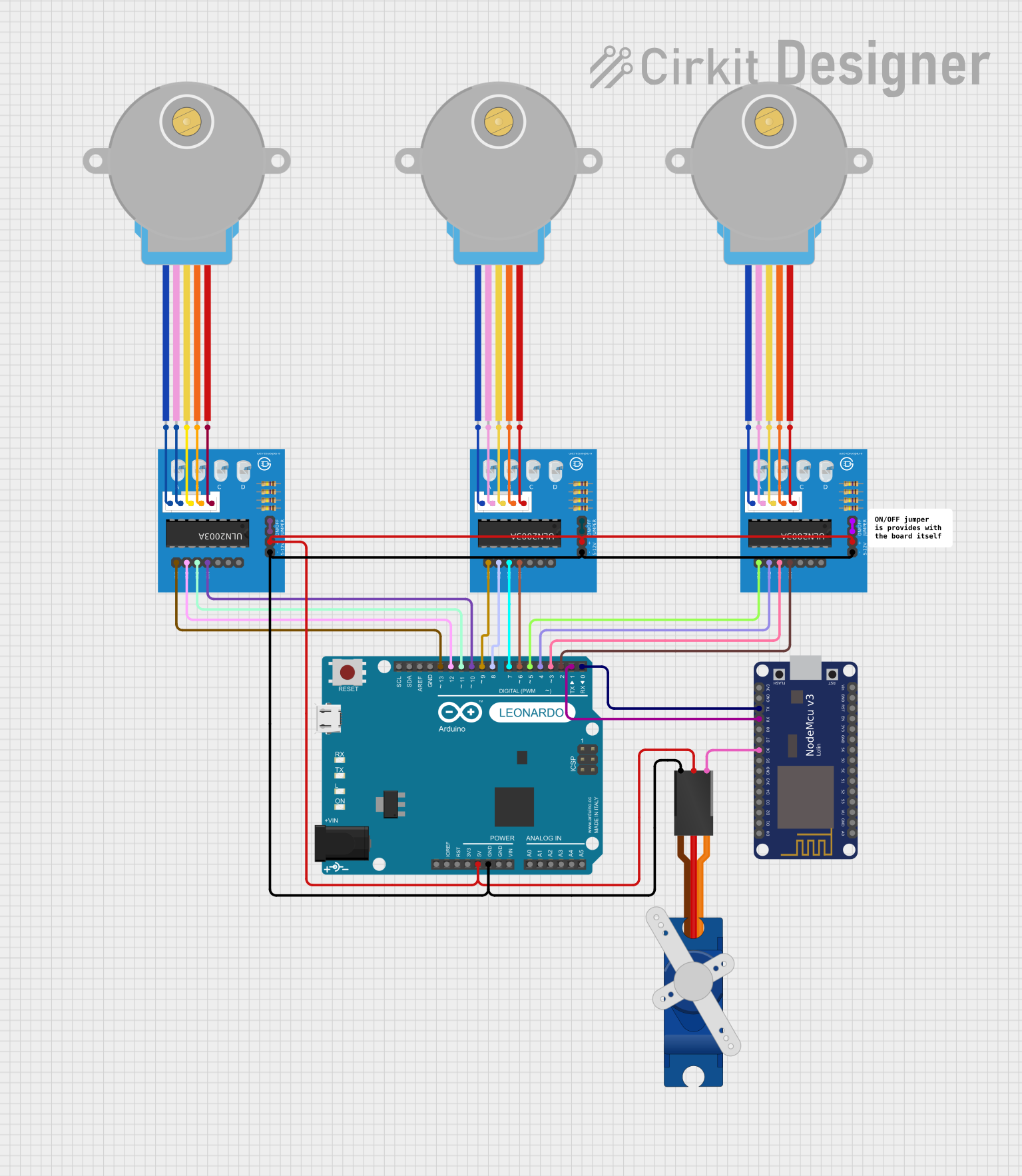
The circuit in question appears to be designed for controlling stepper motors and a servo motor using an Arduino Leonardo and a NodeMCU ESP8266 microcontroller. The Arduino Leonardo is connected to two ULN2003A breakout boards, which in turn are connected to stepper motors. The NodeMCU ESP8266 is programmed to control a Tower Pro SG90 servo motor. Communication between the Arduino and the NodeMCU is established via serial connection, allowing for potential coordination or data exchange between the two microcontrollers.
Component List
Microcontrollers
- Arduino Leonardo (Rev3b): A microcontroller board based on the ATmega32u4, with digital and analog I/O pins, PWM capabilities, and communication interfaces such as UART.
- NodeMCU V3 ESP8266: A microcontroller with built-in Wi-Fi, digital pins, analog input, and UART communication, suitable for IoT applications.
Motor Drivers
- ULN2003A Breakout Board: A board featuring the ULN2003A Darlington transistor array, used for driving stepper motors. It provides input pins for control signals and output pins connected to the motor.
Motors
- 28BYJ-48 Stepper Motor: A small, 5-wire, unipolar stepper motor commonly used for precise motion control.
- Tower Pro SG90 Servo: A small hobbyist servo motor capable of angular rotation to a specified position.
Miscellaneous
- Comment: A placeholder for additional notes or comments about the circuit, not a physical component.
Wiring Details
Arduino Leonardo (Rev3b)
- Digital pins D0 to D13 are used for various control signals to the ULN2003A breakout boards.
- The 5V and GND pins provide power to the ULN2003A breakout boards and the Tower Pro SG90 servo.
- The RX and TX pins are connected to the TX and RX pins of the NodeMCU ESP8266 for serial communication.
ULN2003A Breakout Boards
- Input pins In 1 to In 4 receive control signals from the Arduino Leonardo for stepper motor control.
- The 0V and +5V pins are connected to GND and 5V of the Arduino Leonardo for power.
- The BLUE, PINK, YELLOW, ORANGE, and RED wires are connected to the corresponding wires of the 28BYJ-48 Stepper Motors.
28BYJ-48 Stepper Motors
- The BLUE, PINK, YELLOW, ORANGE, and RED wires are connected to the corresponding wires on the ULN2003A breakout boards.
Tower Pro SG90 Servo
- The Signal pin is connected to pin D6 of the NodeMCU ESP8266.
- The +5V and GND pins are connected to the 5V and GND pins of the Arduino Leonardo for power.
Documented Code
Arduino Leonardo (Rev3b) Code
void setup() {
  // put your setup code here, to run once:

}

void loop() {
  // put your main code here, to run repeatedly:

}
This code is a template and does not contain any functionality. It needs to be populated with the logic to control the stepper motors via the ULN2003A breakout boards.
NodeMCU ESP8266 Code
/*
 * This Arduino Sketch controls a Tower Pro SG90 servo motor connected to
 * pin D6 of an ESP8266 NodeMCU. The servo motor will be moved to different
 * positions in a loop.
 */

#include <ESP8266WiFi.h>
#include <Servo.h>

Servo myServo;  // create servo object to control a servo

void setup() {
  myServo.attach(D6);  // attaches the servo on D6 to the servo object
}

void loop() {
  for (int pos = 0; pos <= 180; pos += 1) { // goes from 0 degrees to 180 degrees
    myServo.write(pos);              // tell servo to go to position in variable 'pos'
    delay(15);                       // waits 15ms for the servo to reach the position
  }
  for (int pos = 180; pos >= 0; pos -= 1) { // goes from 180 degrees to 0 degrees
    myServo.write(pos);              // tell servo to go to position in variable 'pos'
    delay(15);                       // waits 15ms for the servo to reach the position
  }
}
This code snippet demonstrates the control of a Tower Pro SG90 servo motor, making it sweep back and forth between 0 and 180 degrees.