
ESP32-Based Weather Station with BME280 and DS18B20 Sensors, Battery-Powered and Wi-Fi Enabled
View and Edit Project In Cirkit Designer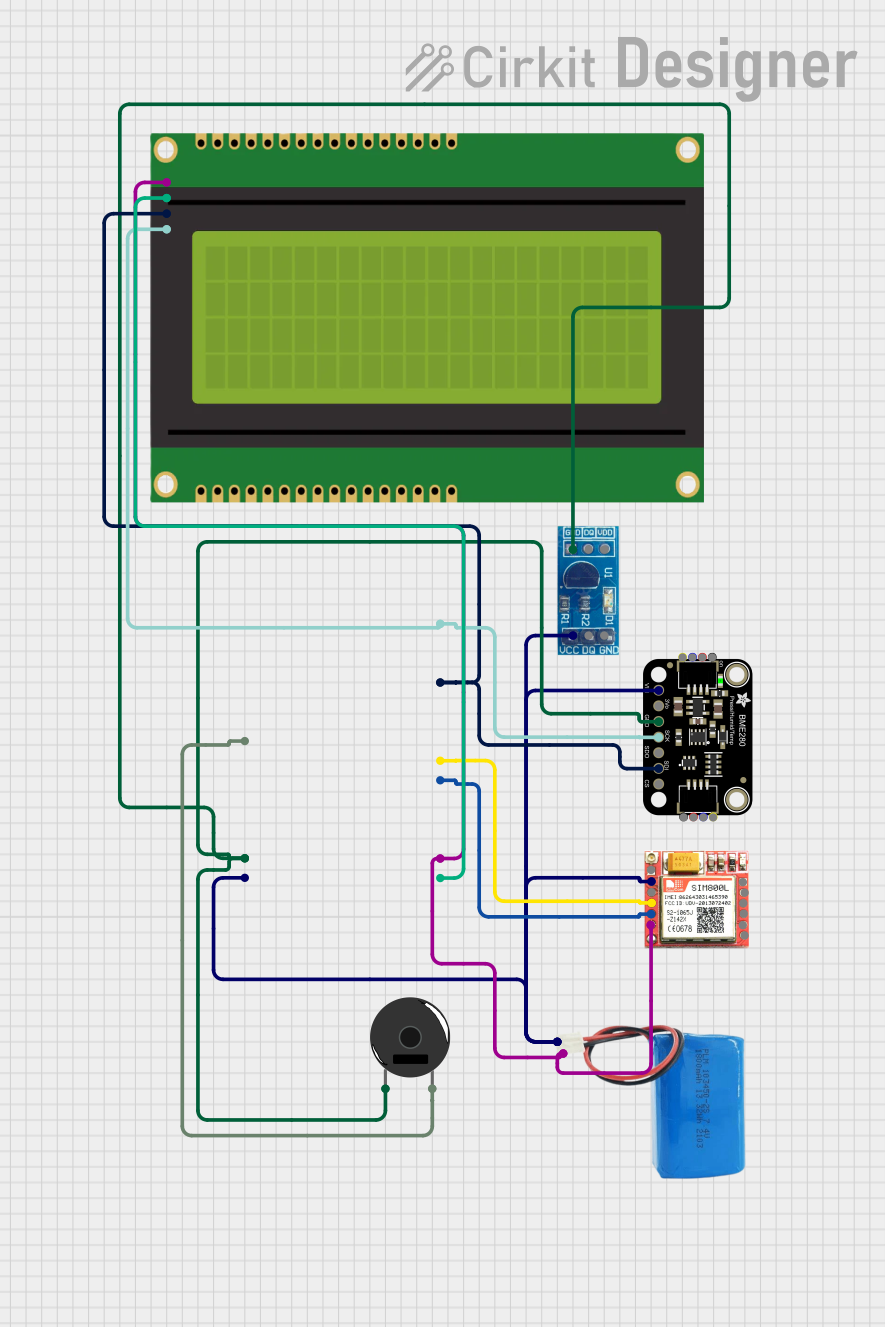
Circuit Documentation
Summary
This circuit integrates various sensors and modules to collect environmental data and display it on an LCD panel. The main components include a DS18B20 temperature sensor, a BME280 environmental sensor, a SIM800L GSM module, a piezo buzzer, a 20x4 I2C LCD panel, and an ESP32 microcontroller. The circuit is powered by a 5V battery.
Component List
DS18B20 Module
- Description: Digital temperature sensor.
- Pins: VCC, DQ, GND
SIM800L
- Description: GSM/GPRS module for communication.
- Pins: NFT, RING, VCC, DTR, RST, MIC +, RXD, MIC-, TXD, SPK+, GND, SPK-
Piezo Buzzer
- Description: Audio signaling device.
- Pins: pin 1, pin 2
20x4 I2C LCD Panel
- Description: Display panel for showing data.
- Pins: GND, VCC, SDA, SCL
Adafruit BME280
- Description: Environmental sensor for temperature, humidity, and pressure.
- Pins: VCC, 3.3V, GND, SCK/SCL, SDO/ADR, SDI/SDA, CS
5V Battery
- Description: Power source for the circuit.
- Pins: positive, negative
ESP32 (30 pin)
- Description: Microcontroller for processing and control.
- Pins: EN, VP, VN, D34, D35, D32, D33, D25, D26, D27, D14, D12, D13, GND, Vin, D23, D22, TX0, RX0, D21, D19, D18, D5, TX2, RX2, D4, D2, D15, 3V3
Wiring Details
DS18B20 Module
- VCC connected to 5V Battery positive
- GND connected to ESP32 GND
SIM800L
- VCC connected to 5V Battery positive
- GND connected to 5V Battery negative
- RXD connected to ESP32 TX2
- TXD connected to ESP32 RX2
Piezo Buzzer
- pin 1 connected to ESP32 GND
- pin 2 connected to ESP32 D25
20x4 I2C LCD Panel
- GND connected to 5V Battery negative
- VCC connected to ESP32 3V3
- SDA connected to ESP32 D21
- SCL connected to ESP32 D22
Adafruit BME280
- VCC connected to 5V Battery positive
- GND connected to ESP32 GND
- SCK/SCL connected to ESP32 D22
- SDI/SDA connected to ESP32 D21
5V Battery
- positive connected to DS18B20 Module VCC, Adafruit BME280 VCC, SIM800L VCC, ESP32 Vin
- negative connected to SIM800L GND, ESP32 GND, 20x4 I2C LCD Panel GND
ESP32 (30 pin)
- Vin connected to 5V Battery positive
- GND connected to 5V Battery negative, DS18B20 Module GND, Adafruit BME280 GND, Piezo Buzzer pin 1
- D21 connected to Adafruit BME280 SDI/SDA, 20x4 I2C LCD Panel SDA
- D22 connected to Adafruit BME280 SCK/SCL, 20x4 I2C LCD Panel SCL
- TX2 connected to SIM800L RXD
- RX2 connected to SIM800L TXD
- D25 connected to Piezo Buzzer pin 2
- 3V3 connected to 20x4 I2C LCD Panel VCC
Documented Code
DS18B20 Module
void setup() {
  // put your setup code here, to run once:
}

void loop() {
  // put your main code here, to run repeatedly:
}
SIM800L
void setup() {
  // put your setup code here, to run once:
}

void loop() {
  // put your main code here, to run repeatedly:
}
20x4 I2C LCD Panel
/*
 * This Arduino Sketch reads pressure from a BME280 sensor and temperature
 * from a DS18B20 sensor, then displays these readings on a 20x4 I2C LCD panel.
 */

#include <Wire.h>
#include <Adafruit_Sensor.h>
#include <Adafruit_BME280.h>
#include <OneWire.h>
#include <DallasTemperature.h>
#include <LiquidCrystal_I2C.h>

#define BME280_ADDRESS 0x76
#define ONE_WIRE_BUS 4

Adafruit_BME280 bme;
OneWire oneWire(ONE_WIRE_BUS);
DallasTemperature sensors(&oneWire);
LiquidCrystal_I2C lcd(0x27, 20, 4);

void setup() {
  Serial.begin(115200);
  if (!bme.begin(BME280_ADDRESS)) {
    Serial.println("Could not find a valid BME280 sensor, check wiring!");
    while (1);
  }
  sensors.begin();
  lcd.init();
  lcd.backlight();
}

void loop() {
  sensors.requestTemperatures();
  float temperature = sensors.getTempCByIndex(0);
  float pressure = bme.readPressure() / 100.0F;

  lcd.clear();
  lcd.setCursor(0, 0);
  lcd.print("Temp: ");
  lcd.print(temperature);
  lcd.print(" C");
  lcd.setCursor(0, 1);
  lcd.print("Pressure: ");
  lcd.print(pressure);
  lcd.print(" hPa");

  delay(2000);
}
Adafruit BME280
void setup() {
  // put your setup code here, to run once:
}

void loop() {
  // put your main code here, to run repeatedly:
}
5V Battery
void setup() {
  // put your setup code here, to run once:
}

void loop() {
  // put your main code here, to run repeatedly:
}
ESP32 (30 pin)
void setup() {
  // put your setup code here, to run once:
}

void loop() {
  // put your main code here, to run repeatedly:
}