
Arduino UNO-Based Automated Waste Sorting System with Stepper Motor and Sensors
View and Edit Project In Cirkit Designer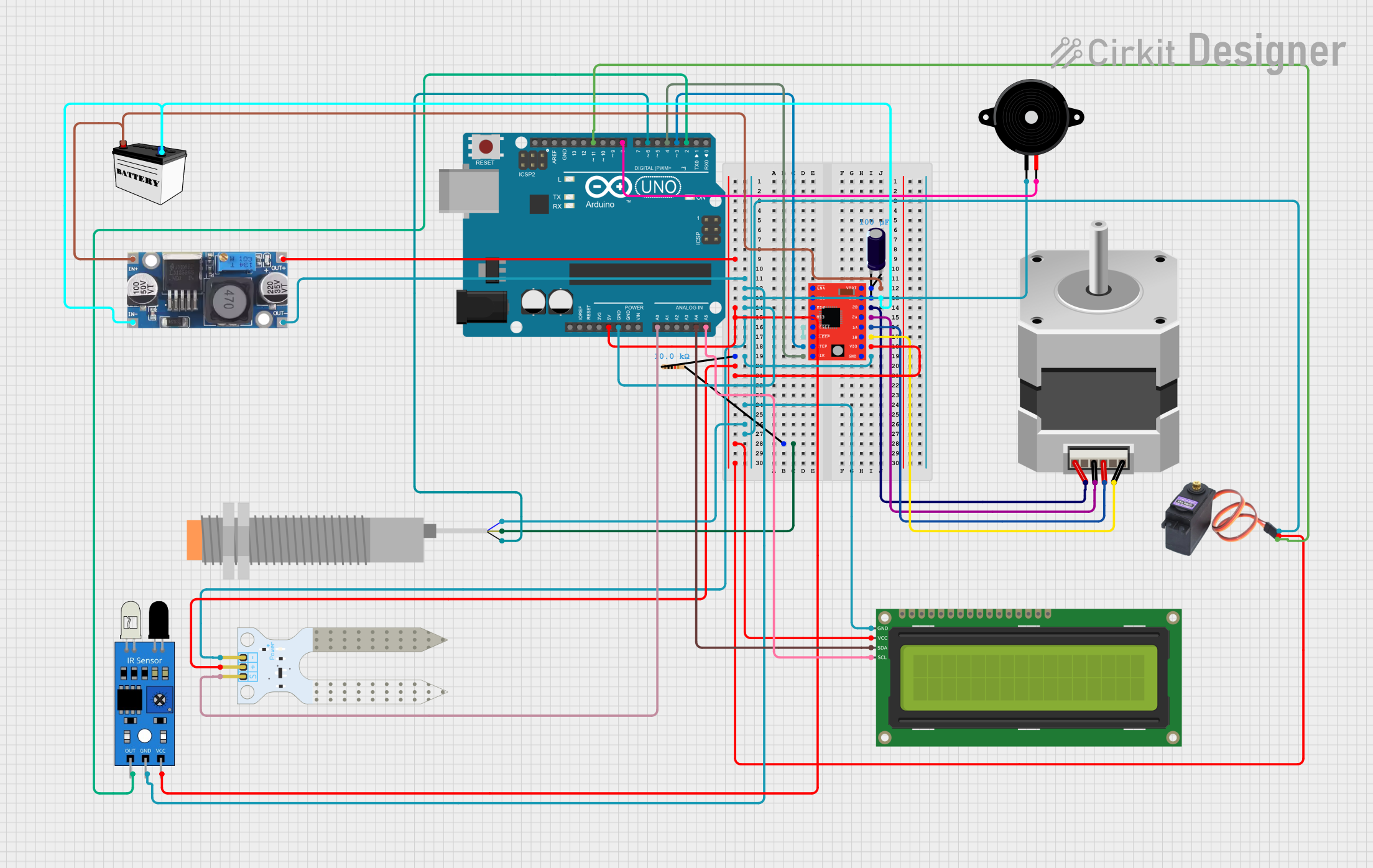
Circuit Documentation
Summary
This circuit is designed to automate waste sorting using various sensors and actuators controlled by an Arduino UNO. The system detects different types of waste (wet, metal, plastic, and dry) and sorts them into appropriate bins using a stepper motor and a servo motor. The system also includes an LCD display for user feedback and a buzzer for alerts.
Component List
Arduino UNO
- Description: Microcontroller board based on the ATmega328P.
- Pins: UNUSED, IOREF, Reset, 3.3V, 5V, GND, Vin, A0, A1, A2, A3, A4, A5, SCL, SDA, AREF, D13, D12, D11, D10, D9, D8, D7, D6, D5, D4, D3, D2, D1, D0
Soil Moisture Sensor
- Description: Sensor to measure soil moisture levels.
- Pins: VCC, GND, SIG
Stepper Motor (Bipolar)
- Description: Bipolar stepper motor for precise control of rotational position.
- Pins: D, B, C, A
A4988 Stepper Motor Driver (Red)
- Description: Driver for controlling a bipolar stepper motor.
- Pins: ENABLE, MS1, MS2, MS3, RESET, SLEEP, STEP, DIR, VMOT, GND, 2B, 2A, 1A, 1B, VDD
MG996R
- Description: High-torque servo motor.
- Pins: GND, VCC, SIG
IR Sensor
- Description: Infrared sensor for object detection.
- Pins: out, gnd, vcc
LJ18A3-H-ZBX Inductive Proximity Sensor
- Description: Inductive sensor for detecting metal objects.
- Pins: VO (BLU), VI (BRN), SIG (BLK)
16x2 I2C LCD
- Description: LCD display with I2C interface.
- Pins: GND, VCC, SDA, SCL
Piezo Speaker
- Description: Speaker for generating sound alerts.
- Pins: pin1, pin2
12V Battery (Small Size)
- Description: Power source for the circuit.
- Pins: VCC, GND
Electrolytic Capacitor
- Description: Capacitor for filtering and stabilizing voltage.
- Pins: -, +
- Properties: Capacitance: 0.0001 Farads
Resistor
- Description: Resistor for current limiting.
- Pins: pin1, pin2
- Properties: Resistance: 10000 Ohms
Step down Buck converter
- Description: Voltage regulator to step down voltage.
- Pins: IN +, IN - GND, OUT +, OUT - GND
Wiring Details
Arduino UNO
5V connected to:
- Step down Buck converter (OUT +)
- Resistor (pin1)
- IR Sensor (vcc)
- A4988 Stepper Motor Driver (VDD)
- Soil Moisture Sensor (VCC)
- 16x2 I2C LCD (VCC)
- MG996R (VCC)
GND connected to:
- Step down Buck converter (OUT - GND)
- IR Sensor (gnd)
- Piezo Speaker (pin1)
- Soil Moisture Sensor (GND)
- A4988 Stepper Motor Driver (GND)
- 16x2 I2C LCD (GND)
- LJ18A3-H-ZBX Inductive Proximity Sensor (VO (BLU))
- MG996R (GND)
A0 connected to:
- Soil Moisture Sensor (SIG)
A4 connected to:
- 16x2 I2C LCD (SDA)
A5 connected to:
- 16x2 I2C LCD (SCL)
D3 connected to:
- A4988 Stepper Motor Driver (STEP)
D4 connected to:
- A4988 Stepper Motor Driver (DIR)
D6 connected to:
- LJ18A3-H-ZBX Inductive Proximity Sensor (SIG (BLK))
D8 connected to:
- Piezo Speaker (pin2)
D11 connected to:
- MG996R (SIG)
D2 connected to:
- IR Sensor (out)
Step down Buck converter
OUT + connected to:
- Arduino UNO (5V)
- Resistor (pin1)
- IR Sensor (vcc)
- A4988 Stepper Motor Driver (VDD)
- Soil Moisture Sensor (VCC)
- 16x2 I2C LCD (VCC)
- MG996R (VCC)
OUT - GND connected to:
- Arduino UNO (GND)
- IR Sensor (gnd)
- Piezo Speaker (pin1)
- Soil Moisture Sensor (GND)
- A4988 Stepper Motor Driver (GND)
- 16x2 I2C LCD (GND)
- LJ18A3-H-ZBX Inductive Proximity Sensor (VO (BLU))
- MG996R (GND)
IN + connected to:
- A4988 Stepper Motor Driver (VMOT)
- Electrolytic Capacitor (+)
- 12V Battery (VCC)
IN - GND connected to:
- A4988 Stepper Motor Driver (GND)
- Electrolytic Capacitor (-)
- 12V Battery (GND)
A4988 Stepper Motor Driver (Red)
2B connected to:
- Stepper Motor (A)
2A connected to:
- Stepper Motor (C)
RESET connected to:
- SLEEP
1A connected to:
- Stepper Motor (B)
1B connected to:
- Stepper Motor (D)
STEP connected to:
- Arduino UNO (D3)
DIR connected to:
- Arduino UNO (D4)
Resistor
- pin2 connected to:
- LJ18A3-H-ZBX Inductive Proximity Sensor (VI (BRN))
LJ18A3-H-ZBX Inductive Proximity Sensor
- SIG (BLK) connected to:
- Arduino UNO (D6)
IR Sensor
- out connected to:
- Arduino UNO (D2)
Documented Code
#include <Stepper.h>
#include <Servo.h>
#include <Wire.h>
#include <LiquidCrystal_I2C.h>

// Define pins for the stepper motor and servo
#define STEP_PIN 3
#define DIR_PIN 4
#define ENABLE_PIN 5
#define SERVO_PIN 9

// Define sensor pins
#define IR_SENSOR_PIN 2
#define MOISTURE_SENSOR_PIN A0
#define INDUCTIVE_SENSOR_PIN 6
#define CAPACITIVE_SENSOR_PIN 7
#define BUZZER_PIN 8

// Set up the stepper motor
const int stepsPerRevolution = 200; // Adjust depending on your motor's specifications
Stepper stepper(stepsPerRevolution, STEP_PIN, DIR_PIN);

// Set up the servo motor
Servo ductServo;

// Set up the LCD
LiquidCrystal_I2C lcd(0x27, 16, 2); // Adjust the I2C address if needed

// Variables for sensor readings
int moistureValue = 0;
int irValue = 0;
int inductiveValue = 0;
int capacitiveValue = 0;

void setup() {
  // Initialize LCD
  lcd.begin(16, 2); // Specify the number of columns and rows
  lcd.print("Waste Sorting");

  // Initialize stepper motor
  stepper.setSpeed(60); // Set the speed of the motor

  // Initialize servo motor
  ductServo.attach(SERVO_PIN);

  // Initialize sensor pins
  pinMode(IR_SENSOR_PIN, INPUT);
  pinMode(MOISTURE_SENSOR_PIN, INPUT);
  pinMode(INDUCTIVE_SENSOR_PIN, INPUT);
  pinMode(CAPACITIVE_SENSOR_PIN, INPUT);
  pinMode(BUZZER_PIN, OUTPUT);

  // Start with the duct plate closed
  ductServo.write(0);

  // Enable the stepper driver
  digitalWrite(ENABLE_PIN, LOW);
}

void loop() {
  // Read sensors
  irValue = digitalRead(IR_SENSOR_PIN);
  moistureValue = analogRead(MOISTURE_SENSOR_PIN);
  inductiveValue = digitalRead(INDUCTIVE_SENSOR_PIN);
  capacitiveValue = digitalRead(CAPACITIVE_SENSOR_PIN);

  // If the IR sensor detects waste