
Arduino Mega 2560 and L298N Motor Driver Controlled Robotic Car with DC Motors
View and Edit Project In Cirkit Designer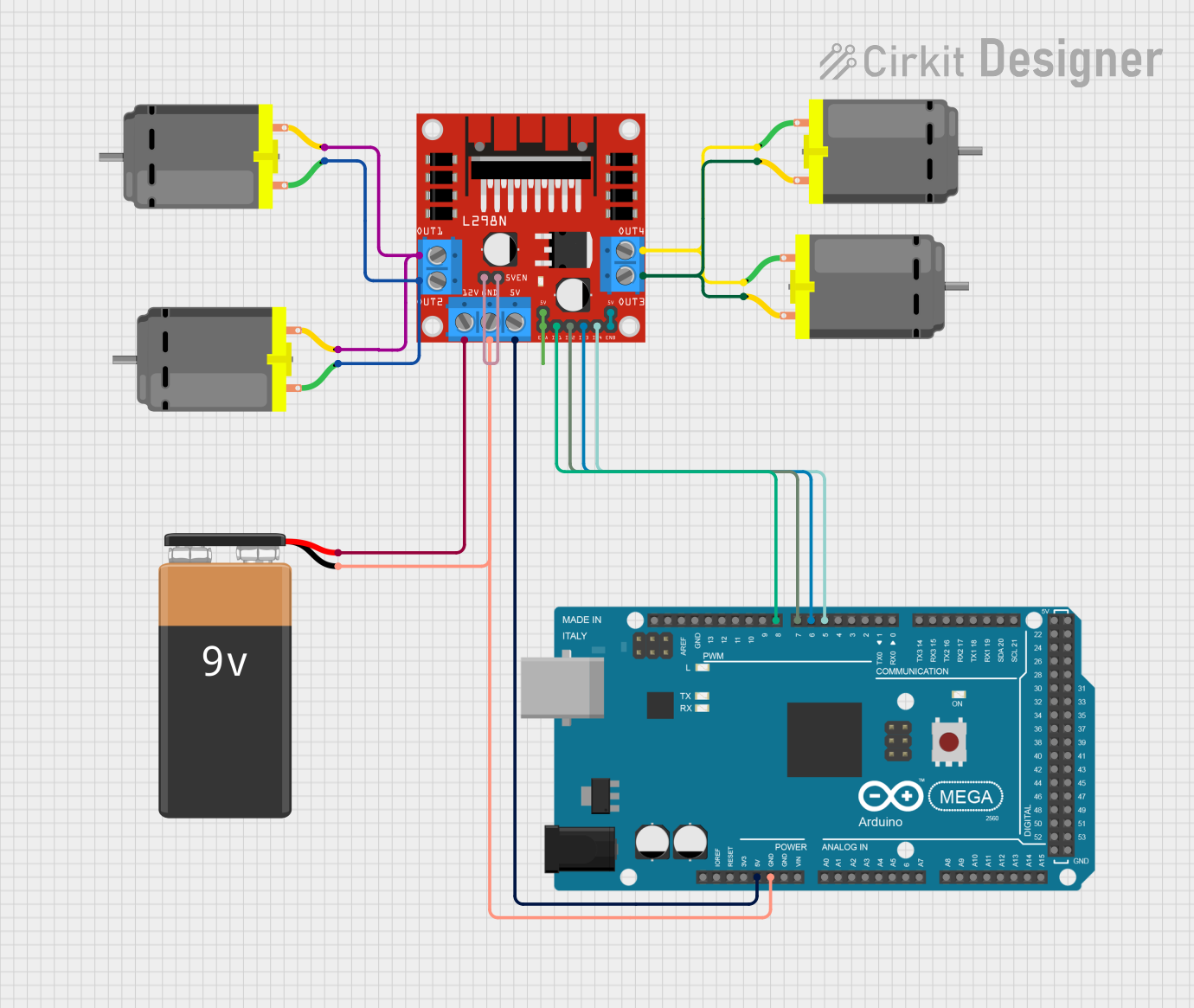
Circuit Documentation
Summary
This circuit is designed to control four DC motors using an L298N DC motor driver and an Arduino Mega 2560 microcontroller. The motors are powered by a 9V battery, and the Arduino is programmed to control the direction and speed of the motors.
Component List
L298N DC Motor Driver
- Description: A dual H-Bridge motor driver that allows for control of the speed and direction of two DC motors.
- Pins: OUT1, OUT2, 12V, GND, 5V, OUT3, OUT4, 5V-ENA-JMP-I, 5V-ENA-JMP-O, +5V-J1, +5V-J2, ENA, IN1, IN2, IN3, IN4, ENB
DC Motor (4 units)
- Description: Standard DC motors used for driving mechanical systems.
- Pins: pin 1, pin 2
9V Battery
- Description: Provides power to the motor driver and motors.
- Pins: +, -
Arduino Mega 2560
- Description: A microcontroller board based on the ATmega2560, used for controlling the motor driver.
- Pins: IOREF, RESET, 3V3, 5V, GND, VIN, A0-A15, D21/SCL, D20/SDA, D19/RX1, D18/TX1, D17 PWM/RX2, D16 PWM/TX2, D15/RX3, D14/TX3, D0 RX0, D1 TX0, D2 PWM-D13 PWM, AREF, SDA, SCL, D52, D50, D48, D46, D44, D42, D40, D38, D36, D34, D32, D30, D28, D26, D24, D22, D53, D51, D49, D47, D45, D43, D41, D39, D37, D35, D33, D31, D29, D27, D25, D23
Wiring Details
L298N DC Motor Driver
- OUT1: Connected to pin 2 of two DC motors.
- OUT2: Connected to pin 1 of two DC motors.
- 12V: Connected to the positive terminal of the 9V battery.
- GND: Connected to the negative terminal of the 9V battery and the GND pin of the Arduino Mega 2560.
- 5V: Connected to the 5V pin of the Arduino Mega 2560.
- OUT3: Connected to pin 2 of two other DC motors.
- OUT4: Connected to pin 1 of two other DC motors.
- 5V-ENA-JMP-I: Internally connected to 5V-ENA-JMP-O.
- 5V-ENA-JMP-O: Internally connected to 5V-ENA-JMP-I.
- +5V-J1: Internally connected to ENA.
- +5V-J2: Internally connected to ENB.
- ENA: Internally connected to +5V-J1.
- IN1: Connected to D8 PWM pin of the Arduino Mega 2560.
- IN2: Connected to D7 PWM pin of the Arduino Mega 2560.
- IN3: Connected to D6 PWM pin of the Arduino Mega 2560.
- IN4: Connected to D5 PWM pin of the Arduino Mega 2560.
- ENB: Internally connected to +5V-J2.
DC Motor (4 units)
Motor 1:
- pin 1: Connected to OUT2 of the L298N DC motor driver.
- pin 2: Connected to OUT1 of the L298N DC motor driver.
Motor 2:
- pin 1: Connected to OUT2 of the L298N DC motor driver.
- pin 2: Connected to OUT1 of the L298N DC motor driver.
Motor 3:
- pin 1: Connected to OUT4 of the L298N DC motor driver.
- pin 2: Connected to OUT3 of the L298N DC motor driver.
Motor 4:
- pin 1: Connected to OUT4 of the L298N DC motor driver.
- pin 2: Connected to OUT3 of the L298N DC motor driver.
9V Battery
- +: Connected to the 12V pin of the L298N DC motor driver.
- -: Connected to the GND pin of the L298N DC motor driver and the GND pin of the Arduino Mega 2560.
Arduino Mega 2560
- GND: Connected to the negative terminal of the 9V battery and the GND pin of the L298N DC motor driver.
- 5V: Connected to the 5V pin of the L298N DC motor driver.
- D8 PWM: Connected to IN1 of the L298N DC motor driver.
- D7 PWM: Connected to IN2 of the L298N DC motor driver.
- D6 PWM: Connected to IN3 of the L298N DC motor driver.
- D5 PWM: Connected to IN4 of the L298N DC motor driver.
Code Documentation
Arduino Code
int motor1 = 8;
int motor2 = 7;
int motor3 = 6;
int motor4 = 5;

void setup() {
  pinMode(motor1, OUTPUT);
  pinMode(motor2, OUTPUT);
  pinMode(motor3, OUTPUT);
  pinMode(motor4, OUTPUT);
}

void forward() {
  digitalWrite(motor1, HIGH);
  digitalWrite(motor2, LOW);
  digitalWrite(motor3, HIGH);
  digitalWrite(motor4, LOW);
}

void backward() {
  digitalWrite(motor1, LOW);
  digitalWrite(motor2, HIGH);
  digitalWrite(motor3, LOW);
  digitalWrite(motor4, HIGH);
}

void left() {
  digitalWrite(motor1, LOW);
  digitalWrite(motor2, HIGH);
  digitalWrite(motor3, HIGH);
  digitalWrite(motor4, LOW);
}

void right() {
  digitalWrite(motor1, HIGH);
  digitalWrite(motor2, LOW);
  digitalWrite(motor3, LOW);
  digitalWrite(motor4, HIGH);
}

void stop() {
  digitalWrite(motor1, LOW);
  digitalWrite(motor2, LOW);
  digitalWrite(motor3, LOW);
  digitalWrite(motor4, LOW);
}

void loop() {
  forward();
  delay(2000);
  backward();
  delay(5000);
  left();
  delay(3000);
  right();
  delay(4000);
  stop();
  delay(7000);
}
This code initializes four pins on the Arduino Mega 2560 as outputs to control the L298N DC motor driver. The setup function sets the pin modes, and the loop function cycles through various motor control functions (forward, backward, left, right, stop) with delays in between.