
Arduino Nano-Based Tachometer with IR Sensor and I2C LCD Display
View and Edit Project In Cirkit Designer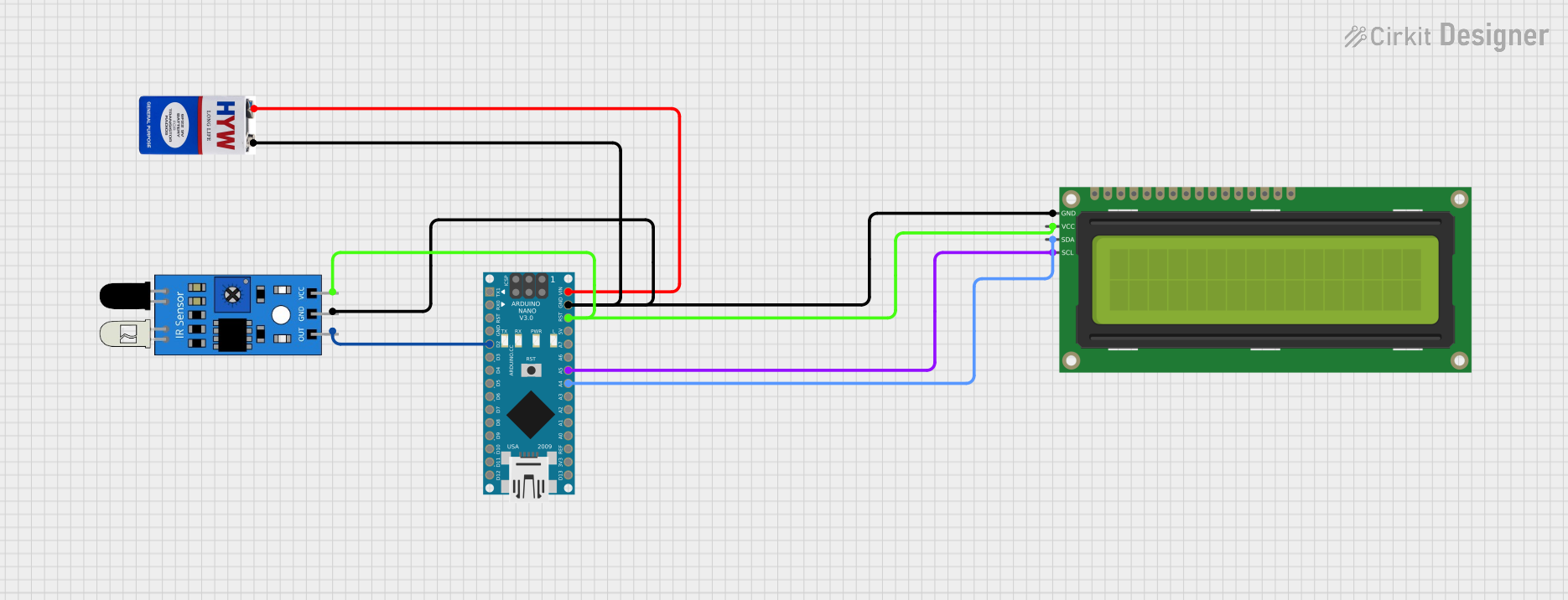
Circuit Documentation
Summary of the Circuit
This circuit is designed to function as a tachometer using an Arduino Nano as the central processing unit. It utilizes an infrared (IR) sensor to detect the rotation of a wheel and displays the rotation count on a 16x2 I2C LCD. The IR sensor's output is connected to one of the digital pins on the Arduino Nano, which counts the rotations and updates the display. The LCD communicates with the Arduino Nano via the I2C protocol, using dedicated SDA and SCL lines. The circuit is powered by a 9V battery connected to the VIN pin of the Arduino Nano, which also supplies power to the IR sensor and the LCD.
Component List
Arduino Nano
- Description: A small, complete, and breadboard-friendly board based on the ATmega328 (Arduino Nano 3.x).
- Pins: D1/TX, D0/RX, RESET, GND, D2, D3, D4, D5, D6, D7, D8, D9, D10, D11/MOSI, D12/MISO, VIN, 5V, A7, A6, A5, A4, A3, A2, A1, A0, AREF, 3V3, D13/SCK.
IR Sensor
- Description: An infrared sensor capable of detecting proximity or motion.
- Pins: out, gnd, vcc.
16x2 I2C LCD
- Description: A 16-character by 2-line display that communicates with the Arduino via the I2C protocol.
- Pins: GND, VCC, SDA, SCL.
9V Battery
- Description: A standard 9V battery used to power the circuit.
- Pins: +, -.
Wiring Details
Arduino Nano
- D2: Connected to the "out" pin of the IR sensor.
- VIN: Connected to the "+" pin of the 9V battery.
- GND: Common ground, connected to the "gnd" pin of the IR sensor, the "GND" pin of the 16x2 I2C LCD, and the "-" pin of the 9V battery.
- RESET: Connected to the "vcc" pin of the IR sensor and the "VCC" pin of the 16x2 I2C LCD.
- A4 (SDA): Connected to the "SDA" pin of the 16x2 I2C LCD.
- A5 (SCL): Connected to the "SCL" pin of the 16x2 I2C LCD.
IR Sensor
- out: Connected to the "D2" pin of the Arduino Nano.
- gnd: Connected to the common ground.
- vcc: Connected to the "RESET" pin of the Arduino Nano.
16x2 I2C LCD
- GND: Connected to the common ground.
- VCC: Connected to the "RESET" pin of the Arduino Nano.
- SDA: Connected to the "A4" pin of the Arduino Nano.
- SCL: Connected to the "A5" pin of the Arduino Nano.
9V Battery
- +: Connected to the "VIN" pin of the Arduino Nano.
- -: Connected to the common ground.
Documented Code
/*
 * Arduino Nano Tachometer
 * This code reads the output from an IR sensor connected to pin D2 to detect
 * the rotation of a wheel. The rotation count is displayed on a 16x2 I2C LCD.
 * The LCD is connected to the I2C pins (A4 for SDA, A5 for SCL).
 */

#include <Wire.h>
#include <LiquidCrystal_I2C.h>

#define IR_SENSOR_PIN 2

LiquidCrystal_I2C lcd(0x27, 16, 2);

volatile unsigned int rotationCount = 0;

void setup() {
  pinMode(IR_SENSOR_PIN, INPUT);
  attachInterrupt(digitalPinToInterrupt(IR_SENSOR_PIN), countRotation, RISING);
  lcd.begin();
  lcd.backlight();
  lcd.setCursor(0, 0);
  lcd.print("Tachometer");
}

void loop() {
  lcd.setCursor(0, 1);
  lcd.print("Count: ");
  lcd.print(rotationCount);
  delay(500);
}

void countRotation() {
  rotationCount++;
}
Filename: sketch.ino
Description: The code initializes the LCD and sets up an interrupt to increment the rotationCount variable each time the IR sensor detects a rotation. The count is then displayed on the LCD. The LiquidCrystal_I2C library is used to simplify communication with the LCD over the I2C protocol.