
Arduino UNO-Based Smart Irrigation System with Soil Moisture Sensor and LCD Display
View and Edit Project In Cirkit Designer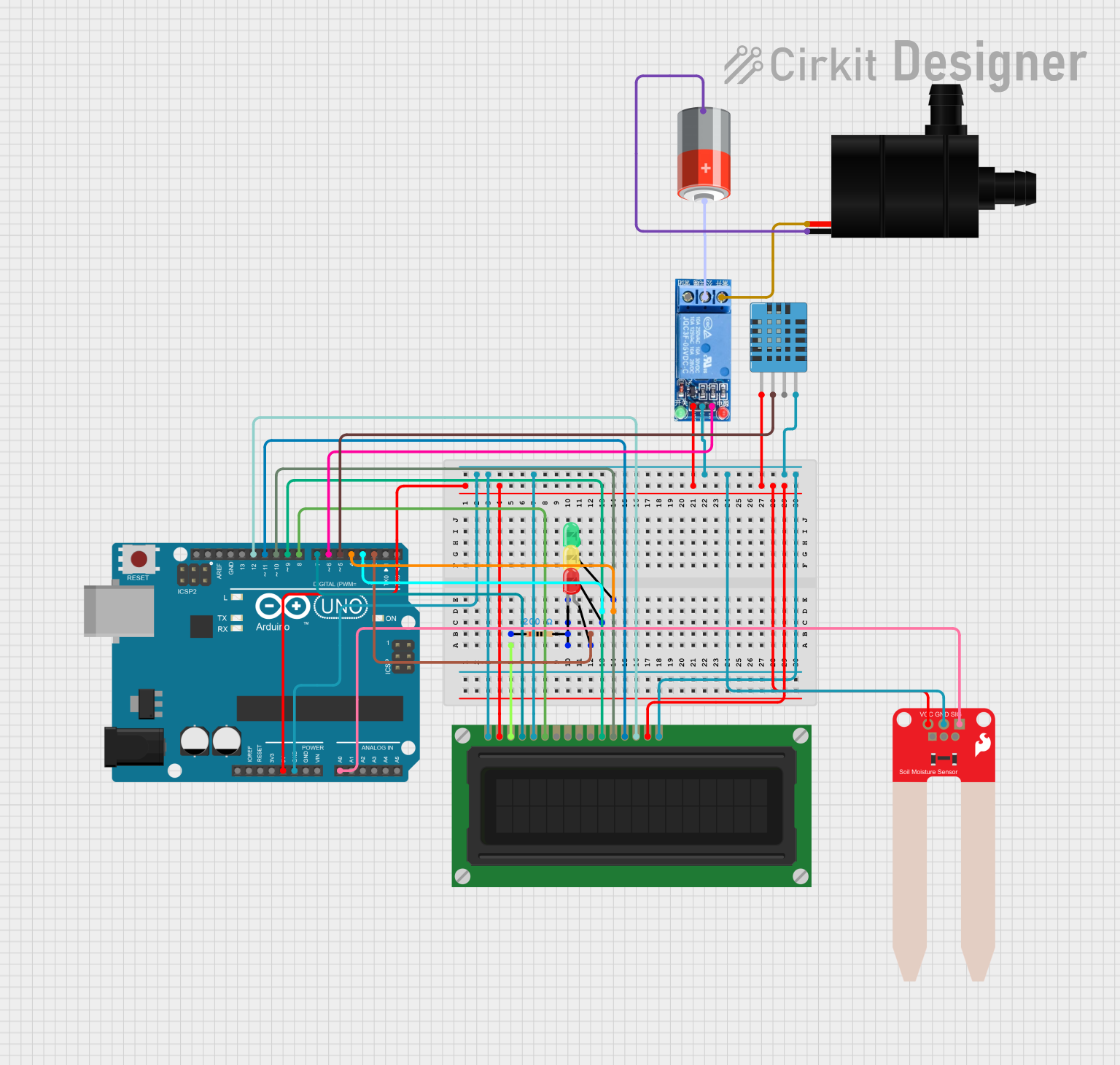
Circuit Documentation
Summary
This circuit is designed to monitor soil moisture levels and control a water pump based on the moisture readings. It also measures temperature and humidity using a DHT11 sensor and displays the readings on an LCD display. The circuit includes three LEDs (red, yellow, and green) to indicate the soil moisture status.
Component List
Arduino UNO
- Description: Microcontroller board based on the ATmega328P.
- Pins: UNUSED, IOREF, Reset, 3.3V, 5V, GND, Vin, A0, A1, A2, A3, A4, A5, SCL, SDA, AREF, D13, D12, D11, D10, D9, D8, D7, D6, D5, D4, D3, D2, D1, D0
DHT11 Humidity and Temperature Sensor
- Description: Sensor for measuring temperature and humidity.
- Pins: VDD, DATA, NULL, GND
LED: Two Pin (green)
- Description: Green LED.
- Pins: cathode, anode
LED: Two Pin (yellow)
- Description: Yellow LED.
- Pins: cathode, anode
LED: Two Pin (red)
- Description: Red LED.
- Pins: cathode, anode
LCD Display (16 pin)
- Description: 16x2 character LCD display.
- Pins: VSS, VDD, VO, RS, R_W, E, DB0, DB1, DB2, DB3, DB4, DB5, DB6, DB7, A, K
Resistor
- Description: 200 Ohms resistor.
- Pins: pin1, pin2
SparkFun Soil Moisture Sensor
- Description: Sensor for measuring soil moisture.
- Pins: VCC, GND, SIG
1 Channel Relay 5V
- Description: Relay module for controlling high voltage devices.
- Pins: VCC, GND, IN, NC, COM, NO
5V Battery
- Description: 5V power supply.
- Pins: +, -
Water Pump
- Description: Pump for watering plants.
- Pins: VCC, GND
Wiring Details
Arduino UNO
5V connected to:
- VDD of LCD Display
- VCC of 1 Channel Relay
- VDD of DHT11 Humidity and Temperature Sensor
- VCC of SparkFun Soil Moisture Sensor
- A of LCD Display
GND connected to:
- VSS of LCD Display
- R_W of LCD Display
- GND of 1 Channel Relay
- GND of SparkFun Soil Moisture Sensor
- GND of DHT11 Humidity and Temperature Sensor
- K of LCD Display
D2 connected to anode of Red LED
D3 connected to anode of Yellow LED
D4 connected to anode of Green LED
A0 connected to SIG of SparkFun Soil Moisture Sensor
D12 connected to DB7 of LCD Display
D11 connected to DB6 of LCD Display
D10 connected to DB5 of LCD Display
D9 connected to DB4 of LCD Display
D8 connected to E of LCD Display
D7 connected to RS of LCD Display
D6 connected to IN of 1 Channel Relay
D5 connected to DATA of DHT11 Humidity and Temperature Sensor
DHT11 Humidity and Temperature Sensor
- VDD connected to 5V of Arduino UNO
- DATA connected to D5 of Arduino UNO
- GND connected to GND of Arduino UNO
LED: Two Pin (green)
- anode connected to D4 of Arduino UNO
- cathode connected to cathode of Yellow LED and Red LED, and pin2 of Resistor
LED: Two Pin (yellow)
- anode connected to D3 of Arduino UNO
- cathode connected to cathode of Green LED and Red LED, and pin2 of Resistor
LED: Two Pin (red)
- anode connected to D2 of Arduino UNO
- cathode connected to cathode of Green LED and Yellow LED, and pin2 of Resistor
LCD Display (16 pin)
- VSS connected to GND of Arduino UNO
- VDD connected to 5V of Arduino UNO
- VO connected to pin1 of Resistor
- RS connected to D7 of Arduino UNO
- R_W connected to GND of Arduino UNO
- E connected to D8 of Arduino UNO
- DB4 connected to D9 of Arduino UNO
- DB5 connected to D10 of Arduino UNO
- DB6 connected to D11 of Arduino UNO
- DB7 connected to D12 of Arduino UNO
- A connected to 5V of Arduino UNO
- K connected to GND of Arduino UNO
Resistor
- pin1 connected to VO of LCD Display
- pin2 connected to cathode of Green LED, Yellow LED, and Red LED
SparkFun Soil Moisture Sensor
- VCC connected to 5V of Arduino UNO
- GND connected to GND of Arduino UNO
- SIG connected to A0 of Arduino UNO
1 Channel Relay 5V
- VCC connected to 5V of Arduino UNO
- GND connected to GND of Arduino UNO
- IN connected to D6 of Arduino UNO
- NC connected to VCC of Water Pump
- COM connected to + of 5V Battery
5V Battery
- + connected to COM of 1 Channel Relay
- - connected to GND of Water Pump
Water Pump
- VCC connected to NC of 1 Channel Relay
- GND connected to - of 5V Battery
Code Documentation
#include <DHT.h>
#include <LiquidCrystal.h>

// Define DHT11 pin and type
#define DHTPIN 5
#define DHTTYPE DHT11

// Create DHT11 instance
DHT dht(DHTPIN, DHTTYPE);

// Define LCD pins
LiquidCrystal lcd(7, 8, 9, 10, 11, 12);

// Define pins for soil moisture and LEDs
const int sensorPin = A0;
const int pumpPin = 6;
const int redLEDPin = 2;
const int yellowLEDPin = 3;
const int greenLEDPin = 4;

// Define threshold values
const int dryThreshold = 300;
const int wetThreshold = 700;

void setup() {
  // Initialize serial communication
  Serial.begin(9600);

  // Initialize DHT11 sensor
  dht.begin();

  // Initialize LCD
  lcd.begin(16, 2);

  // Define pin modes
  pinMode(sensorPin, INPUT);
  pinMode(pumpPin, OUTPUT);
  pinMode(redLEDPin, OUTPUT);
  pinMode(yellowLEDPin, OUTPUT);
  pinMode(greenLEDPin, OUTPUT);
}

void loop() {
  // Read soil moisture value
  int sensorValue = analogRead(sensorPin);
  Serial.print("Soil Moisture Value: ");
  Serial.println(sensorValue);

  // Read temperature and humidity from DHT11
  float temperature = dht.readTemperature();
  float humidity = dht.readHumidity();

  // Check if readings are valid
  if (isnan(temperature) || isnan(humidity)) {
    Serial.println("Failed to read from DHT sensor!");
    return;
  }

  Serial.print("Temperature: ");
  Serial.print(temperature);
  Serial.println(" °C");

  Serial.print("Humidity: ");
  Serial.print(humidity);
  Serial.println(" %");

  // Display values on LCD
  lcd.clear();
  lcd.setCursor(0, 0);
  lcd.print("Soil: ");
  lcd.print(sensorValue);
  lcd.setCursor(0, 1);
  lcd.print("Temp: ");
  lcd.print(temperature);
  lcd.print("C Hum: ");