
Arduino UNO-Based GPS and GSM-Enabled Vibration Sensor System
View and Edit Project In Cirkit Designer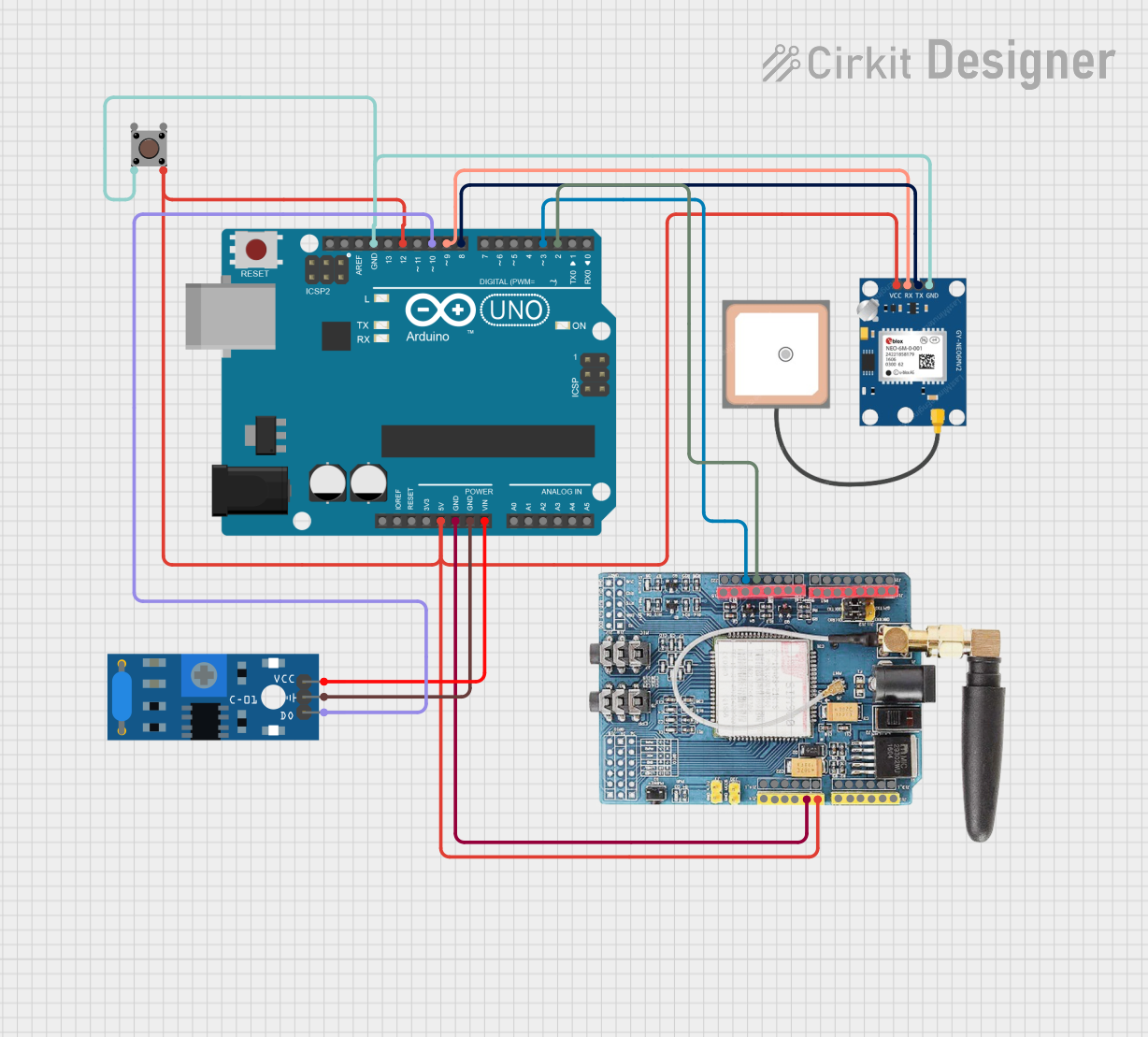
Circuit Documentation
Summary
This circuit integrates an Arduino UNO microcontroller with a GPS NEO 6M module, a GSM SIM900 module, a pushbutton, and an SW-420 vibration sensor. The Arduino UNO serves as the central controller, interfacing with the GPS and GSM modules for location tracking and communication, respectively. The pushbutton and vibration sensor provide user input and environmental sensing capabilities.
Component List
Arduino UNO
- Description: A microcontroller board based on the ATmega328P.
- Pins: UNUSED, IOREF, Reset, 3.3V, 5V, GND, Vin, A0, A1, A2, A3, A4, A5, SCL, SDA, AREF, D13, D12, D11, D10, D9, D8, D7, D6, D5, D4, D3, D2, D1, D0
GPS NEO 6M
- Description: A GPS module for obtaining location data.
- Pins: VCC, RX, TX, GND
GSM SIM900
- Description: A GSM module for communication over cellular networks.
- Pins: A5, A4, A3, A2, A1, A0, 5V, GND, 3.3V, RESET, D0, D1, D2, D3, D4, D5, D6, D7, D8, D9, D10, D11, D12, D13, AREF
Pushbutton
- Description: A simple pushbutton for user input.
- Pins: Pin 3 (out), Pin 4 (out), Pin 1 (in), Pin 2 (in)
SW-420 Vibration Sensor
- Description: A vibration sensor for detecting environmental vibrations.
- Pins: vcc, Ground, Digital output
Wiring Details
Arduino UNO
- 5V: Connected to GSM SIM900 (5V), GPS NEO 6M (VCC), Pushbutton (Pin 4 (out))
- GND: Connected to GPS NEO 6M (GND), Pushbutton (Pin 2 (in)), GSM SIM900 (GND), SW-420 Vibration Sensor (Ground)
- Vin: Connected to SW-420 Vibration Sensor (vcc)
- D12: Connected to Pushbutton (Pin 4 (out))
- D10: Connected to SW-420 Vibration Sensor (Digital output)
- D9: Connected to GPS NEO 6M (RX)
- D8: Connected to GPS NEO 6M (TX)
- D3: Connected to GSM SIM900 (D13)
- D2: Connected to GSM SIM900 (D12)
GPS NEO 6M
- VCC: Connected to Arduino UNO (5V)
- GND: Connected to Arduino UNO (GND)
- RX: Connected to Arduino UNO (D9)
- TX: Connected to Arduino UNO (D8)
GSM SIM900
- 5V: Connected to Arduino UNO (5V)
- GND: Connected to Arduino UNO (GND)
- D13: Connected to Arduino UNO (D3)
- D12: Connected to Arduino UNO (D2)
Pushbutton
- Pin 4 (out): Connected to Arduino UNO (5V), Arduino UNO (D12)
- Pin 2 (in): Connected to Arduino UNO (GND)
SW-420 Vibration Sensor
- vcc: Connected to Arduino UNO (Vin)
- Ground: Connected to Arduino UNO (GND)
- Digital output: Connected to Arduino UNO (D10)
Code Documentation
Arduino UNO Code
void setup() {
  // put your setup code here, to run once:

}

void loop() {
  // put your main code here, to run repeatedly:

}
This code is a basic template for the Arduino UNO. The setup() function is where you initialize your components and settings, and the loop() function is where the main logic of your program runs repeatedly.
Additional Documentation
This section is reserved for any additional documentation or notes related to the circuit and its operation.